
ComfyUI Extension: IAMCCS-nodes
Run ComfyUI workflows without the setup
No installs, no CUDA version roulette, no GPU sitting idle on your bill. Bring a workflow and run it in the browser.
Custom nodes by IAMCCS, including a critical fix for LoRA loading in native WANAnimate workflows, especially useful for advanced models like FLUX and WAN 2.1. This bypasses the need for the WanVideoWrapper for LoRA functionality.
Looking for a different extension?
Custom Nodes (316)
- LoRA Stack (WAN-style remap)
- Apply LoRA to MODEL (Native)
- LoRA Stack (Model In?Out) WAN
- LoRA Schedule (WAN, ranged)
- LoRA Schedule (WAN, hooks)
- Apply LoRA Hooks to Conditioning
- Apply Scheduled WAN LoRA From Conditioning
- Build Scheduled WAN Model Bank
- Select Scheduled WAN Model From Conditioning
- Select Scheduled WAN Model Pair From Conditioning
- LoRA Runtime Bridge (WAN, loop-safe)
- Apply LoRA to MODEL (Runtime Bridge)
- iamccs_ltx2_lora_stack (3 slots)
- LoRA Stack (LTX-2, 3 slots)
- LoRA Stack (LTX-2, staged: stage1+stage2) (BETA)
- Apply LoRA to MODEL (LTX-2, quiet logs)
- Apply LoRA to MODEL (LTX-2, staged) (BETA)
- LoRA Stack (Model In?Out) LTX-2
- LoRA Stack (LTX-2, segmented: 3 seg × 2 stages)
- Apply LoRA to MODEL (LTX-2, segmented: 3 seg × 2 stages)
- LTX-2 FrameRate Sync (int+float)
- LTX-2 Validator
- LTX-2 TimeFrameCount
- LTX-2 Ensure Frames (8n + 1)
- LTX-2 Ensure Minimum Frames
- LTX-2 Control Preprocess (aux)
- LTX-2 Pad Reflect (IMAGE batch)
- LTX-2 Crop By Pad (IMAGE batch)
- Segment Planner (song -> LTX frames)
- Segment Planner Settings (shared)
- Audio Segment Auto Planner (audio -> segmenti)
- Segment Planner Linked (shared inputs)
- Segment Plan From Planner (per index)
- Source Range From Segment Plan
- Two Segment Planner (stable 2SEG)
- Three Segment Planner (stable 3SEG)
- Segment Switch (by segment_index)
- LTX-2 Extension Module ??
- LTX-2 Extension Module (Disk / Low RAM) ??
- LTX-2 Joint Refresh Latent
- LTX-2 Joint Refresh Latent (Disk)
- Load Images From Dir (Lite) ??
- Image Batch Range (VRAM) ???
- Source Frames To Disk ????
- Start Dir To Video Latent ??
- Start Images To Video Latent ??
- Video Combine From Dir ???
- LTX-2 Extension Module (simple) ??
- LTX-2 Get Images From Batch ???
- LTX-2 Reference Image Switch ??
- LTX-2 Inject Reference Into Start Frames ??
- LTX-2 Frame Count Validator ? (8n+1)
- LTX-2 First/Last Frames Controller ??
- LTX-2 Context ? Latent (continue) ??
- LTX-2 Middle Frames (accumulator) ??
- LTX-2 First/Last ? Latent (noise_mask) ??
- LTX-2 First/Last ? Latent (Pro, slot caps) ??
- IAMCCS Cine Reference Board
- IAMCCS Cine FLF Timeline Sequencer
- IAMCCS Cine AllInOne FLF Engine
- IAMCCS Cine PromptRelay Timeline
- IAMCCS Cine Shotboard Timeline Pro
- IAMCCS Cine Shotboard Planner Pro
- IAMCCS Cine Shotboard Planner Pro V2
- IAMCCS Cine Shotboard Planner V3
- IAMCCS Cine Shotboard Planner V4
- IAMCCS Cine Shotboard V4 Backend
- IAMCCS Cine Shotboard V4 Guide
- IAMCCS Cine Shotboard V4 Crop Guides
- IAMCCS LTX Video Duration Crop
- IAMCCS Cine Shotboard Lite
- IAMCCS Cine Shotboard Planner Pro Legacy Outputs
- IAMCCS Cine Resolution Parity Translator
- IAMCCS Cine Stage 2 Bypass Switch
- IAMCCS Cine Stage 2 Preview Toggle
- IAMCCS CineInfo
- IAMCCS CineInfo V2
- IAMCCS Cine FLF Productor
- IAMCCS Cine FLF Productor Dyno
- IAMCCS Cine Filmmaker
- IAMCCS Cine Filmmaker Backend
- IAMCCS Cine Shotboard Backend Pro
- IAMCCS Cine Filmmaker Guide
- IAMCCS Cine Filmmaker Guide 1:1
- IAMCCS Cine Filmmaker Crop Guides 1:1
- IAMCCS CineSwitch Lazy FLF/PromptRelay
- IAMCCS Cine PromptRelay Latent Shape Sync
- IAMCCS Cine FLF Length Compensator
- IAMCCS Cine Board Duration Lock
- IAMCCS Cine Latent Duration Crop
- IAMCCS Cine Shotboard Tail Trim Policy
- IAMCCS Cine Shotboard Final Frame Trim
- IAMCCS Cine Temporal Cut Barrier (Experimental)
- IAMCCS Cine PromptRelay Safe Encode
- IAMCCS Cine Relay Or Bypass
- IAMCCS CinePrompt Architect
- IAMCCS_BoardMaker
- IAMCCS Cine Videoclip Maker Planner
- IAMCCS Cine Shot Planner
- IAMCCS Cine Reference Latent Control
- IAMCCS Cine Audio Prompt Director
- IAMCCS Cine PromptRelay Adapter
- IAMCCS Cine Prompt Composer
- IAMCCS Cine Shot Line Builder
- IAMCCS Cine V2V Line Builder
- IAMCCS Cine Line Stacker
- IAMCCS Cine Multi-Generation Director
- IAMCCS Cine Shot Audio Director
- IAMCCS Cine V2V Timeline Director
- IAMCCS Cine V2V Asset Selector
- IAMCCS Cine Workflow Inspector
- IAMCCS Cine Reference Board (legacy alias)
- IAMCCS Cine LTX Keyframer (legacy alias)
- IAMCCS Cine LTX Sequencer (legacy alias)
- IAMCCS Cine LTX Sequencer Exact
- IAMCCS Cine FLF Engine Simple
- IAMCCS Cine FLF Engine Simple Dyno
- IAMCCS Cine LTX Sequencer Fixed 5 (legacy alias)
- LTX-2 Init Latent Sampler ??
- LTX-2 Looping Sampler (temporal overlap) ??
- LTX-2 One-Shot Low-RAM Looper ??
- LTX-2 Extend Sampler (temporal overlap) ??
- LTX-2 Condition Next Latent (prev overlap) ??
- WanImageMotion
- WanImageMotion
- WanImageMotionPro Plus
- WanImageMotionPro Plus
- IAMCCS_WanImageMotionPro
- WanImageMotionPro Legacy
- WanImageMotionPro Legacy
- WanImageMotionPro Plus
- WanImageMotionPro Plus
- WanImageMotionPro Plus Simple
- WanImageMotion Inductive
- Wan SVI?FLF Bridge Pro Plus
- Wan SVI?FLF Bridge Pro Plus
- WanMotionProTrimmer (trim overshoot tail)
- Wan Prev Tail Prep
- Wan Long Planner
- Wan SVI/FLF Timeline
- Wan SVI/FLF Timeline Pick
- Wan Continuity Guide
- Wan Prompt Phase Planner
- Wan Prompt Loop Info
- Wan Indexed Prompt Encode
- Wan Image Batch Frame Select
- Set AutoLink
- Get AutoLink
- AutoLink Converter
- AutoLink Arguments
- GGUF Accelerator (patch_on_device)
- Sampler Advanced v1
- Bus Group (Mute + Solo) (frontend-only)
- MultiSwitch (dynamic inputs)
- Lazy MultiGen Switch (Qwen / Flux)
- IAMCCS Navigator
- HW Supporter (auto VRAM/attention/torch knobs)
- HW Supporter (ANY passthrough)
- Hard RAM/VRAM Purge (trim working set)
- VRAM Cleanup (unload + empty cache)
- VRAM Flush ? Latent passthrough (empty cache)
- VAE Decode Tiled (safe, optional cleanup)
- VAE Decode ? Disk (frames, low RAM)
- HW Probe Recommendations (JSON)
- IAMCCS Detail Atelier
- IAMCCS Detail Atelier Advanced
- IAMCCS Detail Atelier
- MoveAhead (FreeLong spectral blend) ??
- MoveAhead Enforcer (3-tier motion lock) ??
- MotionScale (temporal RoPE scale) ?
- MotionScale Advanced (RoPE + theta) ?
- Motion Bridge Save ????
- Motion Bridge Load ????
- Latent Tail Slice ??
- Audio Extension Math (timeline sync)
- Audio Extender (segment + overlap)
- Audio Timeline Assembler (full track)
- Audio Timeline Gate (continue/stop)
- IAMCCS BoardMaker Dialogue Foley
- IAMCCS Cine Info 3
- IAMCCS Dialogue Line Router
- IAMCCS Timeline Audio Mixer
- IAMCCS AudioBoard Arranger
- IAMCCS BusOut
- IAMCCS AudioBoard Mixer
- IAMCCS ControlAudEfx
- IAMCCS ControlAudEfx Panel
- IAMCCS Dialogue Tag Editor
- IAMCCS Dialogue AudioBoard Bridge
- IAMCCS CineAudioInfo
- IAMCCS Audio Phase Lazy Gate
- IAMCCS StoryboardFrame + TextInFrame Director
- IAMCCS StoryboardFrame V2 + Image Canvas i2i
- IDEO_INFO
- IAMCCS Ideo Inpaint Prep
- IAMCCS Ideo Masked Pixels
- IAMCCS Ideogram JSON Preview / Pass
- IDEO Noise Debug
- IDEO Random Noise No Cache
- IDEO Image Hash Debug
- IAMCCS IdeoTranslate
- IAMCCS Ideogram Storyboard Sheet
- IAMCCS Ideogram Sheet Builder
- IAMCCS Storyboard Caption Sheet
- IAMCCS Storyboard Auto Crop Grid
- IAMCCS Storyboard Auto Crop Grid PRO
- IAMCCS Target Crop
- IAMCCS Gemma Assist Lazy Gate
- IAMCCS Gemma Assist Output
- IAMCCS Storyboard Prompt Contact Sheet
- GoyAIcanvas Paint (Image + Mask)
- IAMCCS FlashVSR Panel Batch Prep
- IAMCCS FlashVSR Panel Batch Restore
- IAMCCS Video To Woosh Inputs
- IAMCCS Speech1 Prompt Compiler
- IAMCCS Audio Transcript Prompt Compiler
- IAMCCS Speech Length Calculator
- IAMCCS Dialogue Duration Planner
- IAMCCS Audio Duration Probe
- IAMCCS Dialogue Timing Reconciler
- IAMCCS Woosh Foley Chunk Planner
- IAMCCS Final Audio Mixer
- IAMCCS Emotion Buttons
- IAMCCS Dialogue Prompt Kit
- LTX-2 Last Frame Bridge Save ?????
- LTX-2 Blend Latent Bridge ???
- LTX-2 Last Frame Bridge Load ???
- LTX-2 Load Latent Bridge ??
- LTX-2 Long Video Wrapper Prep ??
- LTX-2 Long Video Wrapper Prep (Disk) ????
- LTX-2 Save Latent Bridge ??
- LTX-2 Segment Queue Loop ??
- Image Resize Batch Safe (IAMCCS)
- Load + Resize Segment From Dir ??
- INT Value Monitor
- IAMCCS Qwen Multi-Gen
- Flux Klein Multi-Gen
- Flux Klein Refine (Local NO PAID)
- IAMCCS Image Batch 6
- Multiline Prompt Splitter (8 outputs)
- Supernode Base (contract + linx)
- Supernode Module (cascade contract + linx)
- IAMCCS Project Timeline Planner
- IAMCCS_Ltx2HelperModules Project Timeline Planner
- IAMCCS_Ltx2HelperModules Planner
- IAMCCS_Ltx2HelperModules Audio Timeline
- IAMCCS_Ltx2HelperModules Keyframe Timeline
- IAMCCS_Ltx2HelperModules Refresh Policy
- IAMCCS_Ltx2HelperModules Reanchor Latent
- IAMCCS_Ltx2HelperModules Disk Extension
- IAMCCS_Ltx2HelperModules Runtime Bridge
- IAMCCS_Ltx2HelperModules Continuity
- IAMCCS_Ltx2HelperModules Finalize
- AU+IMG2VID Project Timeline Planner (legacy alias)
- AU+IMG2VID Planner (legacy alias)
- AU+IMG2VID Audio Timeline (legacy alias)
- AU+IMG2VID Keyframe Timeline (legacy alias)
- AU+IMG2VID Refresh Policy (legacy alias)
- AU+IMG2VID Reanchor Latent (legacy alias)
- AU+IMG2VID Disk Extension (legacy alias)
- AU+IMG2VID Runtime Bridge (legacy alias)
- AU+IMG2VID Continuity (legacy alias)
- AU+IMG2VID Finalize (legacy alias)
- IAMCCS-SuperNodes AU+IMG2VID Exec Planner
- IAMCCS-SuperNodes AU+IMG2VID Exec Render
- IAMCCS-SuperNodes AU+IMG2VID Exec VAE
- IAMCCS-SuperNodes AU+IMG2VID Exec Finalize
- IAMCCS SCAIL Identity Seeder
- IAMCCS SCAIL Identity Tracker
- IAMCCS SCAIL Multi-Reference (experimental)
- IAMCCS SCAIL Extends
- IAMCCS SCAIL Extend Plan
- IAMCCS WanAnimate Extends
- IAMCCS WanAnimate Extend Plan
- IAMCCS WAN Shotboard Planner PURE
- IAMCCS WAN CineInfo PURE
- IAMCCS WAN FLF Pair From Timeline
- IAMCCS WAN Chunk Gate PURE
- IAMCCS WAN Relay Or Bypass PURE
- IAMCCS WAN Shotboard Loop Info
- IAMCCS WAN Shotboard Loop Chunk Select
- IAMCCS WAN Prev Samples Loop Select
- IAMCCS WAN Shotboard Loop Accumulator
- IAMCCS WAN Shotboard Loop Accumulator Linear Blend
- IAMCCS WAN Shotboard Loop State
- IAMCCS WAN Load Image From Path PURE
- IAMCCS WAN Load Image From Board PURE
- IAMCCS Shotboard V4 Multigen Adapter
- IAMCCS MultiTimeline Bridge
- IAMCCS TakePackage
- IAMCCS Take Router
- IAMCCS MultiTimeline Take Picker
- IAMCCS Shotboard Video Editor V1
- IAMCCS Shotboard Video Editor Render V1
- IAMCCS Video Hard Concat
- IAMCCS Video Color Correction Control
- IAMCCS Shotboard Planner V2V
- IAMCCS CineInfo V2V
- IAMCCS CineInfo V2V Backend Router
- IAMCCS V2V Bus To LTX
- IAMCCS V2V Bus To SCAIL
- IAMCCS V2V Bus To WanAnimate
- IAMCCS V2V Bus To Pose Transfer
- IAMCCS V2V Active Backend Switch
- IAMCCS V2V Stage Switch
- IAMCCS CineInfo V2V SCAIL
- IAMCCS CineInfo V2V WanAnimate
- IAMCCS CineInfo V2V Pose Transfer
- IAMCCS Audio Normalize For LTX
- IAMCCS Cine-PP AntiAlias 1:1
- IAMCCS Cine-PP AntiAlias 1:1 (legacy)
- IAMCCS Cine Motion Sketch
- IAMCCS Motion Guide Bridge
- IAMCCS Motion Sketch Renderer
- IAMCCS Motion Parts IC-LoRA Apply
- IAMCCS Cine Director Guide B
README
🌀 IAMCCS-nodes

Author: IAMCCS (Carmine Cristallo Scalzi)
<img src="icon.png" width="150" height="150">Category: ComfyUI Custom Nodes
Main Feature: Fix for LoRA loading in native WANAnimate workflows + general nodes 4 ComfyUI
Version: 1.5.0 (Shotboard multigen pipeline, Shotboard Editor and AudioBoard)
This release adds the integrated IAMCCS production path for multi-timeline video work:
- Shotboard multigen pipeline for selecting and routing timeline/take audio pairs.
- Shotboard Video Editor with video, audio and master-audio lanes, real media previews, editing tools and project manifests.
- AudioBoard Arranger with clip editing, real waveform previews, master-audio support, package export and second-grid snapping.
- Metadata and media contracts that keep timeline identity, audio-lane identity and generated take assets aligned.
Version: 1.4.9 (Frame Designer V2 added)
Version: 1.4.8 (Audioboard and other audio utilities)
Version: 1.4.7 (New functions, utilities and bug fixed)
Version: 1.4.6 (Shotboard planner v2 and v3 added)
Version: 1.4.5 (Cine nodes added)
Version: 1.4.4 (Supernodes and wan 2.2 + LTX 2.2 utilities added)
IAMCCS SuperNodes requirements
The IAMCCS SuperNodes are wrappers around ComfyUI/LTXV, IAMCCS helper nodes, audio preprocessing, VAE decode, and video combine nodes. Before sharing or testing a SuperNode workflow, check the dedicated requirements document:
🆕 Added new LTX-2.3 nodes for v2v, au+img2vid (instructions: patreon.com/IAMCCS)
Version: 1.4.0
🆕 Dataset Creation Workflow Companions
The newer dataset creation workflows around IAMCCS QE Prompt Enhancer also now benefit from dedicated IAMCCS-nodes helpers on the generation side.
Relevant nodes to include in workflow documentation:
-
IAMCCS Qwen Multi-Gen(IAMCCS_QwenMultiGen)- Runs newline-separated prompt variants in a single Qwen image-edit execution loop.
- Keeps the same workflow-facing node type name used by earlier dataset creation graphs, so existing workflows can keep loading without JSON edits.
-
Flux Klein Multi-Gen(IAMCCS_FluxKleinMultiGen)- Runs newline-separated prompt variants in a single Flux.2 Klein execution loop.
- Useful when one QE dataset slot needs to become a structured multi-view Flux batch without manually duplicating the whole sampling chain.
-
Multiline Prompt Splitter (8 outputs)(IAMCCS_MultilinePromptSplitter8)- Splits one multiline STRING into
prompt_1throughprompt_8pluscount. - Supports optional fill modes such as
empty,repeat_last, andwrap. - Useful when a workflow needs explicit per-line routing into multiple text encoders or generation branches.
- Splits one multiline STRING into
These nodes are especially relevant if you want to present the full dataset creation ecosystem and not only the QE node itself.
🆕 LTX-2.3 audio extension modules + VAE RAM safers
Version: 1.3.6
🆕 Motion Nodes Update (2026-02-28) +
WanImageMotionPro Bux fixed Added WanMotionProTrimmer added reference workflow
Version: 1.3.5
🆕 Motion Nodes Update (2026-02-24)
This update extends the WAN SVI Pro motion toolset:
- New node:
WanImageMotionPro (Motion + FLF End Lock)- Adds optional
end_samplesend-lock (FLF-style) on top of motion continuity.
- Adds optional
- New artifact-mitigation widget on both motion nodes:
safety_presetsafe(default): activates stabilizations only whenmotion > 1.15safer: stronger stabilization for higher motion valueslegacy: keeps the older behavior

UPDATE VERSION 1-3-4
🆕 Version 1.3.4 — Video Performance + Low-RAM Tools
Date: 2026-02-01
Highlights (EN):
-
New sampler wrapper:
Sampler Advanced v1(IAMCCS_SamplerAdvancedVersion1)- Delegates sampling to ComfyUI
SamplerCustomAdvanced(same sampling core), but adds workflow-friendly knobs:disable_progress: reduces UI/progress update overhead on long video runs (often feels smoother)cleanup: optional VRAM cleanup after sampling
- Compatibility: supports newer ComfyUI returns (
NodeOutput) and older tuple returns.
- Delegates sampling to ComfyUI
-
True low-RAM decoding:
VAE Decode → Disk (frames, low RAM)(IAMCCS_VAEDecodeToDisk)- Decodes one frame at a time and saves frames to disk to avoid large
IMAGEbatches in system RAM.
- Decodes one frame at a time and saves frames to disk to avoid large
-
HW recommendations as a node:
HW Probe Recommendations (JSON)(IAMCCS_HWProbeRecommendations)- Outputs a JSON report + extracted recommended values for long video workflows.
-
GGUF Accelerator improvements:
GGUF Accelerator (patch_on_device)(IAMCCS_GGUF_accelerator)- Added safer patch move strategies (
move_policy) and a VRAM reserve budget (leave_free_vram_mb). - Backward-compatible input ordering preserved for older workflows.
- Added safer patch move strategies (
-
Frontend quality-of-life:
- Bus Group with MACRO settings.
- HW probe apply is user-controlled (overwrite vs fill-missing) and preset sync can be disabled to keep manual tuning.
-
MultiSwitch (frontend + workflow UX):
MultiSwitch (dynamic inputs)(IAMCCS_MultiSwitch)- Active-link indicator: visually shows which input is currently connected/used.
- Input rename: you can rename inputs to keep complex graphs readable (especially when routing MANY signals).
UPDATE VERSION 1-3-3
🆕 Version 1.3.3 — AutoLink + LTX-2 Extension Module
Date: 2026-01-26
Highlights (EN):
- AutoLink (frontend): convert direct links into compact Set/Get nodes + restore when needed.

- LTX-2: Extension Module + helpers for iterative long video extension workflows.

GGUF / OOM tips:
- If you use
IAMCCS_GGUF_acceleratorand you are close to the VRAM limit, consider PyTorch allocator tuning to reduce fragmentation (must be set before launching ComfyUI).- Example:
PYTORCH_ALLOC_CONF=backend:cudaMallocAsync - Example (native allocator):
PYTORCH_ALLOC_CONF=max_split_size_mb:128,garbage_collection_threshold:0.8 - Example (experimental, native allocator):
PYTORCH_ALLOC_CONF=expandable_segments:True
- Example:
IAMCCS_GGUF_accelerator (how to use)

This node modifies a GGUF MODEL so ComfyUI-GGUF can avoid expensive per-step CPU↔GPU patch movement.
Recommended usage:
- Place it after your GGUF model loader and before LoRA application / sampling.
- Default:
mode = auto_oom_safe.- If free VRAM is low, it automatically disables
patch_on_deviceand avoids pre-moving patches. - If a CUDA OOM happens while moving patches, it falls back to CPU/offload (when
oom_fallback = true).
- If free VRAM is low, it automatically disables
Suggested starting values on 12GB GPUs:
mode = auto_oom_safemin_free_vram_mb = 1500(raise to 2000–3000 if you still get OOMs)- Keep
move_patches_now = trueonly if you have headroom; set tofalseif you want the safest VRAM behavior.
PyTorch allocator tuning (set before start):
- You can use
PYTORCH_ALLOC_CONF(or the legacy aliasPYTORCH_CUDA_ALLOC_CONF) to reduce fragmentation. - Windows example (PowerShell, current session):
$env:PYTORCH_ALLOC_CONF = "backend:cudaMallocAsync"
- Windows example (CMD / .bat):
set PYTORCH_ALLOC_CONF=backend:cudaMallocAsync
UPDATE VERSION 1-3-2
🆕 Version 1.3.2 — LTX-2 Nodes Pack
Highlights:
- Added/updated LTX-2 LoRA nodes (category
IAMCCS/LoRA):LoRA Stack (LTX-2, 3 slots)(IAMCCS_LTX2_LoRAStack)LoRA Stack (LTX-2, staged: stage1+stage2) (BETA)(IAMCCS_LTX2_LoRAStackStaged)

Apply LoRA to MODEL (LTX-2, quiet logs)(IAMCCS_ModelWithLoRA_LTX2)Apply LoRA to MODEL (LTX-2, staged) (BETA)(IAMCCS_ModelWithLoRA_LTX2_Staged)LoRA Stack (Model In→Out) LTX-2(IAMCCS_LTX2_LoRAStackModelIO)

- Added/updated LTX-2 workflow utilities (category
IAMCCS/LTX-2):LTX-2 FrameRate Sync (int+float)(IAMCCS_LTX2_FrameRateSync) — keeps FPS INT/FLOAT consistent.LTX-2 Validator (16px, 8n +1)(IAMCCS_LTX2_Validator) — EmptyImage-like IMAGE + validatedlengthoutput; enforces8n+1and a permissive spatial multiple (16px).fpsis handled byLTX-2 FrameRate Sync(no fps input on the Validator).seconds+lengthare both visible; the UI auto-syncs them.
LTX-2 TimeFrameCount(IAMCCS_LTX2_TimeFrameCount) — duration-only helper for I2V workflows:seconds↔lengthkept in sync in the UI (uses nearest FrameRateSync, fallback 24fps).LTX-2 Control Preprocess (aux)(IAMCCS_LTX2_ControlPreprocess) — lightweight grayscale/threshold/edges helper for control-style workflows.

UPDATE VERSION 1-3-1
🆕 Version 1.3.1 — WAN SVI Pro Motion Control

Highlights:
- Added
IAMCCS WanImageMotionnode: drop-in replacement for common WAN SVI Pro image-to-video nodes, with motion amplitude control to fix slow-motion issues in WAN SVI Pro workflows. - Motion modes: apply boost to
prev_samplesonly or all non-first latents. - VRAM profiles: normal / chunked / per-frame loop / CPU offload for memory-constrained systems.
include_padding_in_motiontoggle: enables motion boost on padded frames when anchor has single frame (T=1).safety_preset(safe defaults for higher motion): helps reduce color artifacts and seam degradation when pushingmotion.- Comprehensive logging with warnings when motion_range is empty.
- Full documentation:
docs/WanImageMotion.mdanddocs/wanimagemotion_instructions.md - Removed the previously included external-model LoRA loader node and related documentation.
New Node: IAMCCS WanImageMotion
Use this node in WAN SVI Pro workflows to control motion intensity and prevent slow-motion artifacts.
Inputs:
positive/negative: conditioninglength: video lengthanchor_samples: base latent samplesmotion: motion amplitude (1.0-2.0, default 1.15)motion_mode: choose where to apply boostmotion_latent_count: frames from prev_samples to use as motion referenceinclude_padding_in_motion: enable to apply motion on padded framesvram_profile: memory optimization strategylatent_precision: dtype control (auto/fp16/fp32)safety_preset:safe/safer/legacy(artifact mitigation whenmotion > 1.15)add_reference_latents: optional conditioning stabilization- Optional
prev_samples: previous latents for motion continuity
Outputs:
- Updated
positive/negativeconditioning with motion-boosted latents latent: empty latent for sampling
UPDATE VERSION 1-3-0
🆕 Version 1.3.0 — New MODEL IO LoRA Stack
Highlights:
- Added
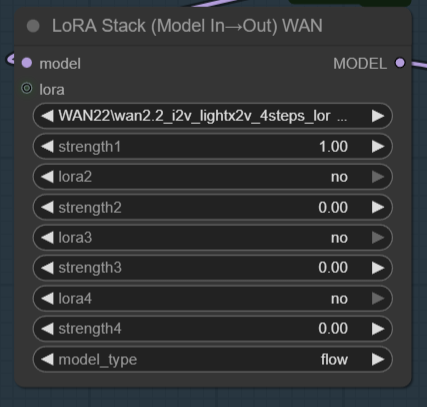
LoRA Stack (Model In→Out) WANnode: directly applies up to 4 WAN / Flow / Standard LoRAs to an incoming MODEL and outputs a patched MODEL (ideal for WAN 2.2 workflows where a single node step is preferred). - Added
LoRA Schedule (WAN, ranged)node: activates extra LoRA stacks by generation index, with optional open-ended ranges for long loop workflows. - Extended internal WAN key remapping for seamless WAN 2.2 (Flow) + WAN 2.1 cross-compatibility.
- Version bump across project files.
New Node: LoRA Stack (Model In→Out) WAN
 lora_stack_model_I_O.png
Use this node when you already have a base MODEL loaded (WAN 2.2, Flow, SDXL, etc.) and want a single pass application of multiple LoRAs without an intermediate stack/output hand-off. It mirrors the behavior of the classic stack + apply pair but merges them for simpler graphs (especially animation or chained sampler pipelines).
Inputs:
model: base diffusion MODEL.lora1..lora4+strength1..strength4(skips if "no" or strength == 0.0)model_type: chooseflow,wan2x, orstandardto control remapping logic.- Optional
lora(LORA) input: allows concatenating a previously built stack fromIAMCCS_WanLoRAStackfor more than 4 total LoRAs.
Output:
- Patched
MODELready for samplers / video pipelines.
Recommended Use (WAN 2.2 workflows):
- Load base WAN 2.2 / LightX2V model.
- Add
LoRA Stack (Model In→Out) WANand select up to 4 LoRAs. - (Optional) Chain a classic
IAMCCS_WanLoRAStackinto the optionallorainput if you need >4. - Connect output to KSampler / Animate nodes.
Why this node: Eliminates one extra node hop, reduces graph complexity and clarifies model lineage in large animation workflows.
Additional Node: LoRA Schedule (WAN, ranged)
Use this node when a WAN loop needs always-on LoRAs plus extra LoRAs that only apply on specific generations or generation ranges.
Typical setup:
- Keep your main always-on LoRAs in
IAMCCS_WanLoRAStackorIAMCCS_WanLoRAStackModelIO. - Build extra LoRA stacks for alternate phases.
- Feed the loop
indexintogeneration_index. - Set
slot_01_start/end,slot_02_start/end, etc. to define which extra stack is active on which generations. - Send the scheduler
loraoutput into the optionallorainput of your main WAN LoRA stack node.
Notes:
default_lorastays active on every generation.end = -1means "from this generation onward".- Multiple active slots stack together, so you can layer phase LoRAs if ranges overlap.
Preset behavior:
manual_range: usesstart/end; ifend = -1, the slot stays active fromstartonward.all_generations: always active.only_first: active only on generation0.all_nonfirst: active from generation1onward.even_generations: active on0, 2, 4, ....odd_generations: active on1, 3, 5, ....every_2_from_start: active onstart, start+2, start+4, ....every_3_from_start: active onstart, start+3, start+6, ....
Logging:
- Each execution logs the current
generation_index. - Logs show the always-on
default_loraentries. - Logs show each active slot, the preset that matched, and the actual LoRA names/strengths injected on that generation.
Previous Versions
Version 1.2.3 — New input lora - add another StackLoraModel (concatenate) + Extended Wan 2.1 Compatibility
Version 1.2.1
UPDATE VERSION 1-2-1
🆕 Version 1.2.1 — Extended Wan 2.1 Compatibility
The WAN-style remap node now supports LightX2V 2.1 LoRA models.
This version extends overall compatibility to all LoRA types — even those without dedicated weight tensors (these will simply display a non-critical “missing optional weights” message).
This ensures smoother cross-compatibility between LightX2V 2.1 / 2.2 and any WAN-based or character LoRA setup.
See full changelog → CHANGELOG.md
Overview
The IAMCCS-nodes package introduces a fix for a key limitation in native WANAnimate workflows: when users run animation pipelines without the WanVideoWrapper, LoRA models fail to load correctly — most weights are ignored, and the visual consistency breaks.
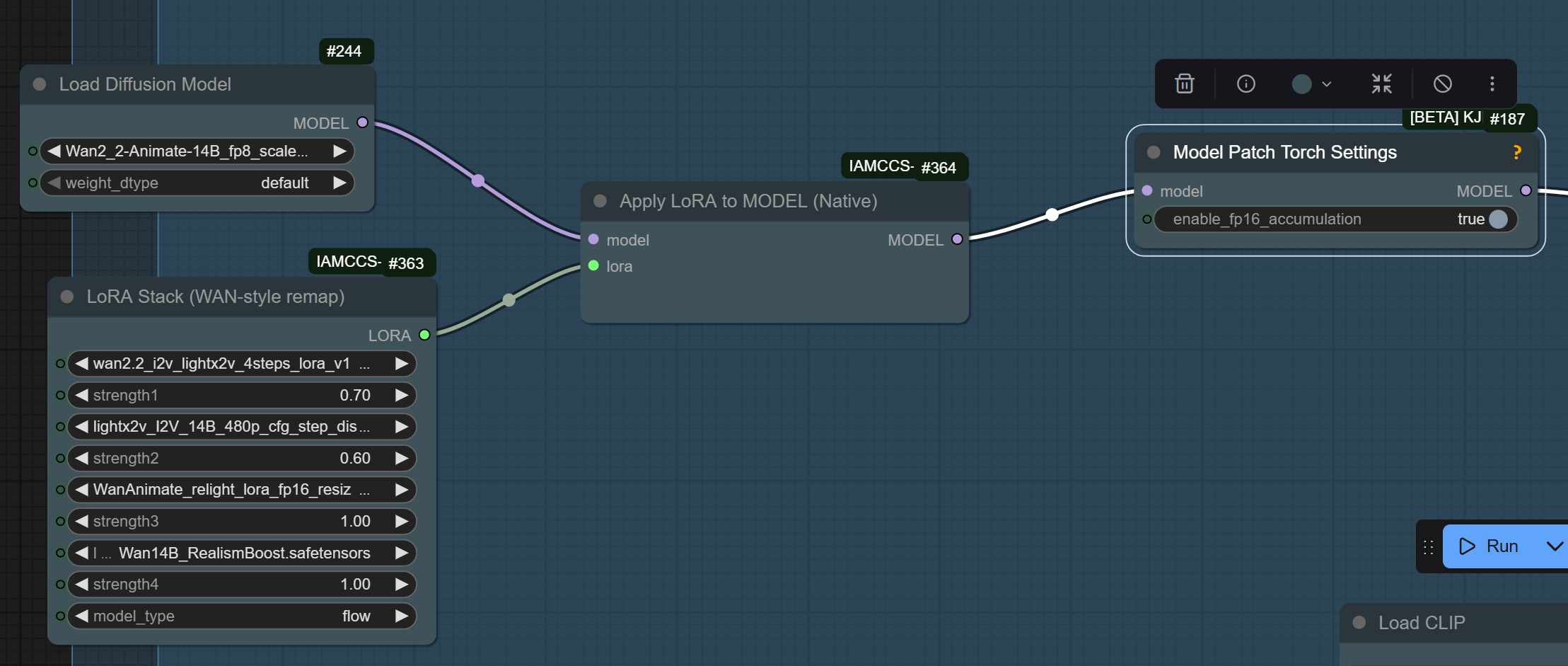
This package contains two complementary nodes that work together to fix this problem and restore full LoRA functionality while keeping the workflow lightweight and modular.
The IAMCCS Native LoRA System introduces an optimized way to handle multiple LoRAs inside native ComfyUI workflows. It is composed of two interconnected nodes designed to work seamlessly together.
1. LoRA Stack (WAN-style remap)
This node lets you combine several LoRA models—especially those made for WAN2.x / Animate / Flow architectures—into one unified output.
](https://github.com/IAMCCS/IAMCCS-nodes/blob/main/assets/lora%20stack.png)
Each LoRA slot includes:
an independent strength control,
automatic WAN-style key remapping for full compatibility,
and support for .safetensors files across any model type (flow, wan, sdxl, etc).
It produces a stacked LoRA bundle that merges all the active LoRAs and prepares them for efficient native injection.
2. Apply LoRA to MODEL (Native)
This node applies the generated LoRA stack directly to a loaded diffusion model at the Torch level, without relying on older ComfyUI Apply LoRA wrappers.
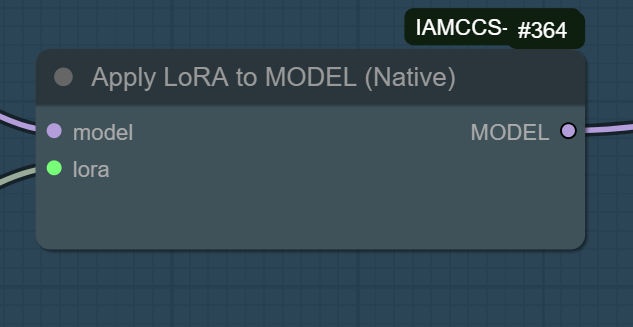
Works natively with FP16 accumulation (recommended when paired with Model Patch Torch Settings)
Maintains precision and speed
Fully compatible with WAN2.x and other Flow-type diffusion models
Output: a ready-to-run patched model for image or video generation.
This structure replaces multiple chained LoRA nodes with a single modular system, improving both stability and performance. Ideal for WANAnimate, WANVideo, or any Flow-based cinematic model.
LoRA Concatenation (1.2.3)
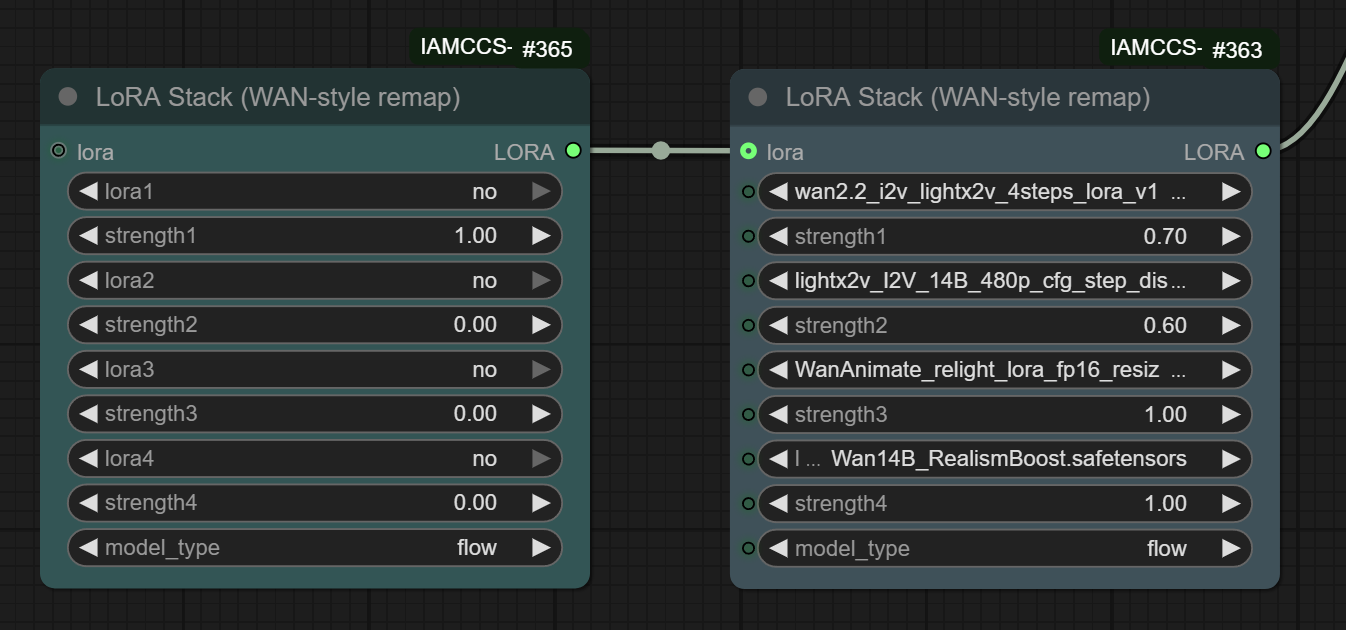 lora_concatenatel.png
LoRA Stack (WAN-style remap)
Supports the following LoRAs:
- New Moe distill WAN 2.2 LightX2V High Model
- New Moe distill WAN 2.2 LightX2V Low Model
- WAN 2.2 LightX2V High Model
- WAN 2.2 LightX2V Low Model
- WAN Boost Realism
- WAN 2.2 LightX2V 4-Step High
- WAN 2.2 LightX2V 4-Step Low
- Character LoRAs
- WAN 2.1 LightX2V Model
Installation
The node has now been officially accepted on ComfyUI Manager, You can install it directly from there (just search for IAMCCS).
or
You can grab it manually:
digit in your terminal:
cd ComfyUI/custom_nodes git clone https://github.com/IAMCCS/IAMCCS-nodes.git
Compatibility
ComfyUI ≥ 0.3.0
Python ≥ 3.12
Torch ≥ 2.8 (CUDA 12.6 or 12.8)
Compatible with: WAN2.1, WAN2.2, WANAnimate, WANAnimate_relight, Pulid, Flux, and multi-LoRA setups.
Technical Insight
LoRA weights fail to load in native WANAnimate pipelines because the model initialization bypasses the internal LoRA merge functions used in the wrapper. By separating the process into two modular nodes, IAMCCS-nodes restores full LoRA compatibility without depending on WanVideoWrapper, keeping performance high and structure clean.
Node 1 replaces the missing LoRA-loading phase.
Node 2 reintroduces dynamic LoRA reapplication and blending inside the animation graph.
This modular architecture makes LoRA management in WANAnimate flexible, transparent, and fully native.
If my work helped you, and you’d like to say thanks — grab me a coffee ☕
<a href="https://www.buymeacoffee.com/iamccs" target="_blank"> <img src="https://cdn.buymeacoffee.com/buttons/v2/default-yellow.png" alt="Buy Me A Coffee" width="200" /> </a>Run ComfyUI workflows without the setup
No installs, no CUDA version roulette, no GPU sitting idle on your bill. Bring a workflow and run it in the browser.