
ComfyUI Extension: ComfyUI_MieNodes
Run ComfyUI workflows without the setup
No installs, no CUDA version roulette, no GPU sitting idle on your bill. Bring a workflow and run it in the browser.
Offering a series of utility nodes designed to simplify workflows and enhance efficiency
Looking for a different extension?
Custom Nodes (117)
- Add Custom System Prompt 🐑
- Add Number Watermark For Image 🐑
- Add Text Watermark For Image 🐑
- Add User Kontext Preset 🐑
- Any To String 🐑
- Aspect Ratio From Size 🐑
- Batch Convert Image Files 🐑
- Batch Delete Files 🐑
- Batch Edit Text Files 🐑
- Batch Rename Files 🐑
- Batch Sync Image Caption Files 🐑
- Bernini Prompt Generator 🐑
- Call LLM Service 🐑
- Check LLM Service Connectivity 🐑
- Classic Aspect Ratio 🐑
- Compare Files 🐑
- Copy Files 🐑
- Custom System Prompt Generator 🐑
- Dedup Image Files 🐑
- Delete Files 🐑
- File Exists 🐑
- Flux2 Prompt Generator 🐑
- Flux Klein T2V Prompt Generator 🐑
- Frame Transition Prompt Generator 🐑
- Get Absolute Path 🐑
- Get Directory Files Info 🐑
- Get File Basename 🐑
- Get File Info 🐑
- HF Repo Downloader 🐑
- Hunyuan Video I2V Prompt Generator 🐑
- Hunyuan Video T2V Prompt Generator 🐑
- Ideogram 4 Prompt Generator 🐑
- If Else 🐑
- Image Hash 🐑
- Int To String 🐑
- Kontext Prompt Generator 🐑
- Krea2 Prompt Generator 🐑
- Load Any 🐑
- Load Image Batch 🐑
- Load Or Compute 🐑
- LTX2 Prompt Generator 🐑
- Mie Image Grid 🐑
- Mie Image Select Frame 🐑
- Mie Loop Body In 🐑
- Mie Loop Body Out 🐑
- Mie Loop Cleanup Audio 🐑
- Mie Loop Cleanup Images 🐑
- Mie Loop Cleanup JSON 🐑
- Mie Loop Cleanup Text 🐑
- Mie Loop Collect Audio 🐑
- Mie Loop Collect Image 🐑
- Mie Loop Collect JSON 🐑
- Mie Loop Collect Text 🐑
- Mie Loop End 🐑
- Mie Loop Finalize Audio 🐑
- Mie Loop Finalize Images 🐑
- Mie Loop Finalize JSON List 🐑
- Mie Loop Finalize Text List 🐑
- Mie Loop Get Index 🐑
- Mie Loop If Current Idx 🐑
- Mie Loop If Is First 🐑
- Mie Loop If Is Last 🐑
- Mie Loop Param Get Bool 🐑
- Mie Loop Param Get Float 🐑
- Mie Loop Param Get Int 🐑
- Mie Loop Param Get String 🐑
- Mie Loop Resume 🐑
- Mie Loop Start 🐑
- Mie Loop State Cleanup Image 🐑
- Mie Loop State Get Bool 🐑
- Mie Loop State Get Float 🐑
- Mie Loop State Get Image 🐑
- Mie Loop State Get Int 🐑
- Mie Loop State Get String 🐑
- Mie Loop State Set Bool 🐑
- Mie Loop State Set Float 🐑
- Mie Loop State Set Image Batch 🐑
- Mie Loop State Set Image 🐑
- Mie Loop State Set Int 🐑
- Mie Loop State Set 🐑
- Mie Loop State Set String 🐑
- Model Downloader 🐑
- Prompt Generator 🐑
- Qwen TTS 🐑
- Remove Custom System Prompt 🐑
- Remove User Kontext Preset 🐑
- Rich Text 🐑
- Round To Multiple 🐑
- Save Any 🐑
- Save Anything As File 🐑
- Save Image Batch 🐑
- SCAIL-2 Prompt Generator 🐑
- Set Bailian LLM Service Connector 🐑
- Set Bailian TTS Connector 🐑
- Set DeepSeek LLM Service Connector 🐑
- Set Gemini LLM Service Connector 🐑
- Set General LLM Service Connector 🐑
- Set Github Models LLM Service Connector 🐑
- Set Kimi LLM Service Connector 🐑
- Set MiMo LLM Service Connector 🐑
- Set MiMo Token Plan LLM Service Connector 🐑
- Set MiniMax LLM Service Connector 🐑
- Set MiniMax Token Plan LLM Service Connector 🐑
- Set SiliconFlow LLM Service Connector 🐑
- Set ZhiPu Code LLM Service Connector (Token Plan) 🐑
- Set ZhiPu LLM Service Connector (not token plan) 🐑
- Show And Save Anything 🐑
- Show Anything 🐑
- Simple Text 🐑
- Single Image To Video 🐑
- String Concat 🐑
- String Format 🐑
- String Hash 🐑
- Summary Text Files 🐑
- Translator 🐑
- Wav Concat 🐑
- Z-Image Prompt Generator 🐑
README
ComfyUI-MieNodes
ComfyUI-MieNodes is a plugin for the ComfyUI ecosystem, offering a series of utility nodes designed to simplify workflows and enhance efficiency.
Workflows
Currently, the following services are supported:
- ZhiPu 智谱 — Open Platform (
zhipukey) + Coding / Token Plan (zhipu_codekey) - SiliconFlow 硅基流动 (
siliconflowkey) - GitHub Models (
github_modelskey, fine-grained PAT recommended) - Kimi 月之暗面 (
kimikey) - DeepSeek (
deepseekkey) - Gemini — multimodal-aware (image input is forwarded as inline data) (
geminikey) - Bailian 阿里云百炼 (
bailiankey) - MiniMax — standard Open Platform (
sk-...key,minimax_open_platform) + Token Plan / Coding Plan (sk-cp-...key,minimax) - Xiaomi MiMo — standard Open Platform (
sk-...key,mimo) + Token Plan / Coding Plan (tp-...key,mimo_token_plan) - Any OpenAI-compatible endpoint via
SetGeneralLLMServiceConnector(custom base URL + model,openai_compatiblekey)
If you wish to use other large language model (LLM) services that cannot be connected through SetGeneralLLMServiceConnector, please submit an issue or a pull request for feedback.
Several providers (notably ZhiPu and SiliconFlow) offer free-tier models. The free lineup changes often, so check the provider's website for what is currently free and enter the model id into the connector's custom_model field.
Call LLM Service Workflow
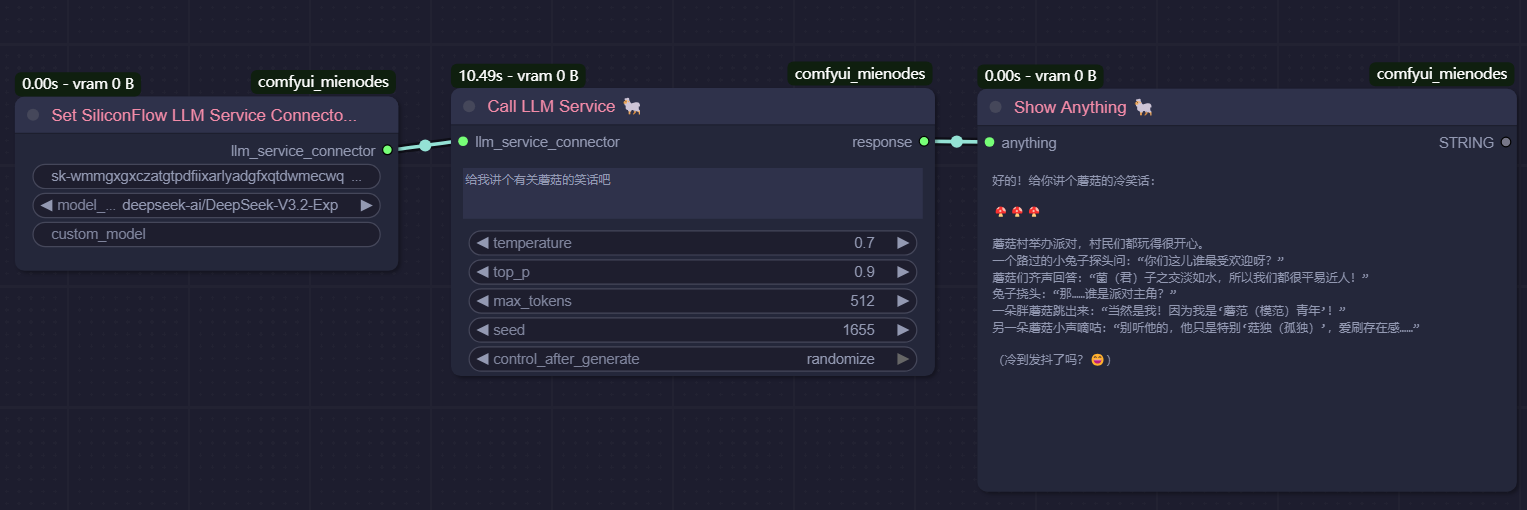
This workflow demonstrates how to connect to an LLM service and generate a response based on a given prompt, you can use any LLM service supported.
Kontext Presets Prompt Generator Workflow
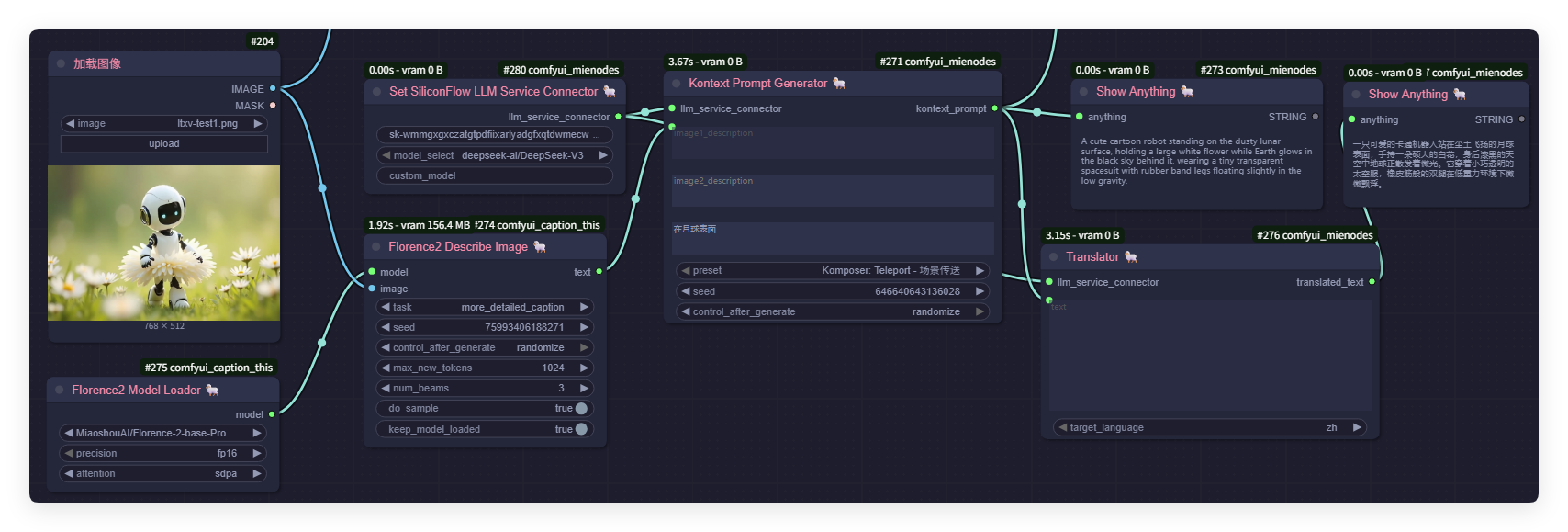
This workflow demonstrates how to load an image, generate a detailed description using the Florence2 model, and compose context prompts with the help of large language models. The results are displayed both in English and Chinese using the Show Anything node.
- Image Loader: Loads the input image.
- Florence2 Model Loader & Describe Image: Generates a detailed caption for the image.
- Set SiliconFlow LLM Service Connector & Kontext Prompt Generator: Uses LLM to create context-aware prompts.
- Show Anything: Displays the generated result.
Check LLM Service Connection Workflow
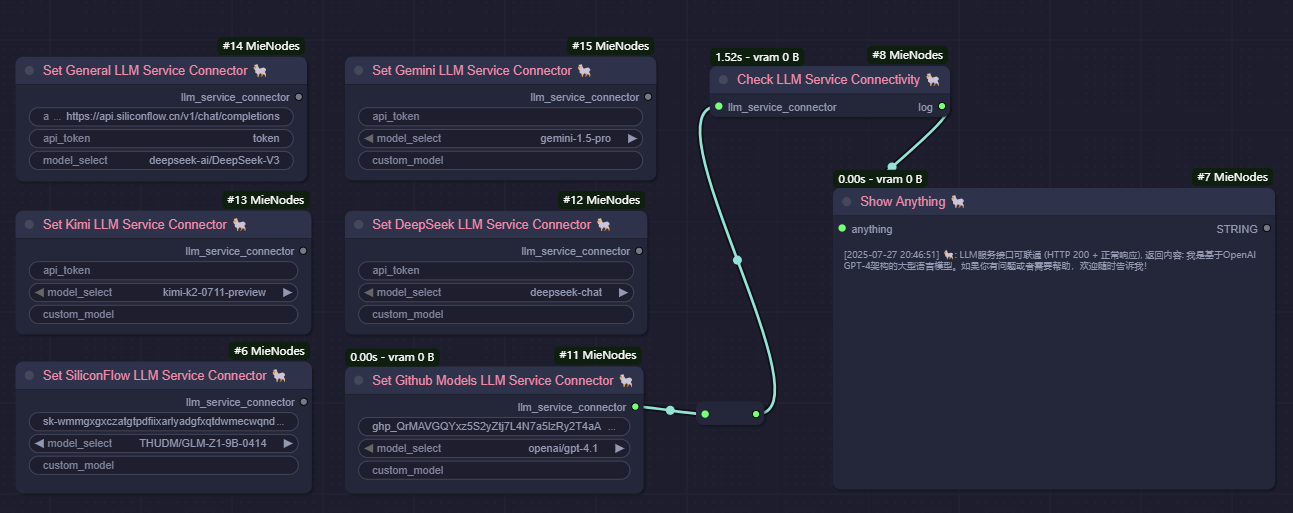
This workflow checks the connection to the LLM service and displays the result.
Kontext Presets Add and Remove Workflow
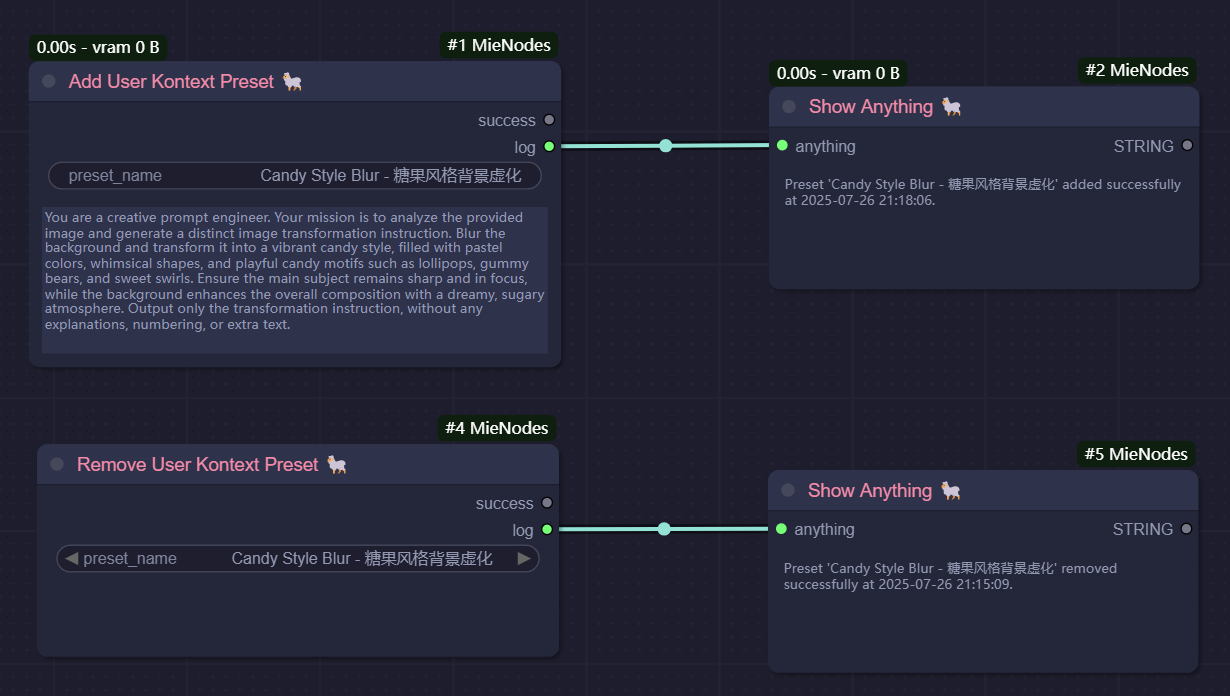
This workflow demonstrates how to add and remove a custom preset.
Advanced Prompt Generator Workflow
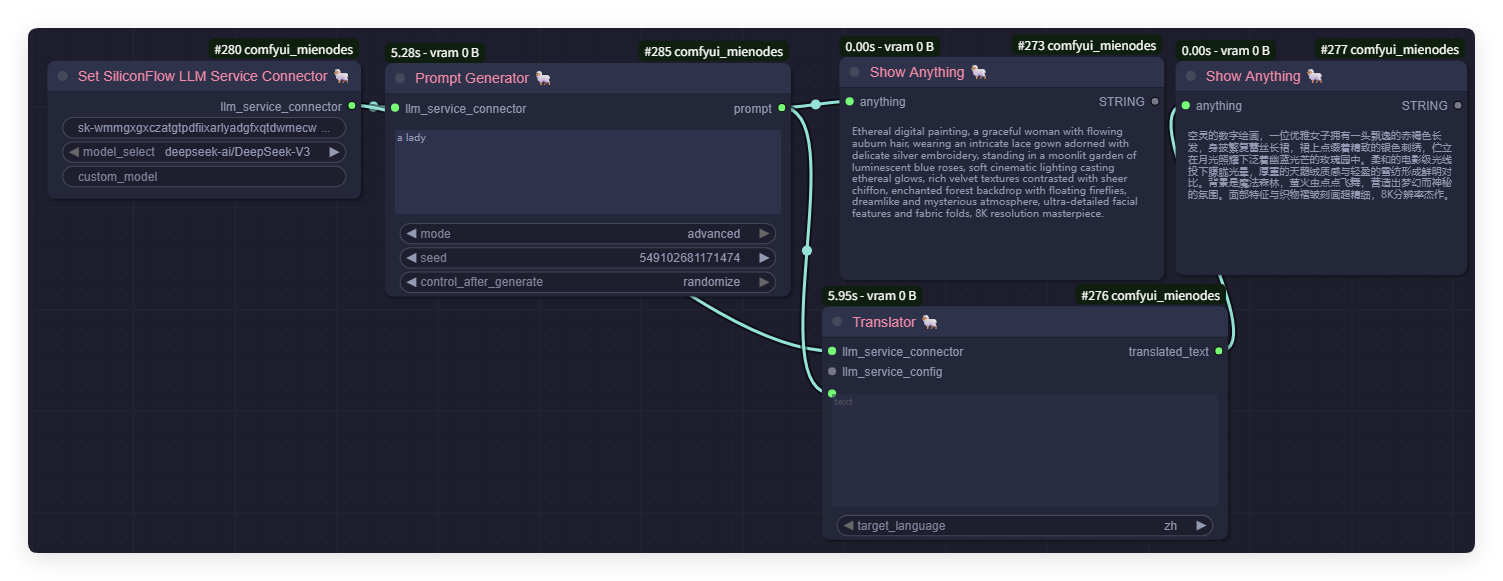
This workflow focuses on generating an artistic prompt for an ethereal digital portrait using the LLM connector and advanced prompt generator nodes.
- Prompt Generator: Produces detailed prompts for creative tasks.
- Show Anything: Displays the generated result.
Bernini Prompt Generator Workflow

This workflow routes a user prompt through the Bernini task-aware prompt enhancer (bytedance/Bernini, Apache 2.0) and writes an enriched, task-shaped prompt back into the graph. The 13 task types supported in the dropdown are:
- t2i / t2v — text-to-image / text-to-video
- i2i / i2v — image-to-image editing / image-to-video
- r2i / r2v — subject-driven image / video generation (reference image of a subject)
- ri2i — reference-image-guided image editing (source image + reference image; MieNodes extension)
- v2v / mv2v — video-to-video editing / multi-source v2v
- vi2v — video editing with a reference image
- rv2v / vrc2v — reference-guided video editing
- ads2v — ads insertion in video
Reference images and source video frames are forwarded to the LLM as image_url content parts, so the model can see what it's rewriting about. The dropdown labels are bilingual (code + 中文) and stay readable in either language.
Current Features
Prompt Enhancement Features
The plugin provides a suite of nodes for prompt enhancement, offering:
- A collection of preset workflows that leverage large language models to automatically generate high-quality prompts from image and text inputs.
- Advanced prompt optimization, including automatic translation and enrichment of details, enabling richer, more expressive outputs for various creative tasks.
LoRA Training Caption Preparation Features
The plugin provides the following utility nodes, with a focus on dataset file management tasks in LoRA training workflows:
- Batch edit caption files (Insert/Append/Replace operations).
- Batch rename files, add prefixes, and format file numbering for specific file types.
- Synchronize image and caption files, with support for automatically creating or removing
.txtfiles to match image files. - Batch read caption files, with support for extracting all file contents for analysis and summarization by large language models.
- Batch convert image files, enabling conversion of all image files to a specified format (
.jpgor.png). - Batch delete files with the specified extension and optional prefix.
- Remove duplicated (same content) image files in the specified directory.
- Save any data as a file in TOML, JSON, or TXT format.
- Compare two files (in TOML or JSON format) and return the differences.
Common Features
The plugin also provides utility nodes for general-purpose tasks:
- Display any input as a string.
- Download files from huggingface, hf-mirror, github or anywhere to models folder.
- Connect to large language models (LLMs) for advanced prompt generation, enhancement, translation, and style adaptation.
- Translate any text to another language (English, Chinese, etc.).
Nodes
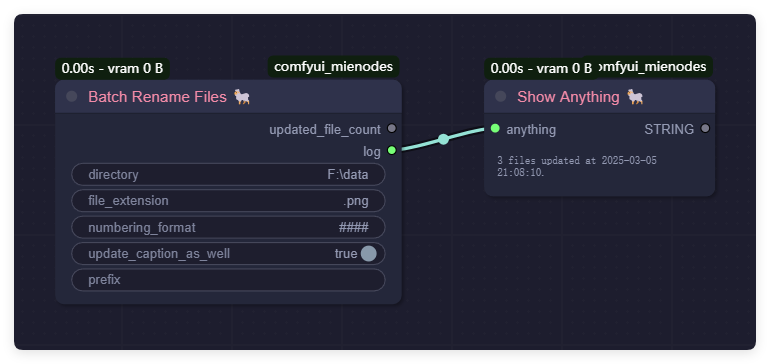
BatchRenameFiles
Function: Batch rename files and add a prefix and numbering.
Parameters:
directory(str): Path to the directory.file_extension(str): File extension to operate on (e.g.,.jpg,.txt).numbering_format(str): Numbering format (###means three digits).update_caption_as_well(bool): Whether to also rename.txtfiles with the same name.prefix(str, optional): Prefix to add to the file name.
BatchDeleteFiles
Function: Batch delete files with the specified extension and optional prefix.
Parameters:
directory(str): Path to the directory.file_extension(str): File extension to delete (e.g.,.jpg,.txt).prefix(str, optional): Prefix to check before deleting files.
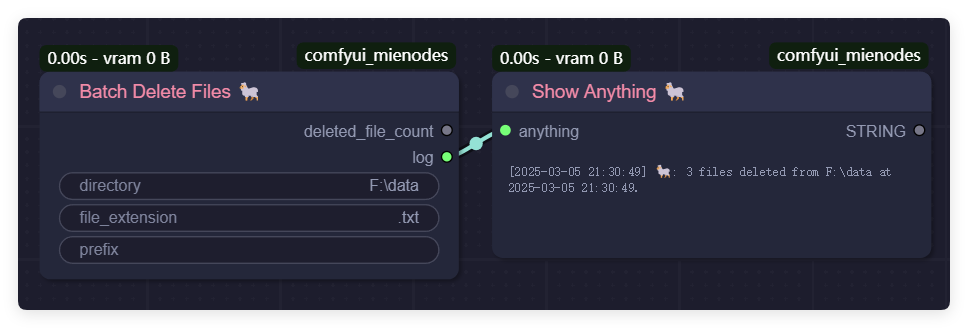
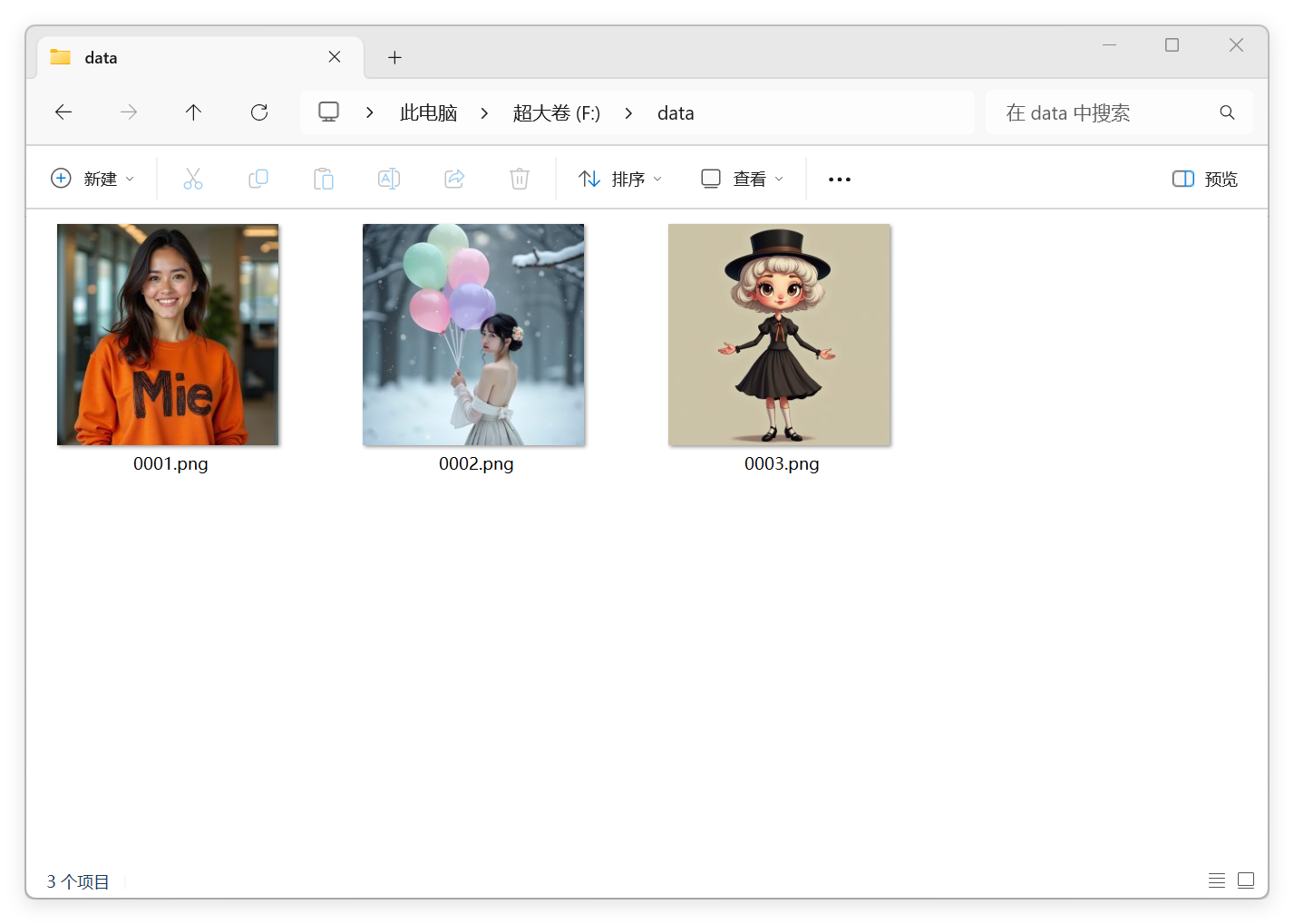
Before:
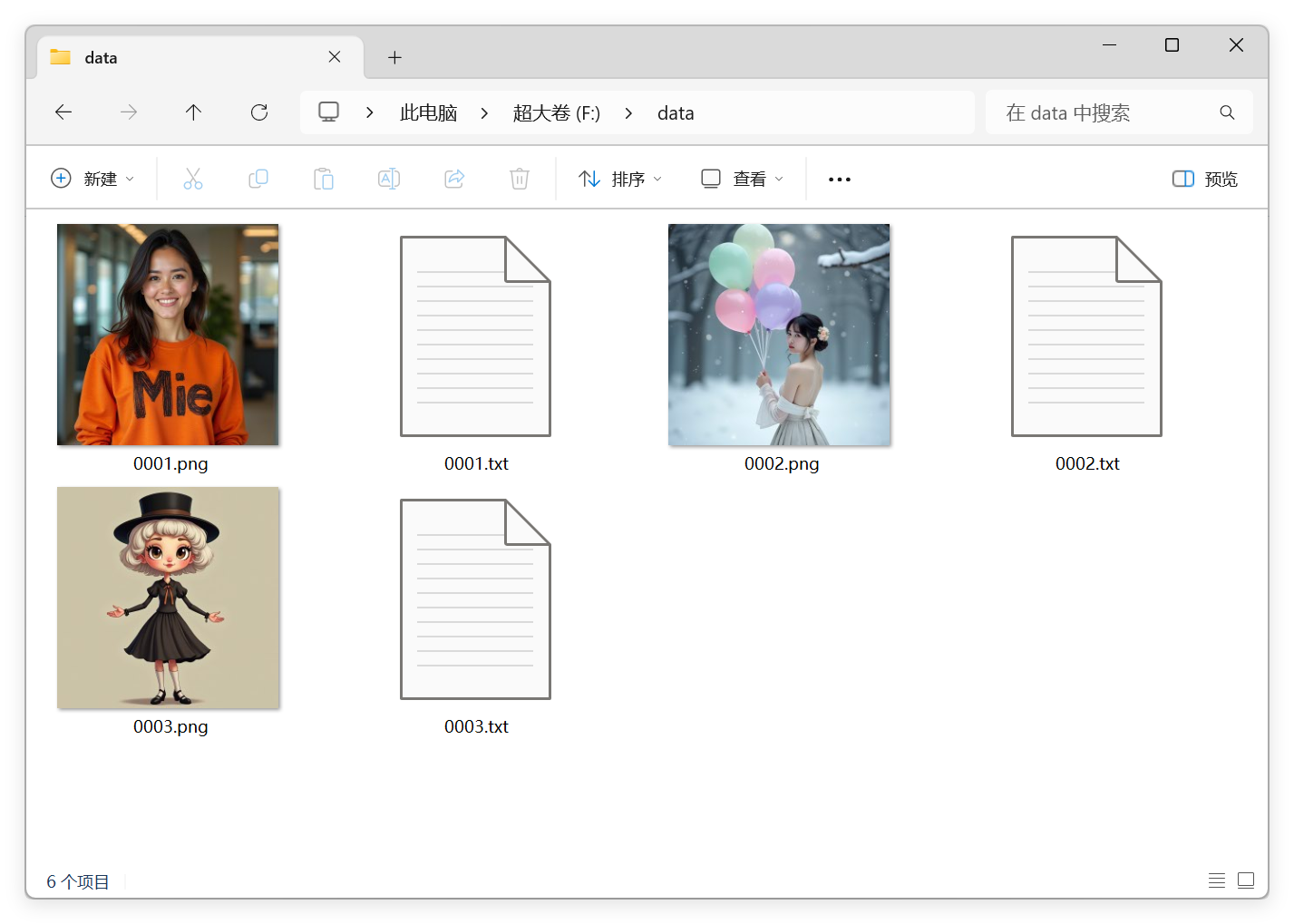
After:
BatchEditTextFiles
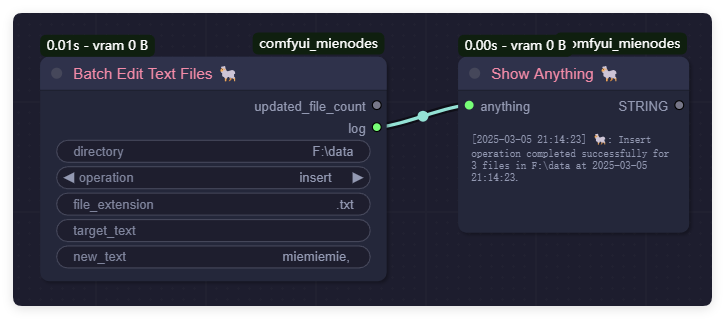
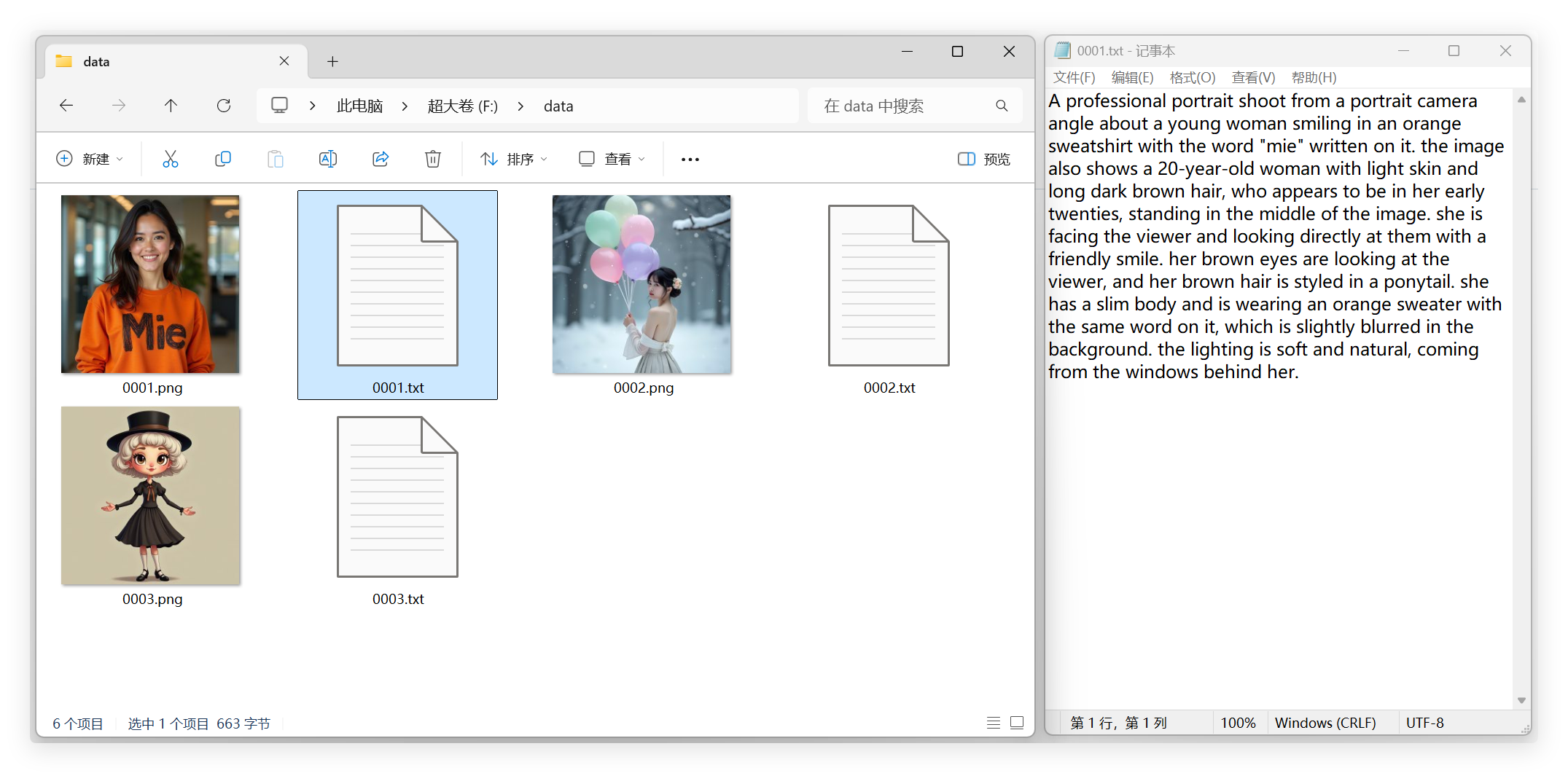
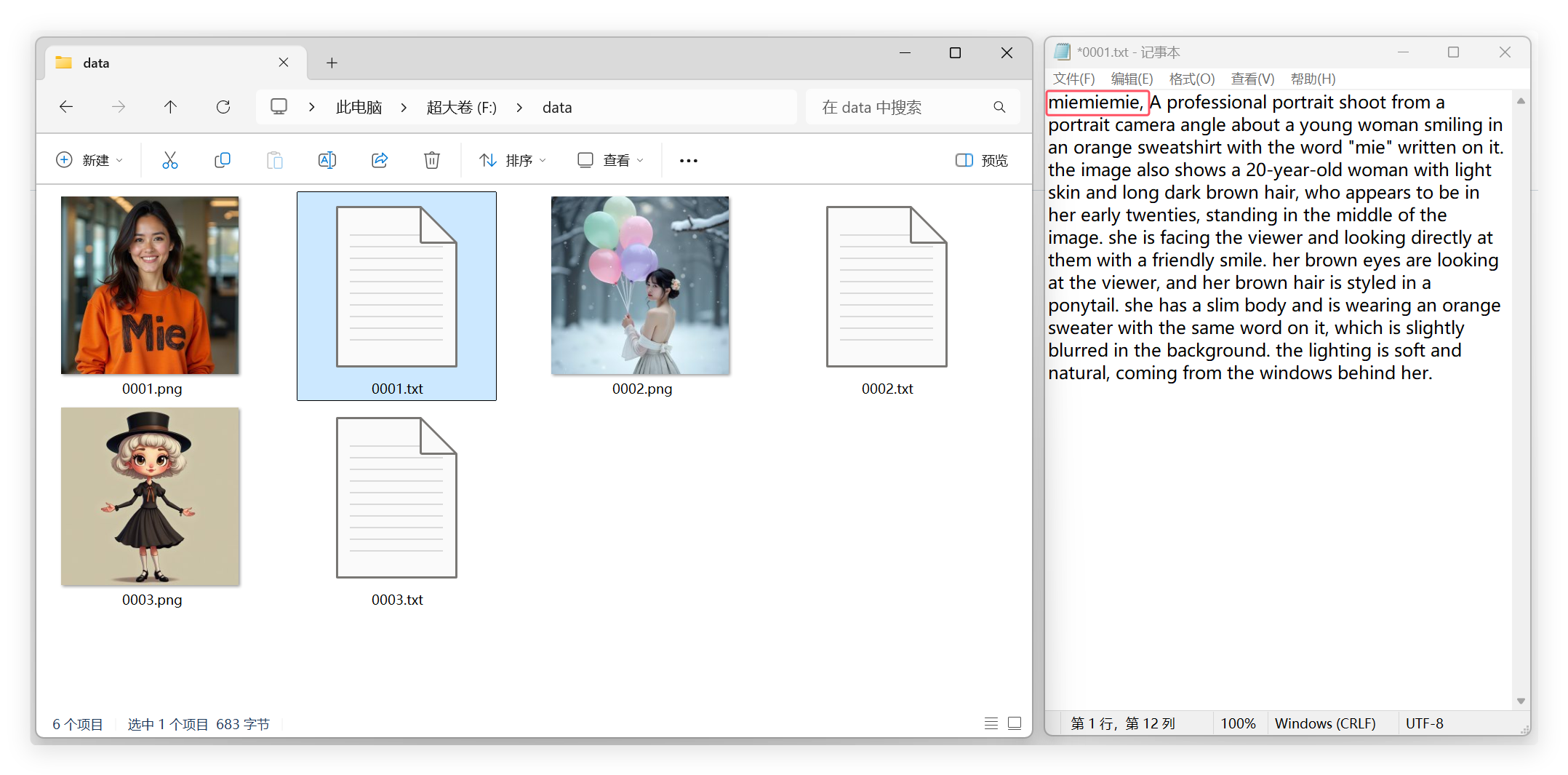
Function: Perform operations on text files (Insert, Append, Replace, or Remove).
Parameters:
directory(str): Path to the directory.operation(str): Type of operation (insert,append,replace,remove).file_extension(str, optional): File extension to operate on (e.g.,.txt).target_text(str, optional): Text to replace or remove (only used for Replace or Remove operations).new_text(str, optional): New content to insert, append, or replace.
Before:
After:
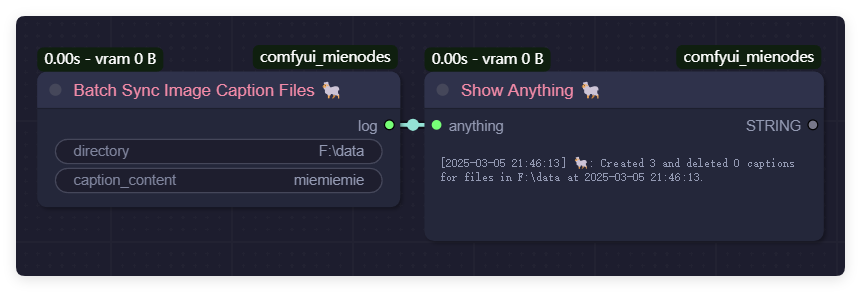
BatchSyncImageCaptionFiles
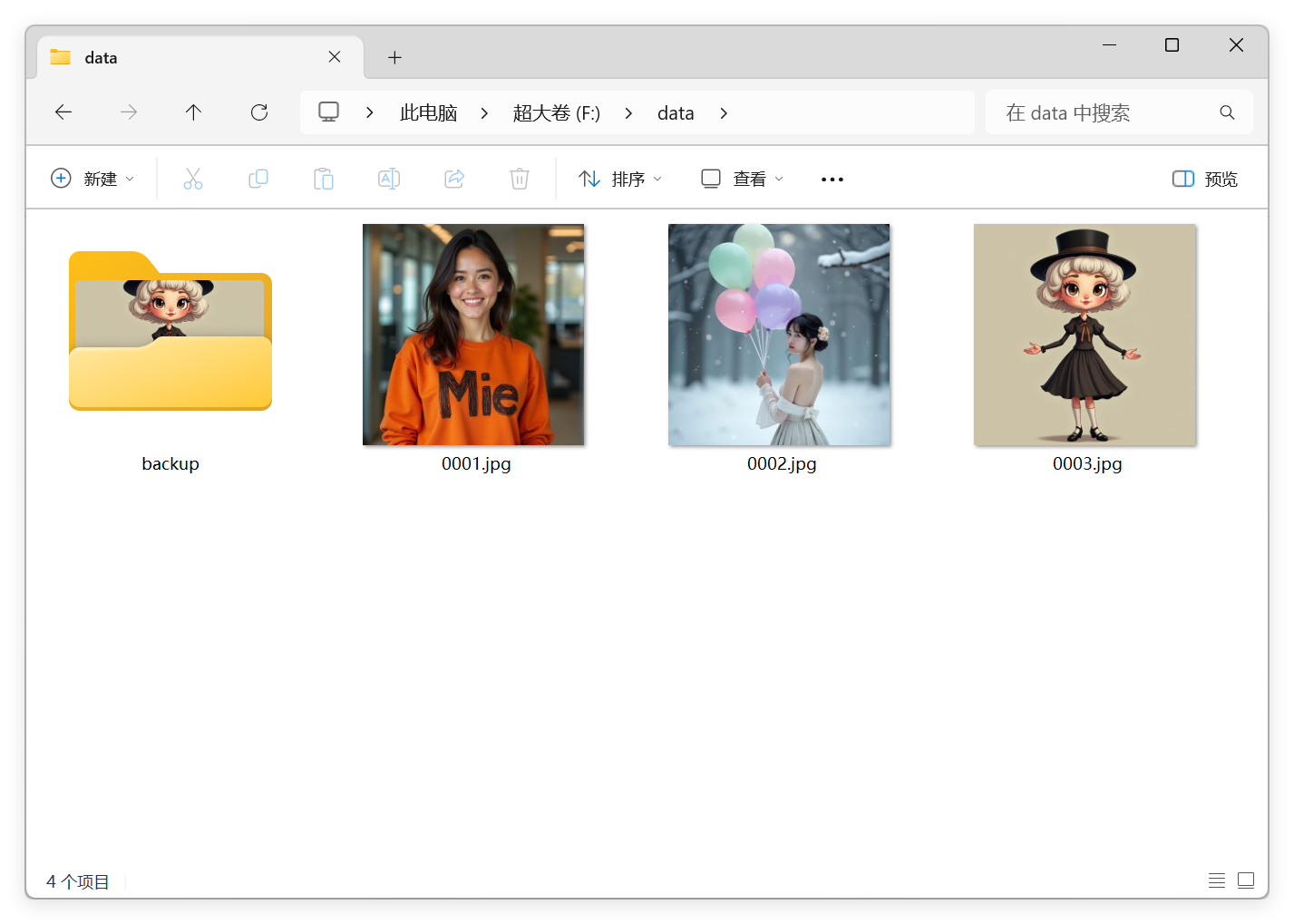
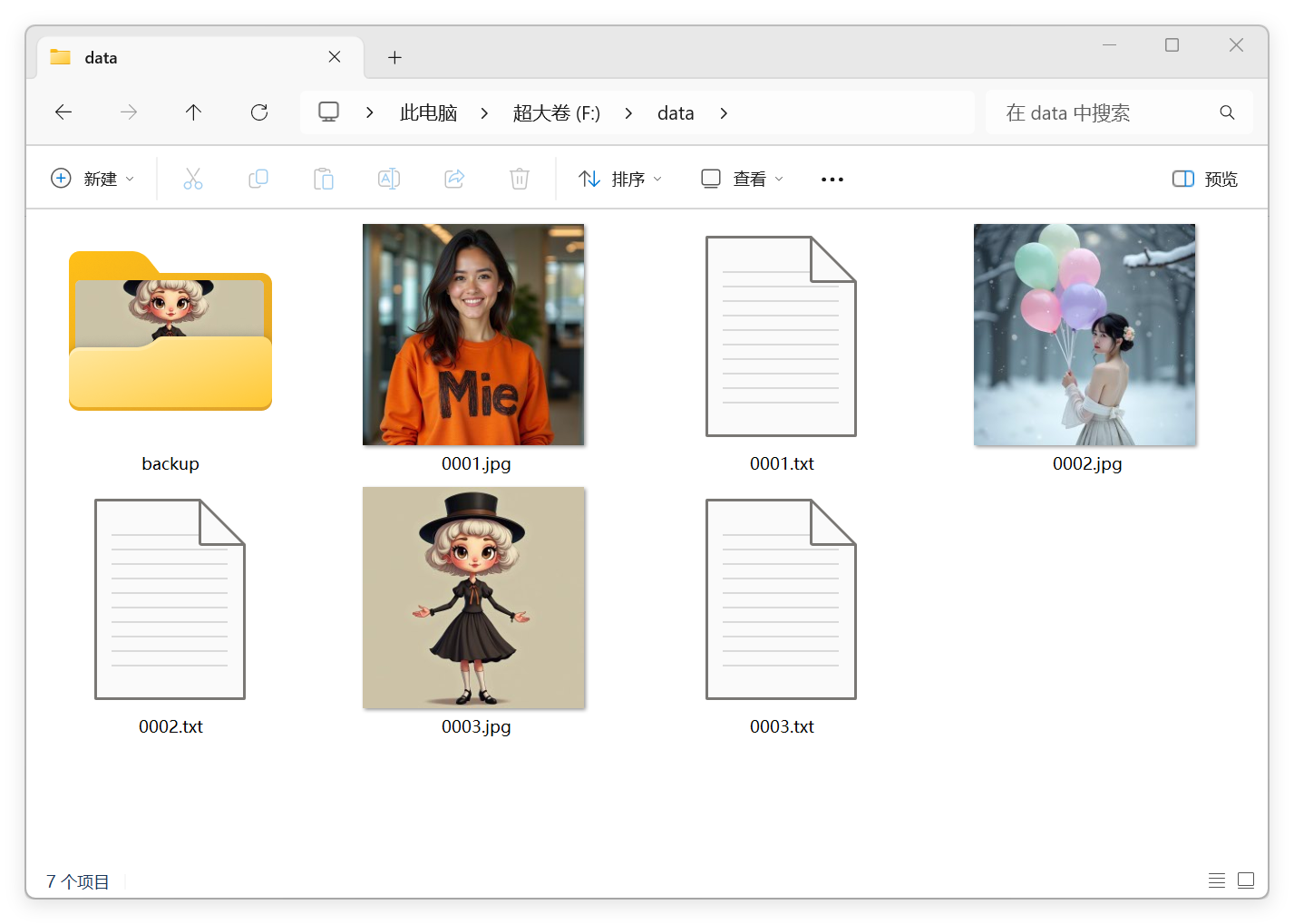
Function: Add caption files (.txt files with the same name) for image files in a directory.
Parameters:
directory(str): Path to the directory.caption_content(str): Content to populate in the caption file (e.g.,"nazha,").
Before:
After:
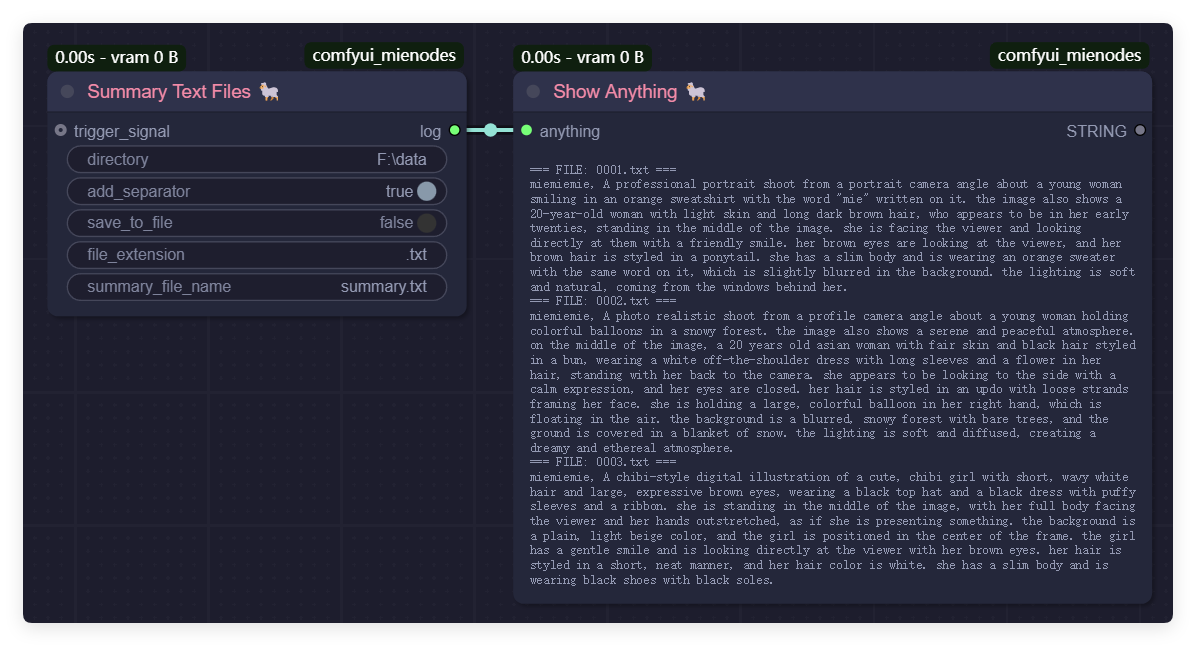
SummaryTextFiles
Function: Summarize the content of all text files in a directory.
Parameters:
directory(str): Path to the directory.add_separator(bool): Whether to add a separator between file contents.save_to_file(bool): Whether to save the summarized content to a file.file_extension(str, optional): File extension to operate on (e.g.,.txt).summary_file_name(str, optional): Name of the file to save the summary.
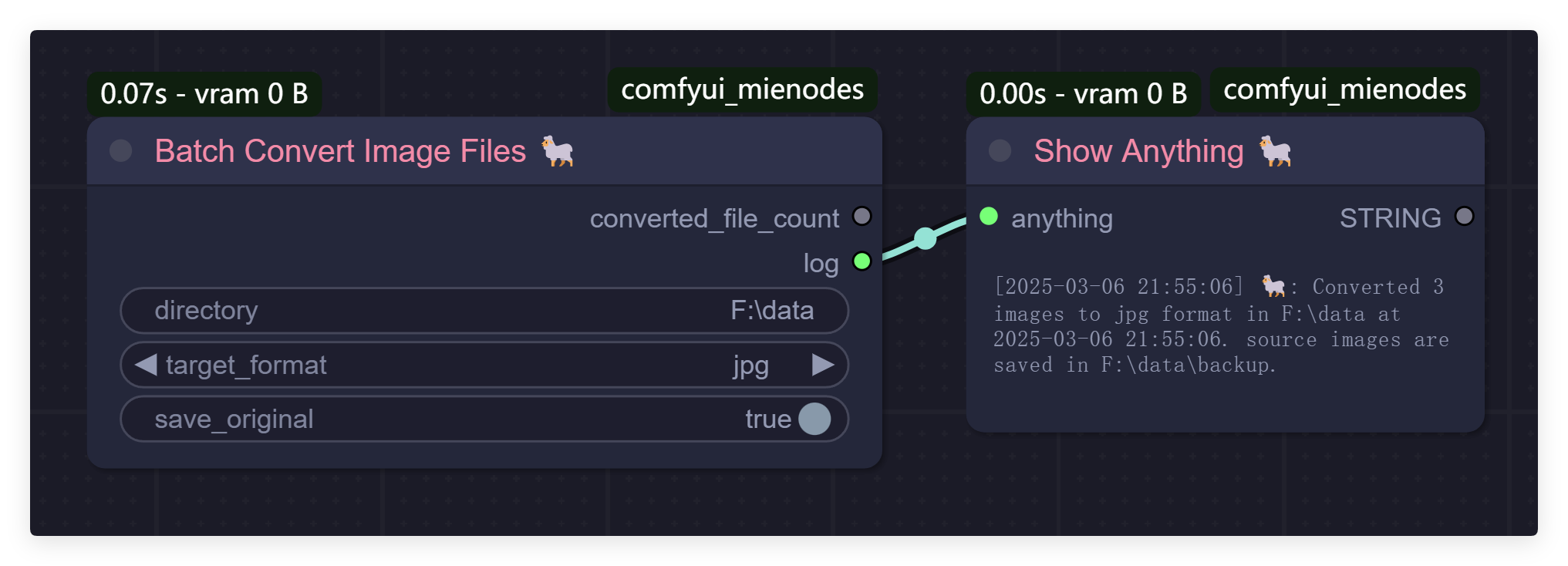
BatchConvertImageFiles
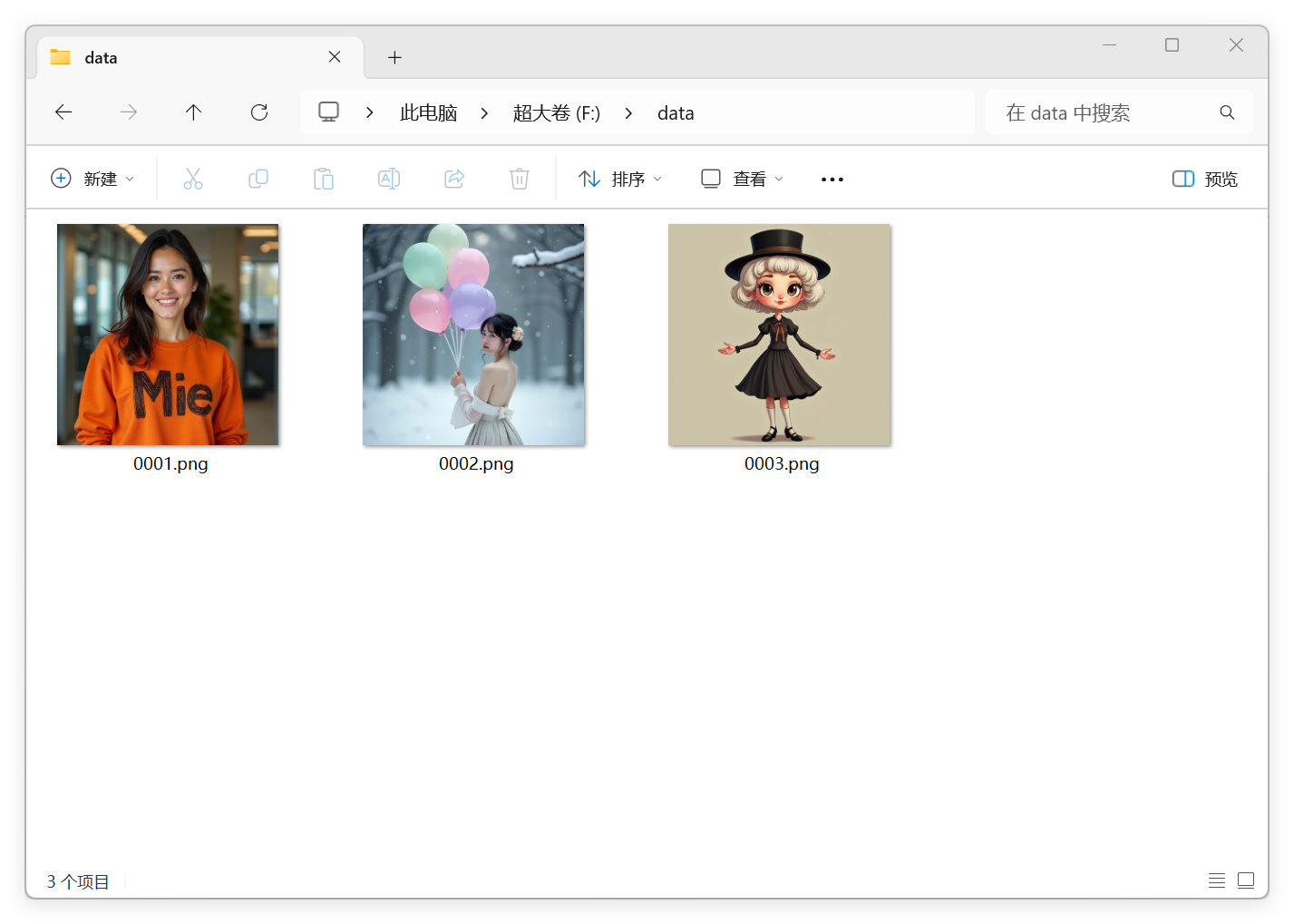
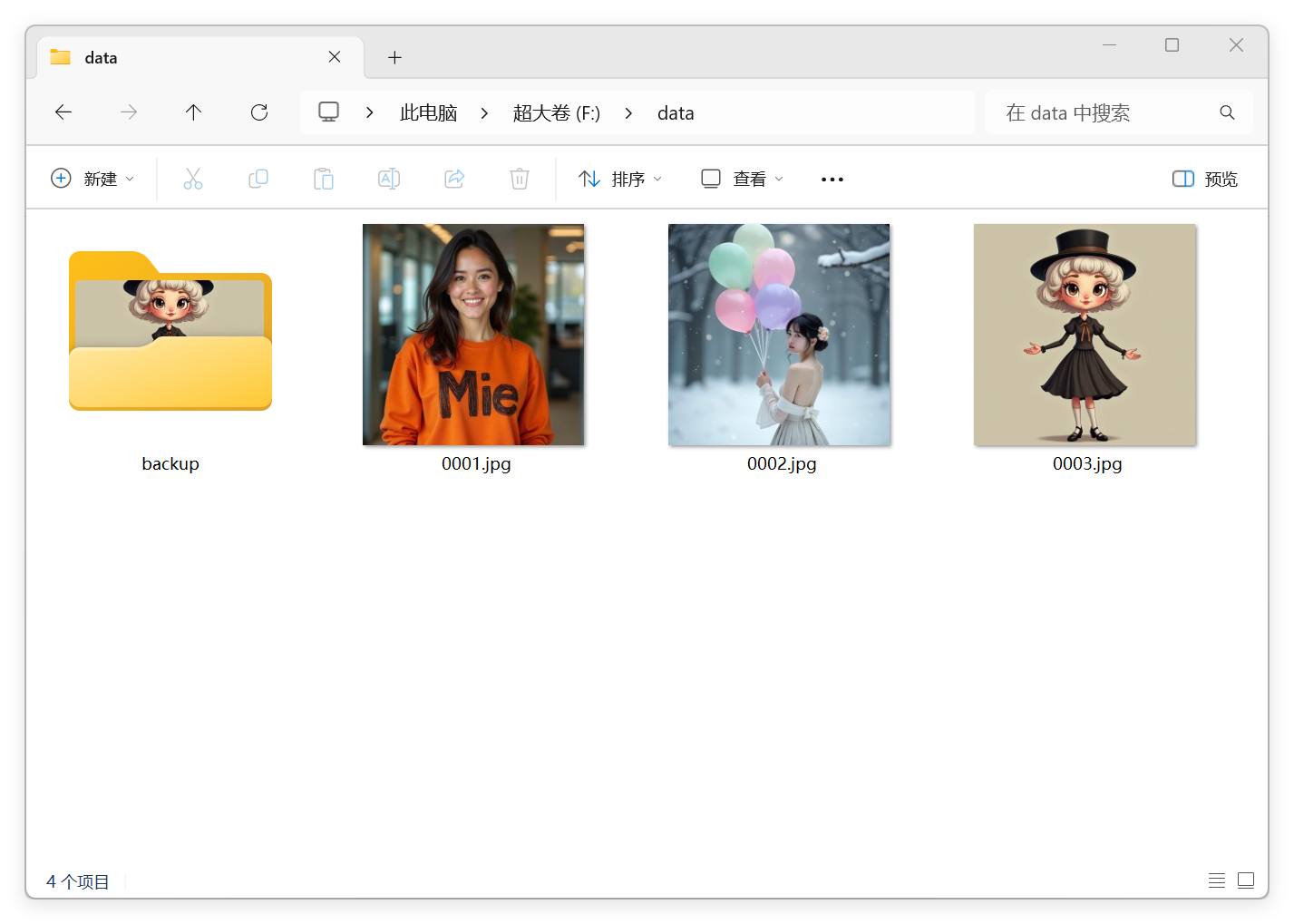
Function: Convert all images in a specified directory to the target format.
Parameters:
directory(str): Path to the directory.target_format(str): Target image format (jpgorpng).save_original(bool): Whether to retain the original files after conversion.
Before:
After:
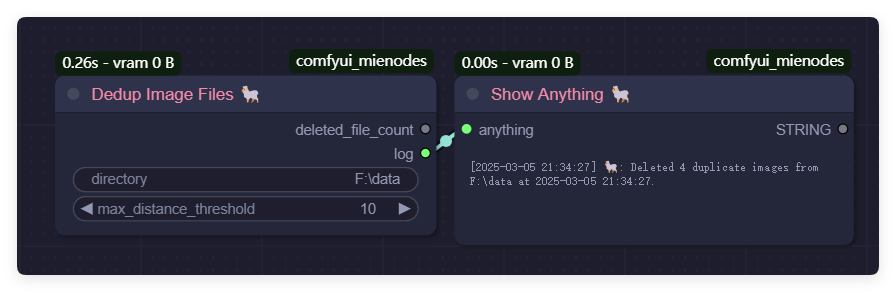
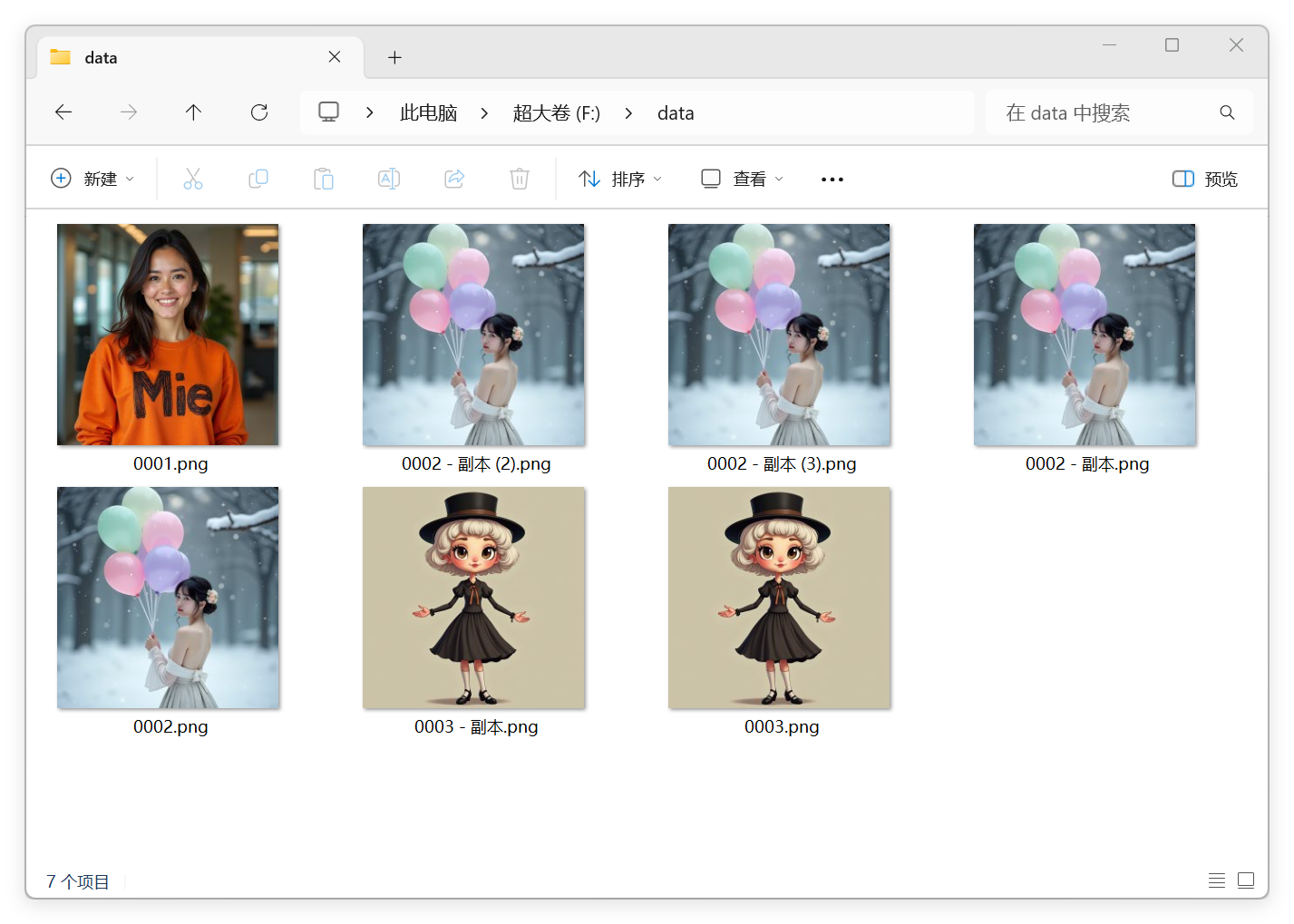
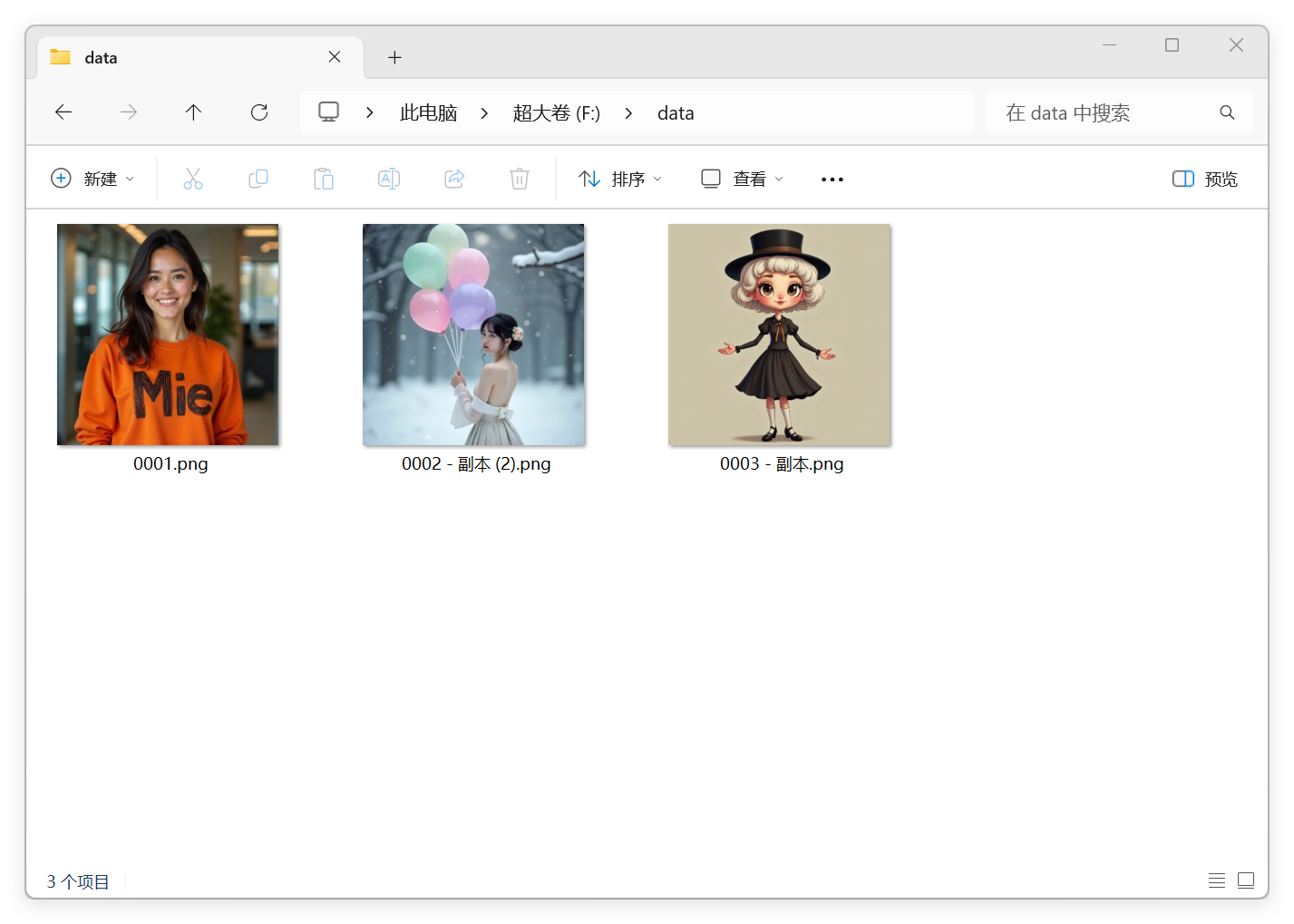
DedupImageFiles
Function: Remove duplicate image files in a specific directory.
Parameters:
directory(str): Path to the directory.max_distance_threshold(int): Maximum Hamming distance threshold for identifying duplicates.
Before:
After:
ShowAnythingMie
Function: Print the input content as a string.
Parameters:
anything(*): The input content to display.
SaveAnythingAsFile
Function: Save data to a file in either TOML, JSON, or TXT format.
Parameters:
data(*): The data to save.directory(str): The directory to save the file in.file_name(str): The name of the output file.save_format(str): The format to save the data in ("json", "toml", or "txt").
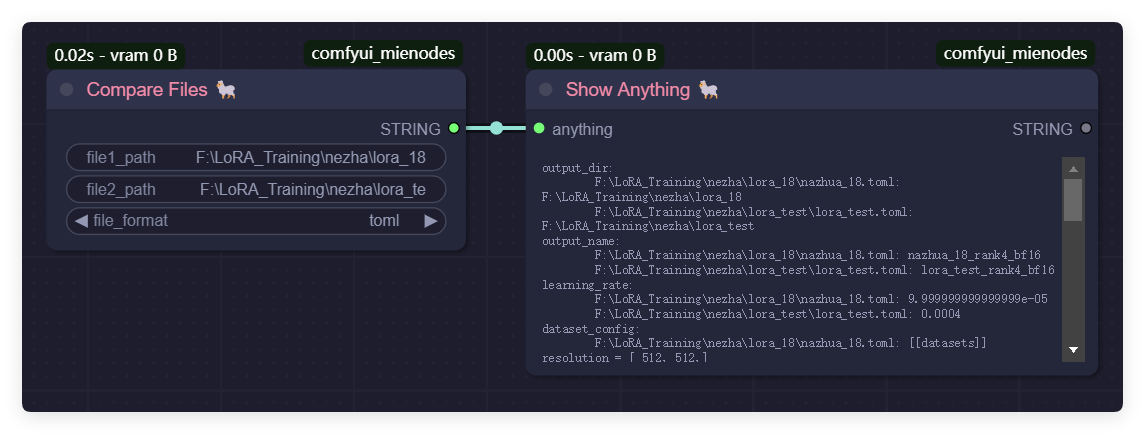
CompareFiles
Function: Compare two files and return the differences. Parameter:
file1_path(str): The path to the first file.file2_path(str): The path to the second file.file_format(str): The format of the files ("json" or "toml").
StringFormat
Function: Format a Python str.format-style template with autogrowing positional value inputs (Bernini Conditioning style UX).
Parameters:
template(str): The format string. Supports{0},{1}, ... positional placeholders and standard format specs (e.g.{0:>5},{0:.2f}). Use{{/}}to emit a literal brace.value_0...value_15(str, optional): The positional arguments, one per slot. The first 2 slots (value_0,value_1) are visible when the node is dropped; the next slot appears automatically each time the last visible slot gets a connection, up to 16. Unconnected slots are treated as the empty string.
Output:result(str): The formatted string. On a malformed template, the raw template is returned and a diagnostic is logged so the user can still see it on the wire.
Example: template"{0} + {1} = {2}"withvalue_0="1",value_1="2",value_2="3"produces"1 + 2 = 3".
StringHash
Function: Hash a STRING into a short hex digest for use in cache-key filenames. Companion to ImageHash|Mie for inputs that are already STRING (e.g. a SAM3 prompt word); keeps the prompt-derived component of a cache key short, deterministic, and free of filename-hostile characters (spaces, slashes).
Parameters:
text(str, required): The STRING to hash. None / empty yields a constant sentinel ("0" * length) so an unconnected input still produces a valid filename component rather than crashing.length(int, optional): Number of hex chars to keep. Default 12, range [4, 64]. Values outside the range are clamped.
Output:hash(str): Lowercase hex ofsha256(text.encode("utf-8"))[:length].
Example:text="human"(default length 12) returns"79a5478768d2".
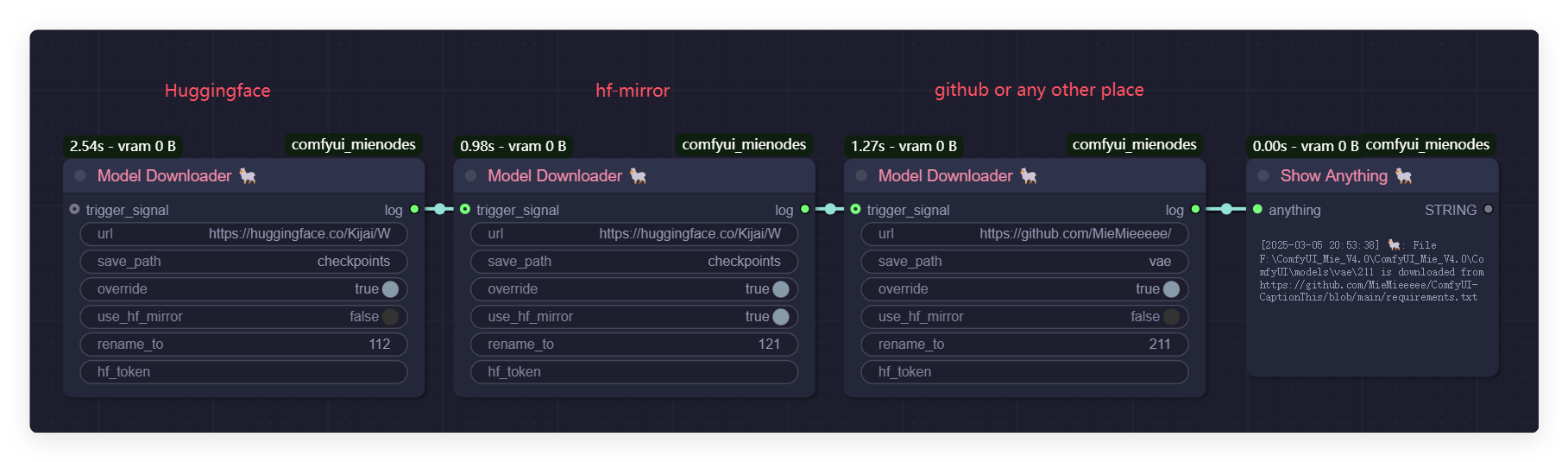
ModelDownloader
Function: Download files from Hugging Face, hf-mirror, GitHub, or any other source to the models folder. Parameters:
url(str): The URL of the file to download.save_path(str): The path to save the downloaded file.override(bool): Whether to override the existing file if it already exists.use_hf_mirror(bool): Whether to use the Hugging Face mirror URL.rename_to(str, optional): The new name for the downloaded file (optional).hf_token(str, optional): The Hugging Face token for authentication (optional).trigger_signal(*, optional): A signal to trigger the download (optional).
LLM configuration file (mie_llm_keys.json)
Every Set*LLMServiceConnector node can pull its API key from a local JSON file instead of being typed into the node's api_token input. Copy mie_llm_keys.json.example to mie_llm_keys.json next to this README and fill in only the services you use; unused keys can stay empty. The file is read by core.utils.load_plugin_config and is intentionally not committed, so each install / clone keeps its own secrets.
The default config_key for each connector matches the JSON key in the example file. Leave it at the default to read the matching entry, or set a custom value to read a different entry from the same file.
| config_key (default) | Connector | Platform / tier | Typical key format |
| --- | --- | --- | --- |
| openai_compatible | SetGeneralLLMServiceConnector | Any OpenAI-compatible endpoint (custom base URL) | varies |
| github_models | SetGithubModelsLLMServiceConnector | GitHub Models | ghp_... (fine-grained PAT recommended) |
| siliconflow | SetSiliconFlowLLMServiceConnector | SiliconFlow 硅基流动 | sk-... |
| zhipu | SetZhiPuLLMServiceConnector | ZhiPu 智谱 Open Platform | ... .xxx |
| zhipu_code | SetZhiPuCodeLLMServiceConnector | ZhiPu 智谱 Coding / Token Plan | ... .xxx |
| kimi | SetKimiLLMServiceConnector | Kimi 月之暗面 | sk-... |
| deepseek | SetDeepSeekLLMServiceConnector | DeepSeek | sk-... |
| minimax_open_platform | SetMiniMaxLLMServiceConnector | MiniMax Open Platform | eyJ... (JWT) |
| minimax | SetMiniMaxTokenPlanLLMServiceConnector | MiniMax Token Plan / Coding Plan | sk-cp-... |
| mimo | SetMiMoLLMServiceConnector | Xiaomi MiMo Open Platform | sk-... |
| mimo_token_plan | SetMiMoTokenPlanLLMServiceConnector | Xiaomi MiMo Token Plan / Coding Plan | tp-... |
| gemini | SetGeminiLLMServiceConnector | Google Gemini | AIza... |
| bailian | SetBailianLLMServiceConnector | Bailian 阿里云百炼 | sk-... |
Resolution rules (matches core.utils.resolve_token):
- The connector loads the JSON at the path given by
config_file(default:mie_llm_keys.jsonin the plugin root — the same folder as this README). - It looks up the entry named by
config_key(default per the table above; override on the node to read a different entry). - With
prefer_local_config=True(default), the JSON file wins. Theapi_tokennode input is used only when the file is missing or the entry is empty. Flip toFalseto make the node input win — useful when you keep a placeholder in the file but want to override the key per workflow.
To use a different config file (for example, a shared team config kept outside the plugin folder), set config_file on the node to its absolute path.
SetMiniMaxLLMServiceConnector (standard, not token plan)
Function: Connect to the MiniMax Open Platform API with a standard eyJ... (JWT) key.
Parameters:
api_token(str): API key, or leave empty to use theminimax_open_platformentry inmie_llm_keys.json.model_select: one ofMiniMax-M2.7,MiniMax-M2.7-highspeed,MiniMax-M2.5,MiniMax-M2.5-highspeed,Custom. Default:MiniMax-M2.7.config_file/config_key/prefer_local_config: standard config plumbing.
SetMiniMaxTokenPlanLLMServiceConnector (Token Plan)
Function: Connect to the MiniMax Token Plan / Coding Plan endpoint with an sk-cp-... prefixed key.
Parameters:
api_token(str): Token Plan API key, or leave empty to use theminimaxentry inmie_llm_keys.json.model_select:MiniMax-M3(default),MiniMax-M2.7,MiniMax-M2.7-highspeed,MiniMax-M2.5,MiniMax-M2.5-highspeed,Custom.config_file/config_key/prefer_local_config: standard config plumbing.
The MiniMax connectors share a per-connector image-detail sanitization step that drops detail: "auto" from image_url parts before sending — MiniMax rejects that value with HTTP 400. The OpenAI-compat services (SiliconFlow, ZhiPu, Kimi, etc.) are unaffected by this.
SetMiMoLLMServiceConnector (standard, not token plan)
Function: Connect to the Xiaomi MiMo Open Platform API with a standard sk-... API key.
Parameters:
api_token(str): API key, or leave empty to use themimoentry inmie_llm_keys.json.model_select:mimo-v2.5-pro(default, Pro / deep thinking, 1M context, 128K output),mimo-v2.5(Omni / full modality, 1M context),mimo-v2-omni(Omni, 256K context),mimo-v2-flash(Flash / low cost, 256K context),mimo-v2-pro(Pro, older),Custom.config_file/config_key/prefer_local_config: standard config plumbing.
SetMiMoTokenPlanLLMServiceConnector (Token Plan)
Function: Connect to the Xiaomi MiMo Token Plan / Coding Plan endpoint with a tp-... prefixed API key. The Token Plan is a fixed-fee subscription with its own base URL (token-plan-cn.xiaomimimo.com) and billing; the model lineup is shared with the standard tier.
Parameters:
api_token(str): Token Plan API key, or leave empty to use themimo_token_planentry inmie_llm_keys.json.model_select: same list as the standard connector, defaultmimo-v2.5-pro.config_file/config_key/prefer_local_config: standard config plumbing.
The MiMo connectors post to the OpenAI-compatible /v1/chat/completions endpoint but use max_completion_tokens (not the legacy max_tokens) and drop top_k / n / response_format from the payload — the MiMo docs never show these and they are likely to 400. Defaults are temperature=1.0, top_p=0.95. The image-detail sanitization is the same as MiniMax: detail: "auto" is stripped from image_url parts; explicit low / high from the caller is preserved.
BerniniPromptGenerator
Function: Rewrite a user prompt using a Bernini task-aware system prompt. Optionally forward media (1 source image or a batch of source video frames, plus 0+ image references and 0+ video-reference frames) so the LLM can see what it's rewriting about. Parameters:
llm_service_connector(LLMServiceConnector): any connector from the list above.task_type: one of the 13 task types (dropdown showscode - 中文labels). Default:t2i - 文生图. Theri2i (扩展)entry is a MieNodes extension task.user_prompt(str): the raw instruction to rewrite.source(IMAGE, optional): the thing being operated on. For image-source tasks (i2i/ri2i/i2v) pass a single image; for video-source tasks (v2v/mv2v/vi2v/rv2v/vrc2v/ads2v) pass a batch of video frames. Unused byr2i/r2v.reference_images(IMAGE, optional): 0+ image references. The subject forr2i/r2v, the guidance material forri2i/vi2v/rv2v/vrc2v, fallback anchor fori2v.reference_video(IMAGE, optional): 0+ video-reference frames. Used byads2v(ad video to insert into the source video) andvrc2v(reference video content alongside subject images). Forwarded in full - the LLM picks the relevant frames.video_frames(int, 1-16): how many ofsourceto forward when the task treats it as video frames (ignored for image-source tasks). Default: 3.image_detail(auto/low/high): OpenAI-style image detail hint.temperature/top_p/max_tokens: standard sampling parameters.
Routing detail:
t2iandt2vuse specialized Chinese system prompts (T2I_A14B_EN_SYS_PROMPT,T2V_A14B_EN_SYS_PROMPT).- The other 11 tasks use the per-task system prompt in
bernini_prompts.SYSTEM_PROMPTSand route reference material through the appropriate*_TEMPLATE. r2i,r2v,rv2v,vrc2v,ri2ireturn JSON-mode outputs ({"rewritten_text": "..."}); the node parses the JSON and returns the inner string.
Future Plans
ComfyUI-MieNodes is under active development and will expand its features in future updates. Planned additions include:
- Automatic reverse caption generation for images.
- Support for complex node chaining to improve data flow integration.
As the author is a content creator, the plugin will also include many practical tools developed to address specific video production needs. Stay tuned for more updates!
Contact Me
- Bilibili: @黎黎原上咩
- YouTube: @SweetValberry
Acknowledgments
Some features in this project are inspired by, or build directly on the work of, the following open-source projects. We are grateful to the original authors and contributors.
-
Bernini by the Bernini Team at ByteDance (Chenchen Liu, Junyi Chen, Lei Li, Lu Chi, Mingzhen Sun, Zhuoying Li, Yi Fu, Ruoyu Guo, Yiheng Wu, Ge Bai, Zehuan Yuan). The 12 task-aware system prompts and user templates used by the
BerniniPromptGeneratornode (undernodes/llm/bernini_prompts.py) are a verbatim copy of the upstream bytedance/Bernini prompt library (Apache 2.0). Routing logic inbernini_prompt_generator.pyis a ComfyUI-friendly port ofbernini.prompt_enhancer.PromptEnhancerfrom the same upstream repo. -
rgthree-comfy by @rgthree. The SimpleText and RichText canvas annotation nodes (in js/textNodes.js and odes/common/text_nodes.py) are a direct re-implementation of rgthree's Label node. The transparent LiteGraph shell, the LGraphCanvas.prototype.drawNode wrapper, the Canvas oundRect/draw(ctx) rendering, and the no-op INPUT_TYPES / oop Python shell all follow rgthree's approach. RichText reuses the same idea and adds a DOM widget for sanitized Markdown rendering. Many thanks to rgthree for the clean reference implementation and for the years of work that have made ComfyUI's node ecosystem so much better.
Run ComfyUI workflows without the setup
No installs, no CUDA version roulette, no GPU sitting idle on your bill. Bring a workflow and run it in the browser.