
ComfyUI Extension: ComfyUI-DepthAnythingV3
Run ComfyUI workflows without the setup
No installs, no CUDA version roulette, no GPU sitting idle on your bill. Bring a workflow and run it in the browser.
ComfyUI nodes to use Depth Anything V3 - the latest depth estimation model from ByteDance. For now monocular depth, camera pose estimation and 3D point clouds/gaussians are supported. Models autodownload from HuggingFace (depth-anything org). This is a first draft, let me know if you have any feedback! :)
Looking for a different extension?
Custom Nodes (15)
- DA3_CreateCameraParams
- DA3_DownloadModel
- DA3_EnableTiledProcessing
- DA3_FilterGaussians
- DA3_MultiViewPointCloud
- DA3_ParseCameraPose
- DA3_PreviewPointCloud
- DA3_SavePointCloud
- DA3_ToMesh
- DA3_ToPointCloud
- DepthAnything_V3
- DepthAnythingV3_MultiView
- DepthAnythingV3_Streaming
- DownloadAndLoadDepthAnythingV3Model
- LoadSALADModel
README
[!WARNING] Warning, uses experimental package
comfy-envto attempt a one click isolated install. Will download and use pixi package manager.
ComfyUI Depth Anything V3
Installation
Three options, in order of speed → reliability:
- ComfyUI Manager (recommended) — search for
Depth Anything V3in the Manager and click Install from the highest version displayed. If that doesn't work, try nightly. - Manager via Git URL — in ComfyUI Manager: "Install via Git URL" with
https://github.com/PozzettiAndrea/ComfyUI-DepthAnythingV3.git. - Manual (most reliable):
cd ComfyUI/custom_nodes
git clone https://github.com/PozzettiAndrea/ComfyUI-DepthAnythingV3.git
cd ComfyUI-DepthAnythingV3
pip install -r requirements.txt --upgrade
python install.py
Please report any problems you hit during installation or use of my nodes — open a Discussion or Issue. Very grateful for your help! 🙏
<div align="center"> <a href="https://pozzettiandrea.github.io/ComfyUI-DepthAnythingV3/"> <img src="https://pozzettiandrea.github.io/ComfyUI-DepthAnythingV3/gallery-preview.png" alt="Workflow Test Gallery" width="800"> </a> <br> <b><a href="https://pozzettiandrea.github.io/ComfyUI-DepthAnythingV3/">View Live Test Gallery →</a></b> </div>
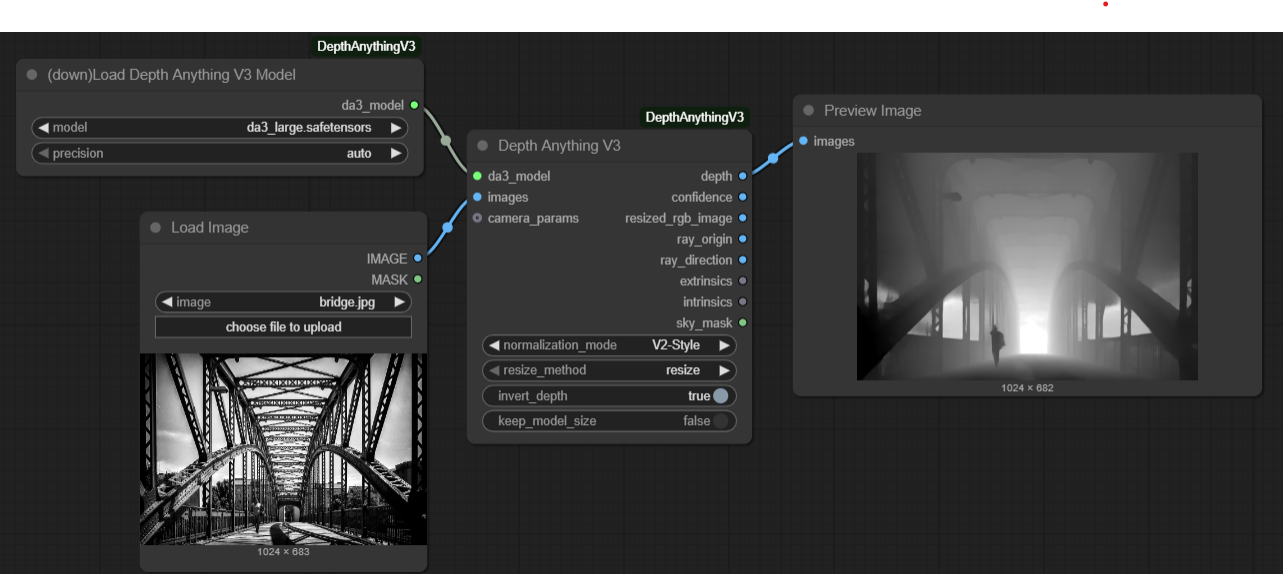
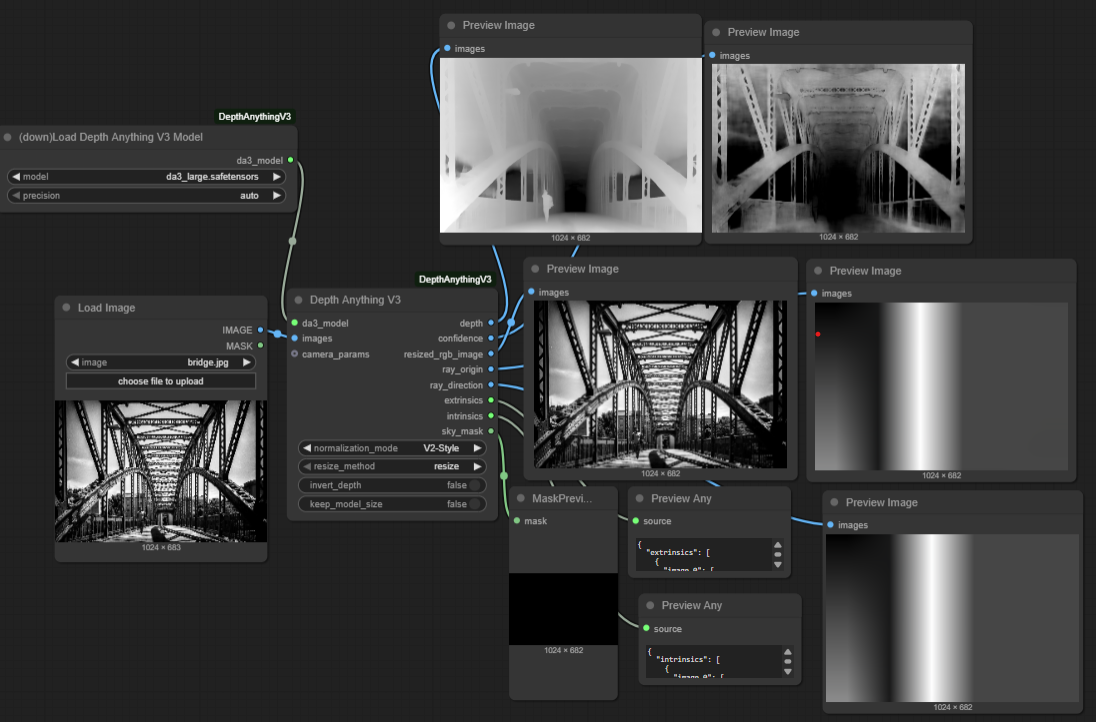
Custom nodes for Depth Anything V3 integration with ComfyUI.
Simple workflow:
Advanced workflow:
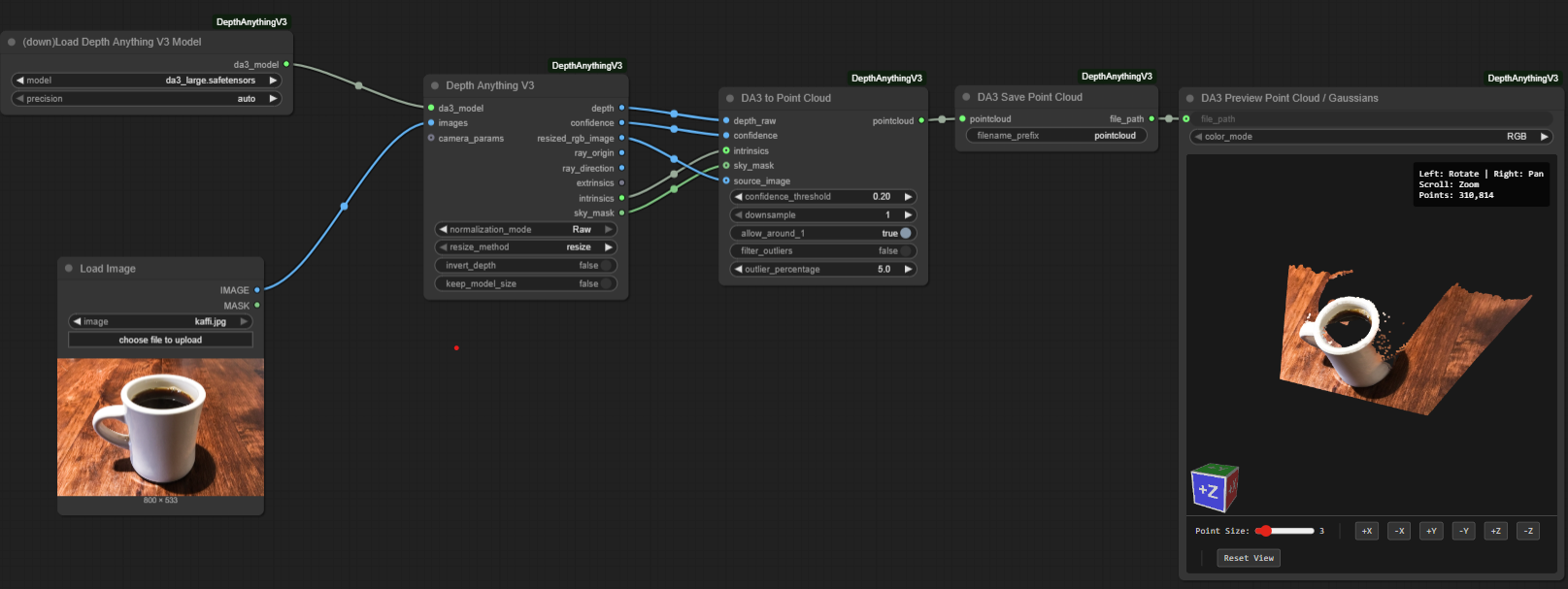
Single image to 3d:
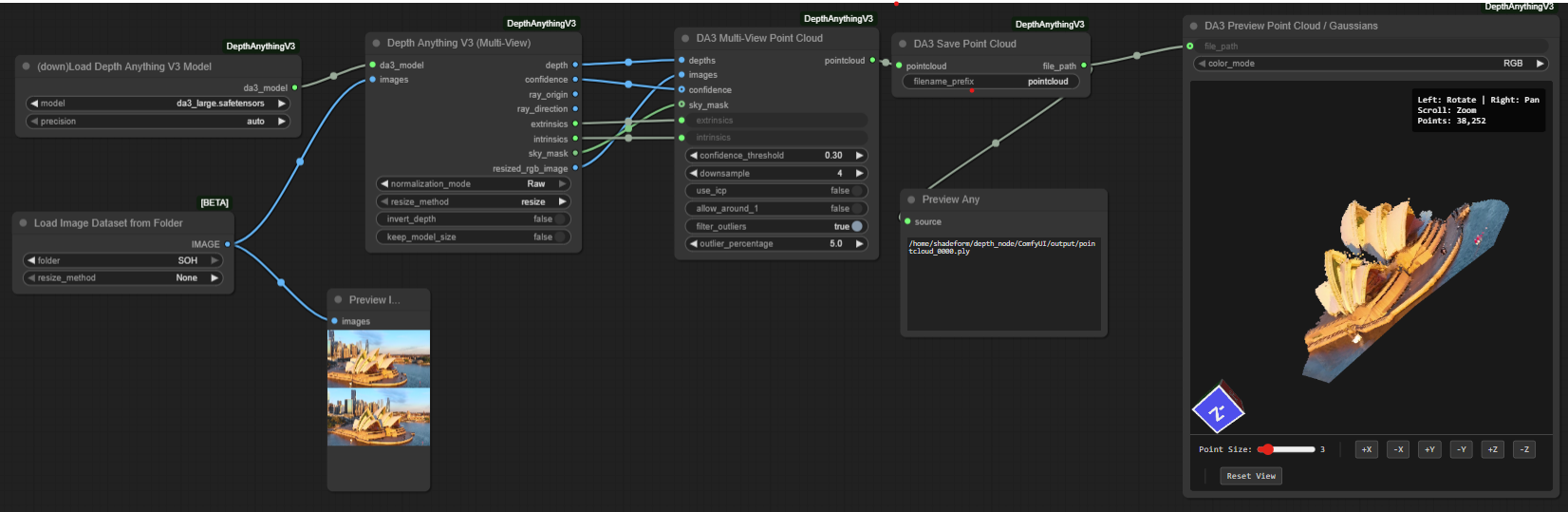
Multiple image to 3d:
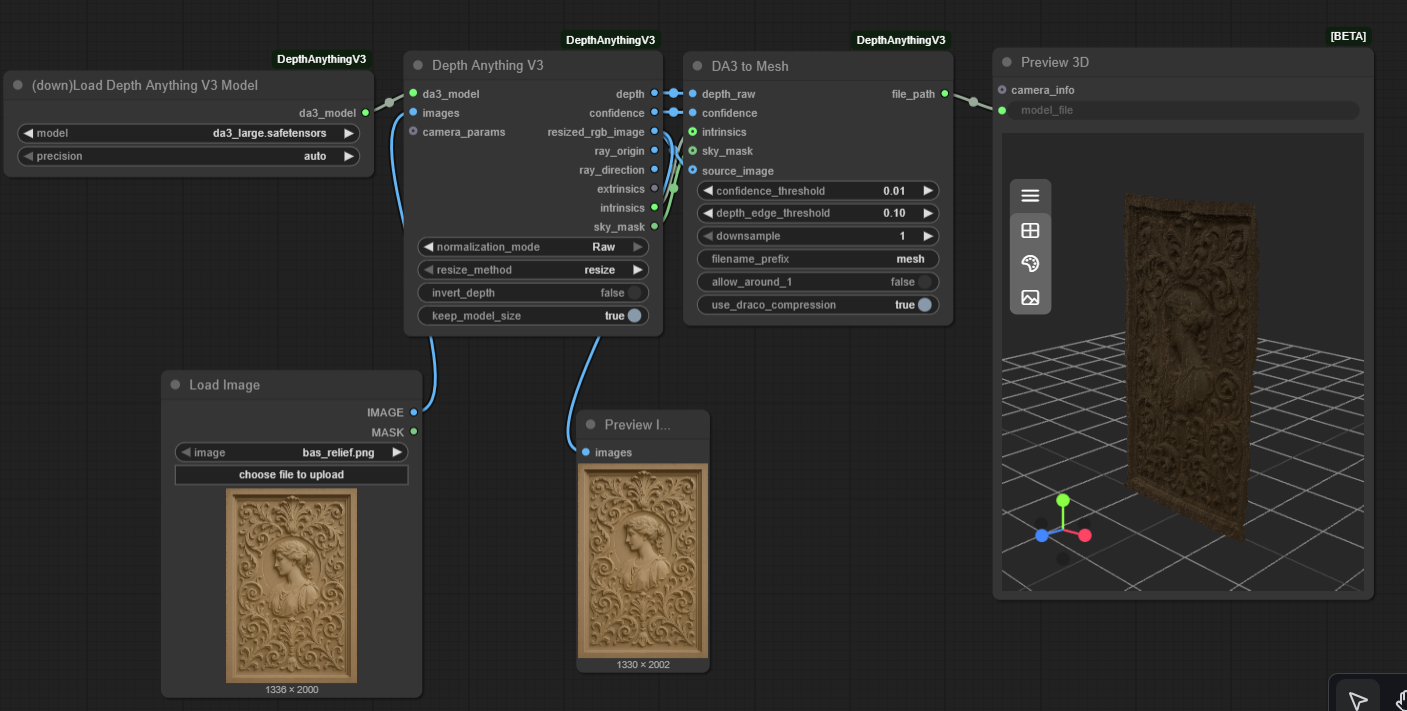
Single image to mesh:
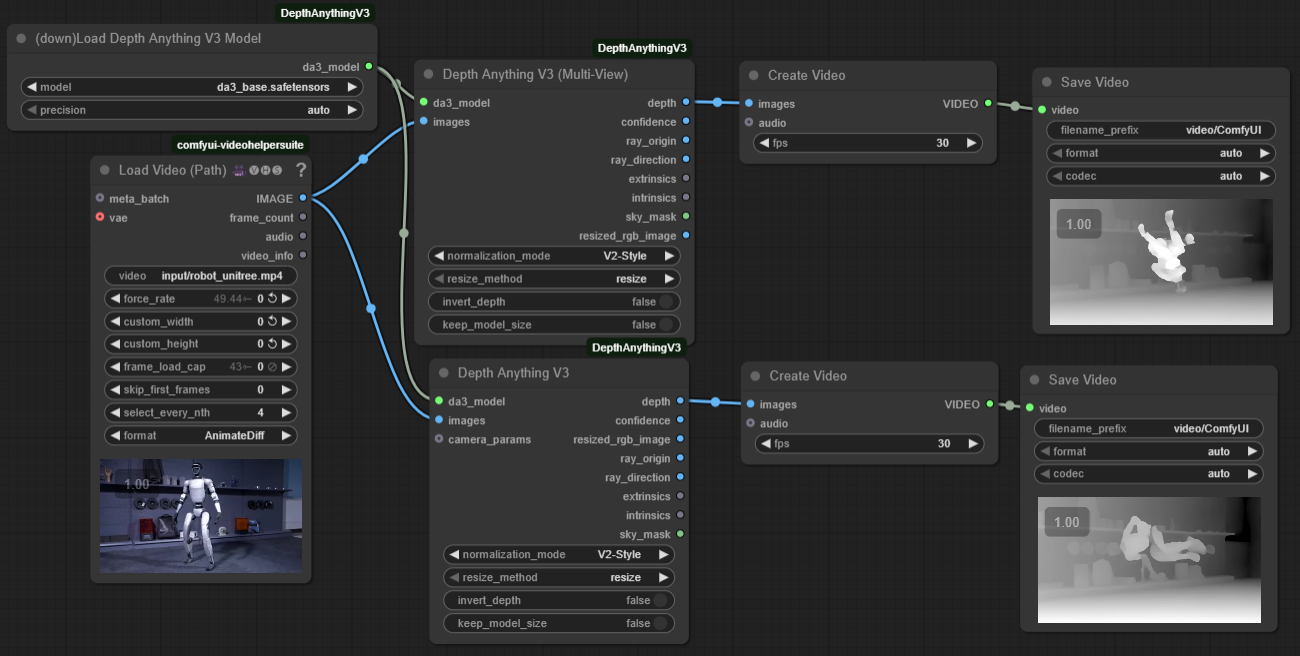
Use multi attention node for smooth video depth!
Demo Videos
You can use the multi-view node to use the cross attention feature of the main class of models. This is done to have a more consistent depth across frames of a video.
https://github.com/user-attachments/assets/058bd968-aae3-4759-887c-4c98132559f0
You can reconstruct 3D point clouds!
https://github.com/user-attachments/assets/8ef6e74b-c7c7-41e7-b1c6-de44733e6c61
Even from multiple views, with the option to either match them (with icp) or leave them to use the predicted camera positions. You also have a field on the point cloud to show you which view each point came from.
https://github.com/user-attachments/assets/6892313d-bcd8-44ec-9038-7d4d8915f59e
Description
Depth Anything V3 is the latest depth estimation model that predicts spatially consistent geometry from visual inputs.
Published: November 14, 2025 Paper: Depth Anything 3: Recovering the Visual Space from Any Views
Model Variants
| Model | Size | Features | |-------|------|----------| | DA3-Small | 80M | Fast, good quality | | DA3-Base | 220M | Balanced quality and speed | | DA3-Large | 350M | High quality, balanced | | DA3-Giant | 1.15B | Best quality, slower | | DA3Mono-Large | 350M | Optimized for monocular depth | | DA3Metric-Large | 350M | Metric depth estimation | | DA3Nested-Giant-Large | 1.4B | Combined model with metric scaling |
Model Capabilities
Different models support different features:
| Feature | Small/Base/Large/Giant | Mono-Large | Metric-Large | Nested | |---------|------------------------|------------|--------------|--------| | Sky Segmentation | ❌ | ✅ | ✅ | ✅ | | Camera Conditioning | ✅ | ❌ | ❌ | ✅ | | Multi-View Attention | ✅ | ⚠️ | ⚠️ | ✅ | | 3D Gaussians | ✅* | ❌ | ❌ | ✅* | | Ray Maps | ✅ | ❌ | ❌ | ✅ |
- ✅ = Fully supported
- ❌ = Not available (returns zeros/ignored)
- ⚠️ = Works but no cross-view attention benefit (images processed independently)
- ✅* = Requires fine-tuned model weights (placeholder in current release)
Choose your model based on needs:
- Need sky masks? → Use Mono/Metric/Nested (required for V2-Style normalization)
- Need camera conditioning? → Use Main series or Nested
- Processing video/multi-view? → Use Main series or Nested for consistency
- Single images only? → Any model works
Workflow Tips
For ControlNet Depth Workflows
- Use Mono or Metric models (they provide sky segmentation)
- Set normalization_mode to V2-Style (default)
- Connect the
depthoutput to your ControlNet node - Enjoy clean depth maps with proper sky handling!
For 3D Reconstruction (Point Clouds)
- Use any model (Mono/Metric recommended for sky filtering)
- Set normalization_mode to Raw
- Connect
depth→depth_raw,confidence→confidence,sky_mask→sky_maskto DA3 to Point Cloud - Sky pixels will be automatically excluded if sky_mask is connected
- Important: Point cloud nodes validate input and will raise an error if normalized depth is detected (prevents incorrect 3D output)
Community
Questions or feature requests? Open a Discussion on GitHub.
Join the Comfy3D Discord for help, updates, and chat about 3D workflows in ComfyUI.
Credits
- Original Paper: Haotong Lin, Sili Chen, Jun Hao Liew, et al. (ByteDance Seed Team)
- Original Implementation: PozzettiAndrea
- V2-Style Normalization: Ltamann (TBG) - See TBG Takeaways: Depth Anything V3 for workflow examples
- Based on: Official Depth Anything 3 repository
- Inspiration: kijai's ComfyUI-Depth-Anything-V2
License
Model architecture files based on Depth Anything 3 (Apache 2.0 / CC BY-NC 4.0 depending on model).
Note: Some models (Giant, Nested) use CC BY-NC 4.0 license (non-commercial use only).
Run ComfyUI workflows without the setup
No installs, no CUDA version roulette, no GPU sitting idle on your bill. Bring a workflow and run it in the browser.