
ComfyUI Extension: ComfyUI-interactive-crop
Run ComfyUI workflows without the setup
No installs, no CUDA version roulette, no GPU sitting idle on your bill. Bring a workflow and run it in the browser.
Interactive crop node for ComfyUI (inline preview with draggable selection).
README
Interactive Crop for ComfyUI
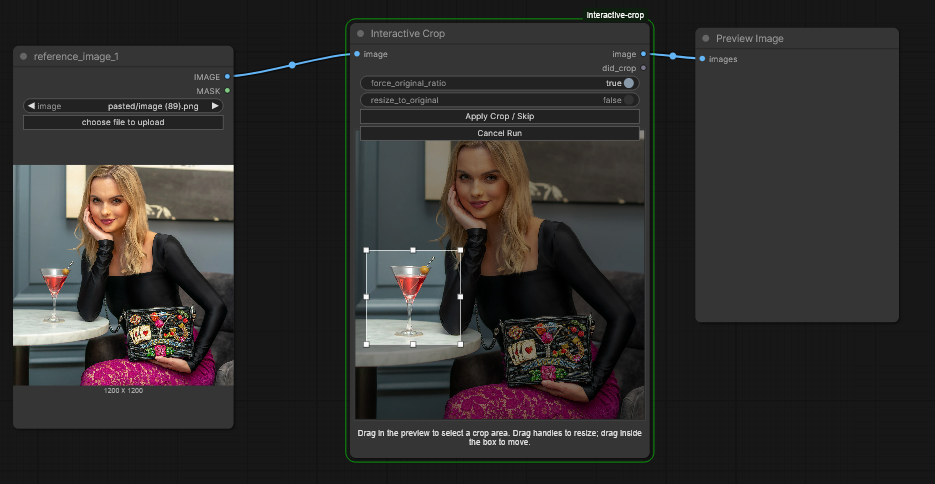
An interactive, run-pausing crop node for ComfyUI.
Unlike most crop nodes (which crop from numeric inputs), this node lets you draw the selection during the prompt run and then choose what to do:
- Apply Crop / Skip (crop if a selection exists, otherwise passthrough)
- Cancel Run (interrupt processing)
Because it waits for you, this node is intended for human-in-the-loop workflows.
✨ What is this?
Interactive Crop displays a live preview inside the node and lets you drag out a crop rectangle directly on the image. When the graph reaches the node, execution pauses until you make a decision.
Use it for:
- Quick visual framing / composition tweaks
- Cropping “just right” before downstream steps (upscales, detailers, inpaint/outpaint)
- Optional “crop or skip” branches using the
did_cropboolean output
🎨 Features
- Interactive selection: click-drag to draw a crop rectangle on the preview.
- Move selection: click inside the rectangle and drag to reposition.
- Run-time decision: crop, passthrough (skip), or cancel the run.
- Aspect lock (optional): constrain the rectangle to the original image aspect ratio.
- Resize-back (optional): resize the cropped output back to the original resolution (bilinear).
📦 Installation
Clone this repository into your ComfyUI custom_nodes folder:
cd <COMFYUI_ROOT>/custom_nodes
git clone https://github.com/Ugleh/ComfyUI-interactive-crop.git
Your folder should look like:
ComfyUI/
└── custom_nodes/
		└── ComfyUI-interactive-crop/
				├── __init__.py
				├── interactive_crop.py
				├── js/
				│   └── interactive_crop.js
				└── README.md
Restart ComfyUI to load the new node.
There are no extra Python dependencies.
🧪 Basic usage
- Add Interactive Crop (category:
image). - Connect an image source to the
imageinput. - Queue / run the workflow.
- When execution reaches the node, it will show a preview and wait.
- Click the node (must be selected), then:
- Draw a crop: click-drag on the preview.
- Move the crop: drag inside the existing rectangle.
- Click Apply Crop / Skip:
- If a valid selection exists: outputs the cropped image.
- If no/too-small selection exists: outputs the original image (skip).
- Optional: click Cancel Run to interrupt the prompt.
Node I/O
- Inputs
image(IMAGE)force_original_ratio(BOOLEAN): locks selection to the input image aspect ratio (live toggle while active)resize_to_original(BOOLEAN): resizes the cropped result back to the original width/height
- Outputs
image(IMAGE)did_crop(BOOLEAN):trueonly when a valid crop was applied
⚠️ Known limitations / behavior notes
- Not for unattended runs: the graph pauses until you respond.
- Timeout: after ~6 hours with no input the node errors with
InteractiveCrop: timed out waiting for user input. - Batch input: the preview/selection is based on the first image in the batch (the node converts
image[0]for the preview). - Node must be selected to interact with the preview (mouse handling is intentionally gated).
- Temp preview file: the node writes a PNG into ComfyUI’s temp directory for display.
💬 Notes
This node is intentionally interactive. If your workflow is meant to run headlessly (e.g. overnight queues), you’ll likely want a standard coordinate-based crop node instead.
License
MIT — see LICENSE.
Run ComfyUI workflows without the setup
No installs, no CUDA version roulette, no GPU sitting idle on your bill. Bring a workflow and run it in the browser.