
ComfyUI Extension: comfyui-axces2000
Run ComfyUI workflows without the setup
No installs, no CUDA version roulette, no GPU sitting idle on your bill. Bring a workflow and run it in the browser.
Custom ComfyUI nodes by axces2000 — Audio Loader, Resolution Master, and more
Looking for a different extension?
Custom Nodes (5)
README
comfyui-axces2000
Custom ComfyUI nodes by axces2000 — practical utility nodes for audio handling, image dimensions, text manipulation, and string composition.
Nodes
🎵 Audio Loader
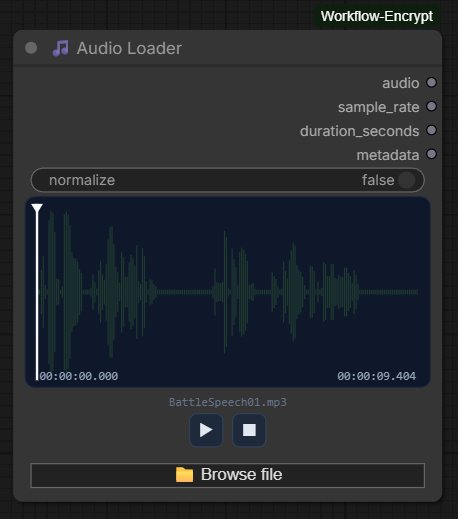
Load audio files into your ComfyUI workflow with a full-featured waveform interface.
Features
- Drag & drop audio files directly onto the node canvas
- Real-time waveform visualisation with played/unplayed colour coding
- Click or drag anywhere on the waveform to seek
- Play / Pause / Stop transport controls
- Current position and total duration displayed as
HH:MM:SS.mmm - Optional normalisation toggle
- Supports MP3, WAV, FLAC, OGG, AAC, M4A, OPUS
- Compatible with ComfyUI's native audio pipeline — output connects directly to
SaveAudio,PreviewAudio, and other audio nodes
Inputs
| Name | Type | Description |
|------|------|-------------|
| normalize | BOOLEAN | Normalise waveform amplitude to peak 1.0 (default: false) |
Outputs
| Name | Type | Description |
|------|------|-------------|
| audio | AUDIO | Waveform tensor + sample rate, compatible with native ComfyUI audio nodes |
| sample_rate | INT | Sample rate in Hz |
| duration_seconds | FLOAT | Duration in seconds |
| metadata | STRING | File info: name, sample rate, channels, samples, size |
🎧 Audio Player
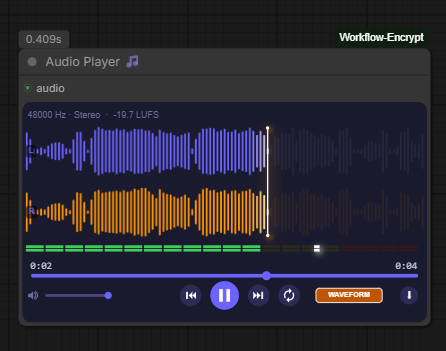
A rich in-node audio monitor for listening to and analysing audio output from any upstream node. Receives a ComfyUI AUDIO input and displays four switchable visualisation modes, full transport controls, a stereo level meter, and a download menu. Created by qualar.
Visualisation modes — cycle through them with the button in the bottom-right corner:
| Mode | Screenshot |
|------|-----------|
| Waveform — stereo RMS bar display, left channel in purple, right in orange, playhead scrubbing | |
| Spectrum — real-time FFT frequency plot with labelled Hz axis | 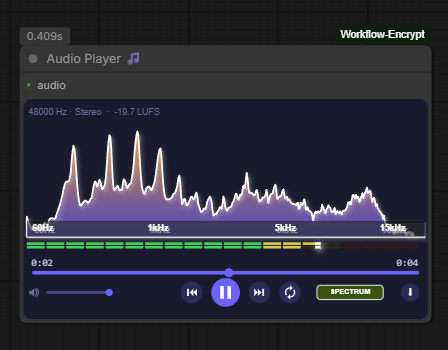 |
| Analyzer — stereo goniometer (phase/width scope) and stereo correlation meter |
|
| Analyzer — stereo goniometer (phase/width scope) and stereo correlation meter | 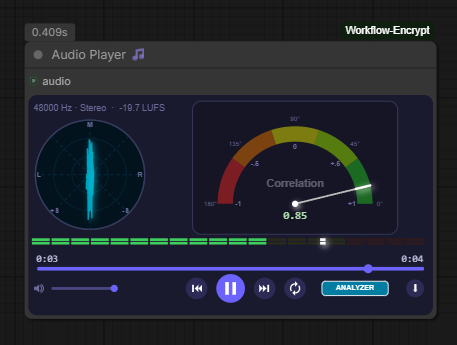 |
| Spectrogram — psychoacoustic heatmap scrolling in real time |
|
| Spectrogram — psychoacoustic heatmap scrolling in real time | 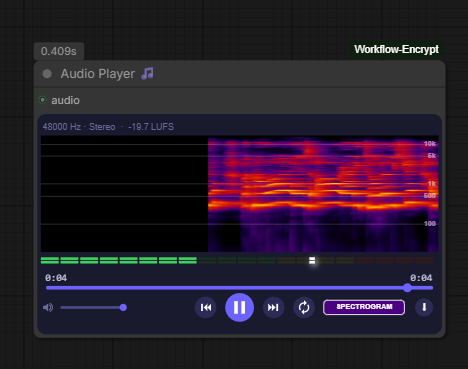 |
|
Transport controls
- Volume slider with mute button
- Skip to start / skip to end
- Play / Pause
- Loop toggle
Download menu — click the ⋮ button to export the audio:
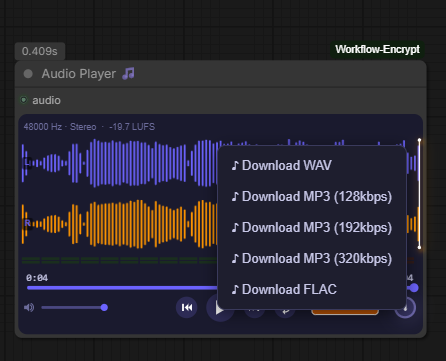
- Download WAV (lossless, original quality)
- Download MP3 at 128 / 192 / 320 kbps (encoded in-browser via lamejs — no server round-trip)
- Download FLAC (lossless compressed, encoded server-side via soundfile)
Stats bar — always visible above the waveform: sample rate, mono/stereo, and integrated LUFS loudness.
Inputs
| Name | Type | Description |
|------|------|-------------|
| audio | AUDIO | Audio to monitor — connects from any node that outputs AUDIO |
Outputs
None — this is a terminal monitoring node.
📐 Resolution Master
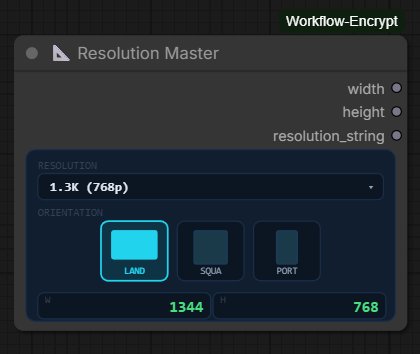
Pick a standard resolution and orientation and get clean width/height integers out — no more mental arithmetic or hardcoded values.
Features
- Visual orientation selector with landscape, square, and portrait icons
- Covers SD through 8K with accurate pixel dimensions
- Live preview of output width and height inside the node
- Resolution dropdown with all standard presets
Resolution table
| | SD (480p) | 1K (720p) | 1.3K (768p) | 2K (1080p) | 2.5K (1440p) | 4K (2160p) | 8K (4320p) | |-------------|-----------|------------|-------------|------------|--------------|------------|------------| | Landscape | 720×480 | 1280×720 | 1344×768 | 1920×1080 | 2560×1440 | 3840×2160 | 7680×4320 | | Square | 512×512 | 1024×1024 | 1024×1024 | 1536×1536 | 1920×1920 | 2048×2048 | 5760×5760 | | Portrait | 480×720 | 720×1280 | 768×1344 | 1080×1920 | 1440×2560 | 2160×3840 | 4320×7680 |
Outputs
| Name | Type | Description |
|------|------|-------------|
| width | INT | Output width in pixels |
| height | INT | Output height in pixels |
| resolution_string | STRING | e.g. 1344x768 |
✂️ String Extractor
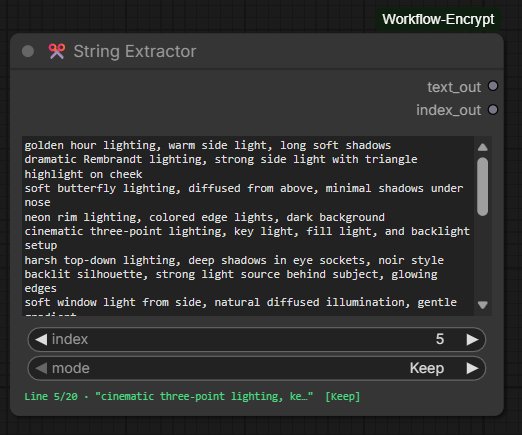
Extract individual lines from a multi-line text block by index, with automatic index advancement for batch workflows.
Features
- Multi-line text input (scrollable, supports paste)
- Integer index selector to choose which line to extract
- Live status bar showing current line preview and mode
- Selected line is highlighted in the textarea
textandindexcan optionally be wired from upstream nodes- Works correctly across scheduled batch runs — advancement happens before each prompt is queued
How the index works
| index value | behaviour |
|-------------|-----------|
| 0 | Full textarea passed to output unchanged |
| 1 to N (valid line) | That line is extracted; a trailing space is added if missing |
| Greater than line count | Full textarea passed unchanged; index resets to 0 |
Mode selector
| Mode | Behaviour |
|------|-----------|
| Keep | Index stays the same after execution |
| Increment | Index advances to the next line after each execution; wraps from last line back to 1 |
| Randomise | Index is set to a random valid line number after each execution |
The mode selector is disabled when the index is 0 or out of range.
Inputs
| Name | Type | Description |
|------|------|-------------|
| text | STRING | Multi-line text block (can be wired in or typed directly) |
| index | INT | Line to extract, 0 = passthrough (can be wired in or set directly) |
| mode | COMBO | Keep / Increment / Randomise |
Outputs
| Name | Type | Description |
|------|------|-------------|
| text_out | STRING | Extracted line (or full text for index 0 / out of range) |
| index_out | INT | Updated index after applying mode |
Typical workflow pattern
Set mode to Increment and queue multiple runs — each run extracts the next line automatically, starting from the displayed index value.
🔗 String Combine
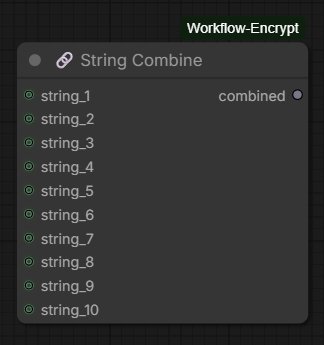
Concatenate up to 10 string inputs into a single output. All content is preserved exactly — no trimming, no separators added between inputs.
Features
- Up to 10 optional string inputs
- Unconnected inputs are silently ignored
- Strings are joined in order (1 through 10) with no modification
- Add separators or spaces in upstream nodes if needed
Inputs
| Name | Type | Description |
|------|------|-------------|
| string_1 … string_10 | STRING | Optional string inputs to concatenate |
Outputs
| Name | Type | Description |
|------|------|-------------|
| combined | STRING | All connected strings joined in order |
Installation
Via ComfyUI Manager (recommended)
Search for axces2000 in the Custom Nodes section and click Install.
Manual
cd ComfyUI/custom_nodes
git clone https://github.com/axces2000/comfyui-axces2000.git
pip install -r comfyui-axces2000/requirements.txt
Then restart ComfyUI.
Requirements
- ComfyUI (any recent version)
torchaudio— for Audio Loadersoundfile— for Audio Loader (fallback backend) and Audio Player (FLAC export)scipy— for Audio Player LUFS metering (optional, falls back to RMS if not present)
File structure
comfyui-axces2000/
├── __init__.py
├── requirements.txt
├── pyproject.toml
├── Makefile
├── docs/
│   ├── audio_loader.png
│   ├── audio_player_1waveform.png
│   ├── audio_player_2spectrum.png
│   ├── audio_player_3analyzer.png
│   ├── audio_player_4spectrogram.png
│   ├── audio_player_5save.png
│   ├── resolution_master.png
│   ├── string_extractor.png
│   └── string_combine.png
├── audio_loader/
│   ├── __init__.py
│   ├── audio_loader.py
│   └── js/
│       └── audio_loader.js
├── audio_player/
│   ├── __init__.py
│   ├── audio_player_node.py
│   └── js/
│       └── audio_player_widget.js
├── resolution_master/
│   ├── __init__.py
│   ├── resolution_master.py
│   └── js/
│       └── resolution_master.js
├── string_extractor/
│   ├── __init__.py
│   └── string_extractor.py
├── string_combine/
│   ├── __init__.py
│   └── string_combine.py
└── js/
    ├── audio_loader.js
    ├── audio_player_widget.js
    ├── resolution_master.js
    ├── string_extractor.js
    └── lib/
        └── lame.min.js
Credits
- Audio Player node created by qualar
License
MIT © axces2000
Run ComfyUI workflows without the setup
No installs, no CUDA version roulette, no GPU sitting idle on your bill. Bring a workflow and run it in the browser.