
ComfyUI Extension: Mecha Merge Node Pack
Run ComfyUI workflows without the setup
No installs, no CUDA version roulette, no GPU sitting idle on your bill. Bring a workflow and run it in the browser.
model merging nodes powered by sd-mecha, a memory efficient state dict recipe merger.
Looking for a different extension?
Custom Nodes (83)
- Add Cosine A
- Add Cosine B
- Add Difference
- Add Opposite Mask
- Add Opposite
- Add Strict Opposite Mask
- Already Loaded Model
- Any Model
- Balance Attention
- Blocks
- Bool
- Cast
- Clamped Add Opposite
- Clamp
- Crossover
- Dropout
- Exchange Ema
- Extract Kohya Lokr
- Extract Kohya Lora
- Extract Lycoris Lokr
- Extract Lycoris Lora
- Fallback
- Float
- FLUX-FLUX Components Params
- Geometric Median
- Geometric Sum
- Get Device
- Get Dtype
- Get Rank From Ratio
- Int
- Lora
- Converter
- Deserializer
- Cache Unit
- Merger
- Recipe List
- Regex Weights
- Serializer
- Subtract Recipe List
- Model
- Model Stock
- Multiply Quotient
- N Average
- Omit Component
- Omit Non Finite
- Perpendicular Component
- Pick Component
- Randperm
- Rebasin
- Rotate
- Scale
- SD1-LDM Components Params
- SD1-KOHYA Components Params
- SD1-KOHYA_KOHYA_LORA Components Params
- SD1-KOHYA_LYCORIS_LORA Components Params
- SD1-LDM Blocks
- SD1-SUPERMERGER_BLOCKS Components Params
- SD3-COMFYUI Components Params
- SDXL-SGM Components Params
- SDXL-DIFFUSERS_UNET_ONLY Components Params
- SDXL-KOHYA_BUT_DIFFUSERS Components Params
- SDXL-KOHYA_BUT_DIFFUSERS_KOHYA_LORA Components Params
- SDXL-KOHYA_BUT_DIFFUSERS_LYCORIS_LORA Components Params
- SDXL-KOHYA Components Params
- SDXL-KOHYA_KOHYA_LORA Components Params
- SDXL-KOHYA_LYCORIS_LORA Components Params
- SDXL-SGM Blocks
- SDXL-SUPERMERGER_BLOCKS Components Params
- SINGLETON-MECHA Components Params
- Slerp
- Stack
- String
- Subtract
- Tensor Sum
- Ties Sum Extended
- Ties Sum
- Ties Sum With Dropout
- Top K Tensor Sum
- Train Difference Mask
- Train Difference
- Truncate Kronecker
- Truncate Rank
- Weighted Sum
README
sd-mecha for Comfyui
comfy-mecha is a complete model merging nodepack for ComfyUI with a focus on low memory footprint.
- compose complex recipes without needing to save dozens of intermediate merges to disk
- merge loras to models
- support for block weights
- and a bunch of other stuff. For more info, see the nodes listing below. See also the readme of the underlying library sd-mecha
Workflows
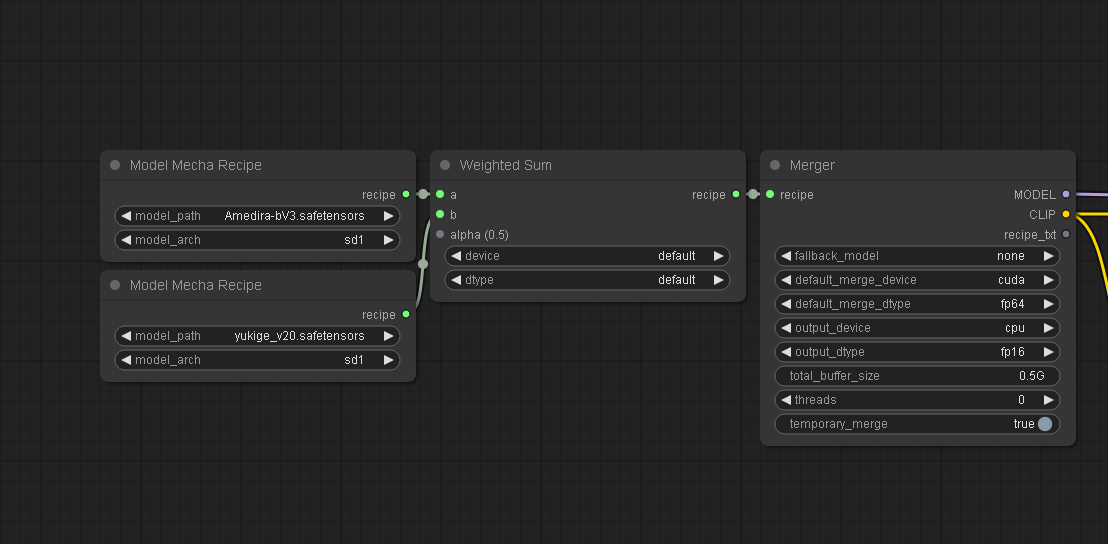
Basic weighted sum
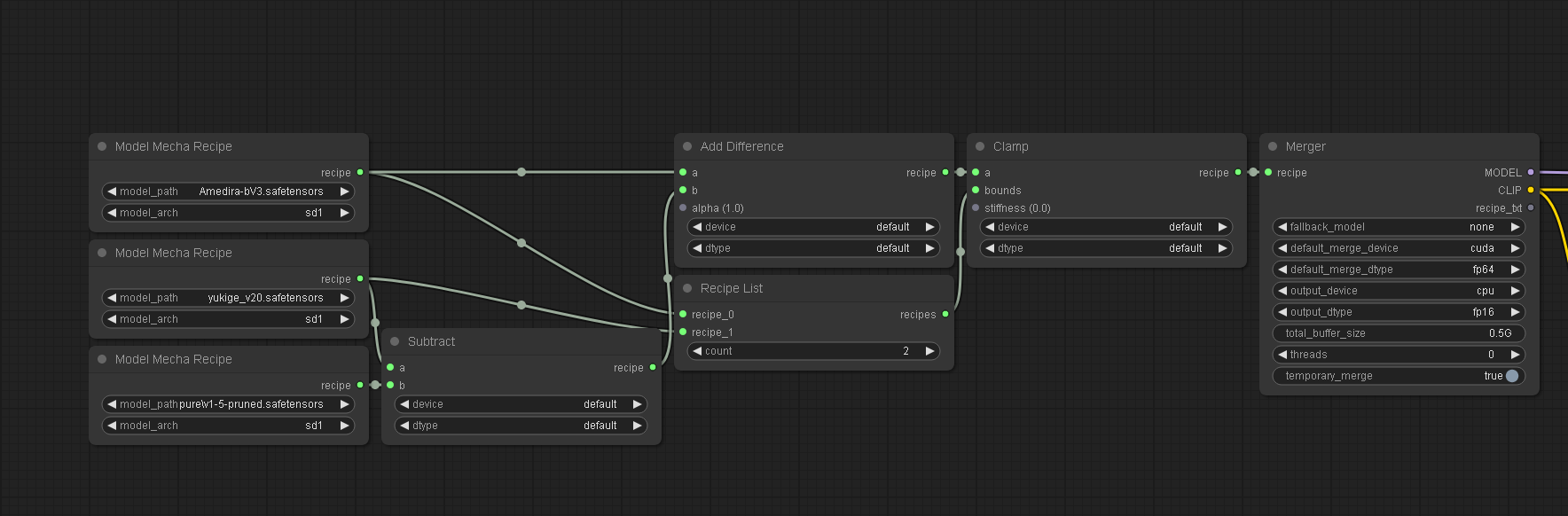
Clipped add difference
Ties merging
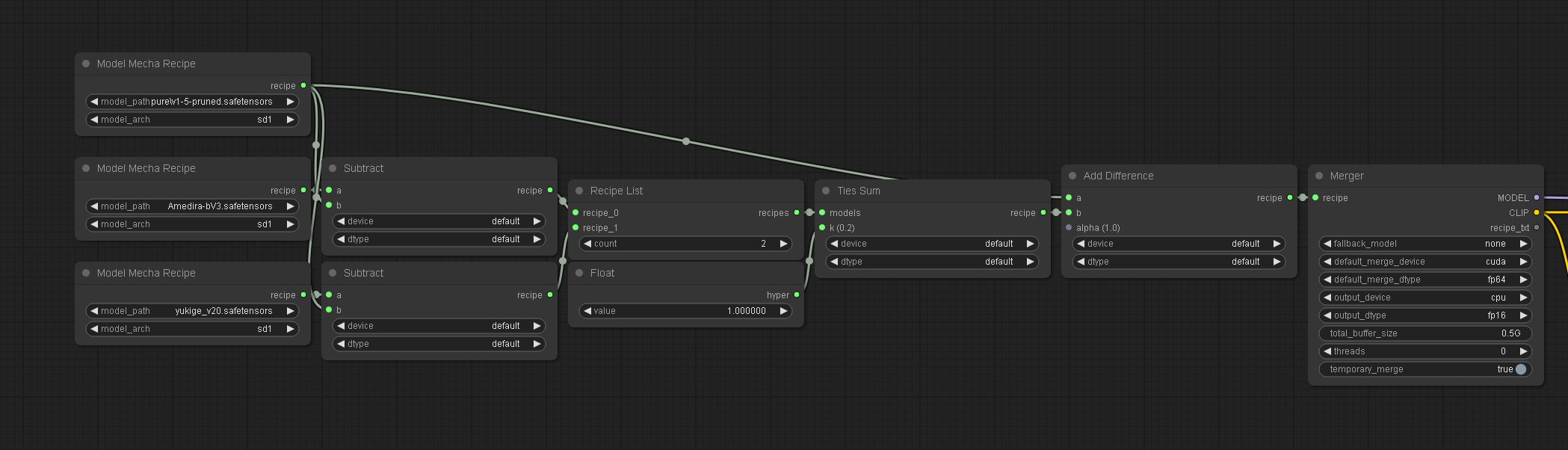
Recipe workflows can get much, much more complex than this.
If you are familiar with writing python code, you might be interested in using the sd-mecha library directly for experiments as an alternative to ComfyUI: https://github.com/ljleb/sd-mecha
Install
Install with ComfyUI-Manager
Assuming you have ComfyUI-Manager installed:
- Open a browser tab on ComfyUI
- Click on the "Manager" button
- Click on "Install Custom Nodes"
- Search for "mecha"
- Install "Mecha Merge Node Pack"
Install manually
You can also install the node pack manually:
cd custom_nodes
git clone https://github.com/ljleb/comfy-mecha.git
pip install -r comfy-mecha/requirements.txt
Nodes listing
Merge nodes
Nodes used for merging. They all have Recipe in their name except for Mecha Merger.
- nodes ending in
... Mecha Recipereturn a merge recipe Mecha Mergertakes aMECHA_RECIPEas input, and returns a unet and a text encoderSerializertakes aMECHA_RECIPEas input, and returns the recipe instructions using the mecha formatDeserializertakes a mecha recipe string as input, and returns the deserializedMECHA_RECIPE(this is the inverse operation ofSerializer)Mecha Model Recipeloads a model as a recipe to be used as input to other recipe nodes.Mecha Lora Recipeloads a lora model as a recipe to be used as input to other recipe nodes.Mecha Recipe Listtakes an arbitrary number of recipes and returns aMECHA_RECIPE_LIST. It is intended to be used as input to recipe nodes that accept an arbitrary number of recipes as input, i.e. theboundsinput ofClip Mecha RecipeMecha Subtract Recipe Listis the same asMecha Recipe Listbut takes an additionalbase_recipeinput that is subtracted from all other recipe inputs. This can simplify workflows that work with multiple deltas all obtained from the same base model.
Param Nodes
Nodes used to specify parameters to merge methods. For example, Weighted Sum Mecha Recipe has a param input alpha with a default value of 0.5.
Blocks Mecha Paramscan specify a different parameter for each block of the models to be merged (A.K.A. "merge block weighted")Float Mecha Paramsspecifies the same float for all keys of the models to be merged
Extensions
To add custom merge nodes, you can add python scripts that make use of the mecha extension API under the mecha_extensions directory.
The nodepack will run all scripts placed there and turn them into Comfy nodes.
Currently, the documentation for the mecha extension API is under construction. For now, to get more information, you can either take a look at the custom merge method example, open a discussion post to ask questions, or join the discord server.
Run ComfyUI workflows without the setup
No installs, no CUDA version roulette, no GPU sitting idle on your bill. Bring a workflow and run it in the browser.