
ComfyUI Extension: comfyui-sambanova
Run ComfyUI workflows without the setup
No installs, no CUDA version roulette, no GPU sitting idle on your bill. Bring a workflow and run it in the browser.
This node pack provides a Python node that uses the SambaNova API to send prompts to a chat AI model (e.g., DeepSeek-V3-0324) and retrieve responses, intended for integration into node-based workflows like ComfyUI.
README
comfyui-sambanova
概要
このリポジトリは、SambaNovaのAPIを利用してチャットAIモデル(例: DeepSeek-V3-0324)にプロンプトを送信し、応答を取得するPythonノードを提供します。ComfyUIなどのノードベースのワークフローに組み込むことを想定しています。
特徴
- SambaNova APIへの簡単なリクエスト送信
- システムプロンプトやモデル名の指定が可能
- エラー処理とレスポンス解析を実装
ファイル構成
sambanova_node.py: メインのノード実装__init__.py: パッケージエクスポート設定requirements.txt: 必要なPythonパッケージ(requests).gitignore: Git管理対象外ファイル設定
インストール方法
-
必要なパッケージのインストール
pip install -r requirements.txt -
リポジトリのクローンまたはファイル配置
使い方
直接実行例
sambanova_node.pyのget_sambanova_responseメソッドを利用して、APIリクエストを送信できます。
from sambanova_node import SambaNovaNode

node = SambaNovaNode()
api_key = "YOUR_SAMBANOVA_API_KEY"
prompt = "フランスの首都は?"
system_prompt = "あなたは親切な地理の専門家です。"
model = "DeepSeek-V3-0324"

response = node.get_sambanova_response(api_key, prompt, system_prompt, model)
print(response)
ノードとしての利用
NODE_CLASS_MAPPINGSやNODE_DISPLAY_NAME_MAPPINGSを使い、ComfyUI等のノードフレームワークに組み込めます。
ノードの使用例
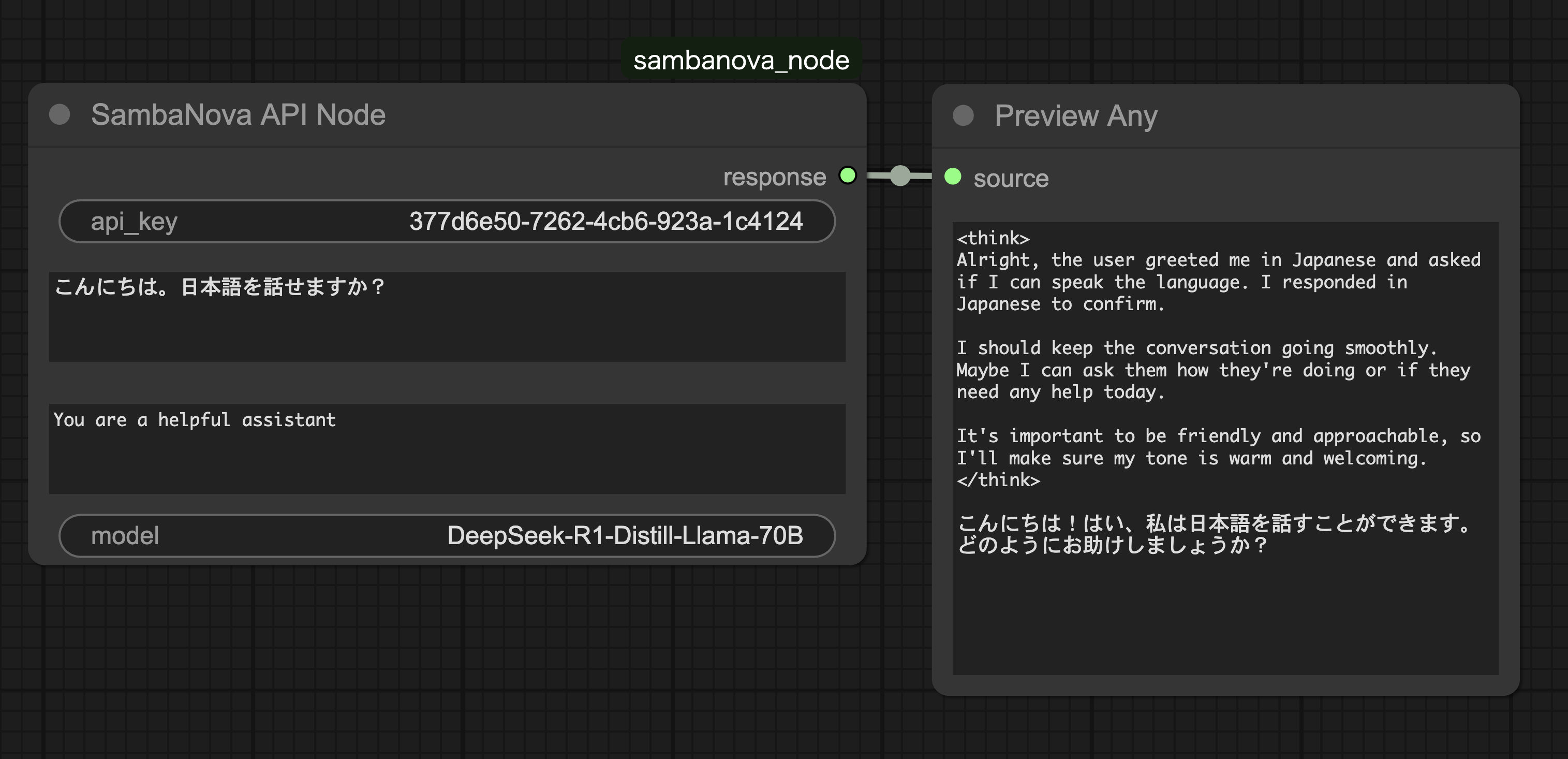
上記の画像のように、ComfyUIのワークフローにSambaNova APIノードを追加し、以下のパラメータを設定できます:
api_key: SambaNova APIキーprompt: 送信するプロンプトsystem_prompt: システムプロンプト(AIの役割設定)model: 使用するモデル名
注意事項
- APIキーはSambaNovaの公式サイトから取得してください。
.gitignoreによりキャッシュや一時ファイルは管理対象外です。
English
Overview
This repository provides a Python node to interact with the SambaNova API, allowing you to send prompts to chat AI models (e.g., DeepSeek-V3-0324) and receive responses. It is designed to be integrated into node-based workflows such as ComfyUI.
Features
- Simple request sending to SambaNova API
- Customizable system prompt and model name
- Error handling and response parsing
File Structure
sambanova_node.py: Main node implementation__init__.py: Package export settingsrequirements.txt: Required Python packages (requests).gitignore: Files and directories ignored by Git
Installation
-
Install required packages:
pip install -r requirements.txt -
Clone the repository or place the files as needed.
Usage
Direct Execution Example
You can use the get_sambanova_response method in sambanova_node.py to send API requests.
from sambanova_node import SambaNovaNode

node = SambaNovaNode()
api_key = "YOUR_SAMBANOVA_API_KEY"
prompt = "What is the capital of France?"
system_prompt = "You are a helpful geography expert."
model = "DeepSeek-V3-0324"

response = node.get_sambanova_response(api_key, prompt, system_prompt, model)
print(response)
As a Node
You can integrate this as a node in frameworks like ComfyUI using NODE_CLASS_MAPPINGS and NODE_DISPLAY_NAME_MAPPINGS.
Node Usage Example
As shown in the image above, you can add the SambaNova API node to your ComfyUI workflow and configure the following parameters:
api_key: Your SambaNova API keyprompt: The prompt to sendsystem_prompt: System prompt (AI role setting)model: Model name to use
Notes
- Obtain your API key from the official SambaNova website.
- Cache and temporary files are excluded from version control via
.gitignore.
Run ComfyUI workflows without the setup
No installs, no CUDA version roulette, no GPU sitting idle on your bill. Bring a workflow and run it in the browser.