
ComfyUI Extension: Quality of life Suit:V2
Run ComfyUI workflows without the setup
No installs, no CUDA version roulette, no GPU sitting idle on your bill. Bring a workflow and run it in the browser.
openAI suite, String suite, Latent Tools, Image Tools: These custom nodes provide expanded functionality for image and string processing, latent processing, as well as the ability to interface with models such as ChatGPT/DallE-2. NOTE: Currently, this extension does not support the new OpenAI API, leading to compatibility issues.
Looking for a different extension?
Custom Nodes (51)
- Chat completion _O
- Chat_Completion _O
- ChatGPT compact _O
- ChatGPT _O
- ChatGPT Simple _O
- Chat_Message_fromString _O
- Chat_Message _O
- CLIPStringEncode _O
- combine_chat_messages _O
- compine_chat_messages _O
- ConcatRandomNSP_O
- concat Strings _O
- Concat Text _O
- create image _O
- create_image _O
- debug Completeion _O
- debug messages_O
- Debug String _O
- Debug Text _O
- Debug Text route _O
- Equation1param _O
- Equation2params _O
- float _O
- floatToInt _O
- floatToText _O
- GetImage_(Width&Height) _O
- GetLatent_(Width&Height) _O
- ImageScaleFactor _O
- ImageScaleFactorSimple _O
- int _O
- intToFloat _O
- LatentUpscaleFactor _O
- LatentUpscaleFactorSimple _O
- LatentUpscaleMultiply
- load_openAI _O
- Note _O
- QOL Split String
- RandomNSP _O
- replace String advanced _O
- replace String _O
- Replace Text _O
- saveTextToFile _O
- seed _O
- selectLatentFromBatch _O
- string2Image _O
- String _O
- Text2Image _O
- Text _O
- trim String _O
- Trim Text _O
- variation_image _O
README
ComfyUI Quality of Life Suite — Omar92
Thank you to all the valuable contributors. Kindly submit any pull requests to the development branch instead of the main branch. Your efforts are greatly appreciated.
A feature-rich ComfyUI extension providing 50+ quality-of-life nodes including OpenAI (ChatGPT & DALL-E 2) integration, text processing, image/latent scaling, math utilities, and more.
Table of Contents
Features
- 🤖 OpenAI Integration — ChatGPT (GPT-3.5 / GPT-4) prompt generation and DALL-E 2 image creation
- 📝 String Suite — Concatenate, trim, replace, split, and save text; convert text to an image
- 🎲 NSP (Noodle Soup Prompts) — Random prompt term generation from categorised terminology
- 🖼️ Image Tools — Scale images using multiplication factors instead of fixed pixel dimensions
- 🔲 Latent Tools — Upscale latents by factor and select individual latents from a batch
- 🔢 Number / Math Tools — Evaluate equations, convert between types, read image/latent dimensions
- 🛠️ Utility Nodes — Thin wrappers for text, integer, float, and seed inputs
- 🐛 Debug Nodes — Write intermediate values to the console, optionally passing them through
All nodes appear in the ComfyUI menu under the O/ top-level category.
Installation
Option A — Manual (zip)
- Download the repository as a zip file.
- Extract the folder into
<ComfyUI root>/custom_nodes/. - The resulting path should look like
custom_nodes/ComfyUI-QualityOfLifeSuit_Omar92/. - Restart ComfyUI (a browser reload is not sufficient).
Option B — Git clone
cd <ComfyUI root>/custom_nodes
git clone https://github.com/omar92/ComfyUI-QualityOfLifeSuit_Omar92.git
Then restart ComfyUI.
After installation you will find all nodes grouped under O/… in the node search / right-click menu.
Tip: See
how directory should look like.pngat the repository root for the expected folder structure.
Configuration
On the first run ComfyUI will automatically create a config.json file inside the extension folder:
{
  "autoUpdate": true,
  "branch": "main",
  "openAI_API_Key": "sk-#################################"
}
| Key | Default | Description |
|-----|---------|-------------|
| autoUpdate | true | Pull the latest changes from GitHub every time ComfyUI starts. Set to false to disable. |
| branch | "main" | Git branch to pull updates from. Use "dev" for the latest development changes. |
| openAI_API_Key | placeholder | Your OpenAI API key. Required for all ChatGPT and DALL-E nodes. Get yours at platform.openai.com/api-keys. |
Security note: The API key is stored in
config.jsonand is never embedded in generated images.
Node Reference
OpenAI Suite
Located under O/OpenAI and O/OpenAI/Advanced/….
Simple ChatGPT
ChatGPT Simple _O — O/OpenAI
The quickest way to use ChatGPT. Provide a short prompt and the node returns a fully formed Stable Diffusion prompt or a detailed image description.
| Input | Type | Description |
|-------|------|-------------|
| prompt | STRING | Your input text / subject |
| model | dropdown | OpenAI model to use (e.g. gpt-3.5-turbo) |
| behaviour | dropdown | tags — returns SD-style comma-separated tags; description — returns a natural language description |
| seed | INT | Controls randomness; same seed ≈ same output |
| Output | Type | |--------|------| | result | STRING |
ChatGPT compact _O — O/OpenAI
Mid-complexity ChatGPT node with a customisable system initialisation message.
| Input | Type | Description |
|-------|------|-------------|
| prompt | STRING | User message |
| initMsg | STRING | System message that shapes the AI's behaviour |
| model | dropdown | OpenAI model |
| seed | INT | Randomness seed |
Advanced OpenAI
load_openAI _O — O/OpenAI/Advanced
Loads the OpenAI client. Required by all Advanced nodes.
| Input | Type | Description |
|-------|------|-------------|
| base_url | STRING | API endpoint (defaults to OpenAI; change for compatible providers) |
| api_key | STRING | Your OpenAI API key |
| Output | Type | |--------|------| | client | CLIENT |
Chat_Message _O — O/OpenAI/Advanced/ChatGPT
Creates a single chat message.
| Input | Type | Description |
|-------|------|-------------|
| role | dropdown | user, assistant, or system |
| content | STRING | Message text |
| Output | Type | |--------|------| | messages | OPENAI_CHAT_MESSAGES |
combine_chat_messages _O — O/OpenAI/Advanced/ChatGPT
Merges two message lists into one, allowing you to chain multi-turn conversations.
Chat completion _O — O/OpenAI/Advanced/ChatGPT
Sends a message list to the API and returns the model's reply.
| Input | Type | Description |
|-------|------|-------------|
| client | CLIENT | From load_openAI _O |
| model | dropdown | OpenAI model |
| messages | OPENAI_CHAT_MESSAGES | Built with Chat_Message / combine_chat_messages |
| seed | INT | Randomness seed |
| Output | Type | |--------|------| | text | STRING | | completion | OPENAI_CHAT_COMPLETION |
DALL-E 2
create image _O — O/OpenAI/Advanced/Image
Generates images from a text prompt using DALL-E 2.
| Input | Type | Description |
|-------|------|-------------|
| client | CLIENT | From load_openAI _O |
| prompt | STRING | Image description |
| number | INT (1–10) | How many images to generate |
| size | dropdown | 256x256, 512x512, or 1024x1024 |
| Output | Type | |--------|------| | IMAGE | IMAGE | | MASK | MASK |
variation_image _O — O/OpenAI/Advanced/Image
Creates variations of an existing image using DALL-E 2.
| Input | Type | Description |
|-------|------|-------------|
| client | CLIENT | From load_openAI _O |
| image | IMAGE | Source image |
| number | INT (1–10) | Number of variations |
| size | dropdown | Output resolution |
String Suite
Located under O/text and O/text/operations.
Text _O — O/utils
Simple pass-through text input node.
Concat Text _O — O/text/operations
Concatenates up to 13 strings with a configurable separator (default: , ).
Trim Text _O — O/text/operations
Removes leading and trailing whitespace from a string.
Replace Text _O — O/text/operations
Replaces all occurrences of a substring with another string.
| Input | Description |
|-------|-------------|
| text | Input string |
| old | Substring to find |
| new | Replacement string |
QOL Split String — O/text/operations
Splits a string by a delimiter and exposes up to 13 individual outputs.
| Input | Description |
|-------|-------------|
| text | Input string |
| delimiter | Character(s) to split on |
saveTextToFile _O — O/text
Saves text to a file inside the ComfyUI /output folder. A timestamp is appended to the filename to avoid overwriting.
| Input | Description |
|-------|-------------|
| text | Content to save |
| filename | Base filename |
| append | If true, appends to an existing file instead of creating a new one |
Text-to-Image
Text2Image _O — O/text
Renders text onto a canvas and outputs it as an IMAGE. Useful with ControlNet to place styled text into a generated image.
| Input | Type | Description |
|-------|------|-------------|
| text | STRING | Text to render |
| font | dropdown | Font selected from the fonts/ directory |
| size | INT (0–255) | Font size in points |
| font_R/G/B/A | INT (0–255) | Font colour (RGBA) |
| background_R/G/B/A | INT (0–255) | Background colour (RGBA) |
| width / height | INT | Canvas size in pixels |
| expand | bool | Auto-expand canvas to fit the text |
| x / y | INT | Text position on canvas |
Custom fonts: Add any
.ttf,.otf, or.ttcfile to thefonts/folder and restart ComfyUI — it will appear in the font dropdown automatically.
NSP (Noodle Soup Prompts)
Located under O/text/NSP.
NSP is a community-maintained collection of categorised prompt terms. The extension downloads the list automatically on first use.
RandomNSP _O
Returns a random term from the chosen category.
| Input | Description |
|-------|-------------|
| terminology | Category (e.g. artist, style, subject, …) |
| seed | Randomness seed |
ConcatRandomNSP_O
Appends a random NSP term to an existing string — handy as an in-route modifier.
| Input | Description |
|-------|-------------|
| text | Existing string |
| terminology | NSP category |
| separator | String inserted between text and the NSP term (default , ) |
| seed | Randomness seed |
Latent Tools
Located under O/latent.
LatentUpscaleFactor _O
Upscales a latent tensor using separate width and height multiplication factors.
| Input | Description |
|-------|-------------|
| samples | Input LATENT |
| upscale_method | Interpolation method |
| WidthFactor | Multiplier for width (e.g. 2 doubles the width) |
| HeightFactor | Multiplier for height |
| crop | Whether to crop after upscaling |
Example: 512×512 latent with WidthFactor=2, HeightFactor=2 → 1024×1024. Use factors < 1 to downscale (e.g. 0.5 → 256×256).
LatentUpscaleFactorSimple _O
Same as above but uses a single factor applied to both dimensions.
selectLatentFromBatch _O
Picks a single latent from a batch by index. Useful when you generate multiple images and want to apply further processing to just one of them.
| Input | Description |
|-------|-------------|
| samples | Batch LATENT |
| index | Zero-based index of the latent to select |
Image Tools
Located under O/image.
ImageScaleFactor _O
Scales an IMAGE tensor using separate width and height multiplication factors.
| Input | Description |
|-------|-------------|
| image | Input IMAGE |
| upscale_method | Interpolation method |
| WidthFactor | Width multiplier |
| HeightFactor | Height multiplier |
| MulOf46 | When enabled, rounds output dimensions to the nearest multiple of 8 — required by most Stable Diffusion models (enabled by default) |
| crop | Whether to crop after scaling |
ImageScaleFactorSimple _O
Same as above but with a single uniform scale factor.
GetImage_(Width&Height) _O — O/numbers
Reads the pixel dimensions of an IMAGE and outputs them as separate INT values.
Number / Math Tools
Located under O/numbers.
Equation1param _O
Evaluates a Python math expression with one variable x.
| Input | Description |
|-------|-------------|
| x | FLOAT value for x |
| equation | Expression string, e.g. x * 2 + 1 |
Outputs: FLOAT, INT
Equation2params _O
Evaluates two expressions with variables x and y.
| Input | Description |
|-------|-------------|
| x | First FLOAT |
| y | Second FLOAT |
| equation | First expression, e.g. x + y |
| equation_2 | Second expression, e.g. x * y |
Outputs: FLOAT, INT, FLOAT, INT (one pair per equation)
floatToInt _O — Convert FLOAT → INT
intToFloat _O — Convert INT → FLOAT
floatToText _O — Convert FLOAT → STRING
seed2String _O — Convert a SEED value → STRING
GetLatent_(Width&Height) _O — Read width and height from a LATENT tensor as INTs
Utility Nodes
Located under O/utils.
| Node | Output | Description |
|------|--------|-------------|
| Text _O | STRING | Text input widget |
| seed _O | INT | Seed input widget |
| int _O | INT | Integer input widget |
| float _O | FLOAT | Float input widget |
| Note _O | (none) | Read-only sticky note for annotating workflows |
Debug Nodes
Located under O/debug/….
| Node | Description |
|------|-------------|
| Debug Text _O | Prints [prefix] text to the console. No output — terminal only. |
| Debug Text route _O | Same as above but also passes the string through, so it can be inserted mid-route. |
| Debug OpenAI Chat Messages _O | Prints the full message list to the console. |
| Debug OpenAI Chat Completion _O | Prints the full completion object to the console. |
Example Workflows
The Workflows/ directory contains ready-to-use workflow files and screenshots:
| File | Description |
|------|-------------|
| All nodes Workdflow .json | Master workflow demonstrating every node |
| ChatGPT.png | Simple ChatGPT-to-prompt workflow |
| ChatGPT_Advanced.png | Advanced multi-message ChatGPT workflow |
| string_o.png | String manipulation node examples |
To load a workflow from an image, drag the PNG file onto the ComfyUI canvas.
Simple ChatGPT Workflow
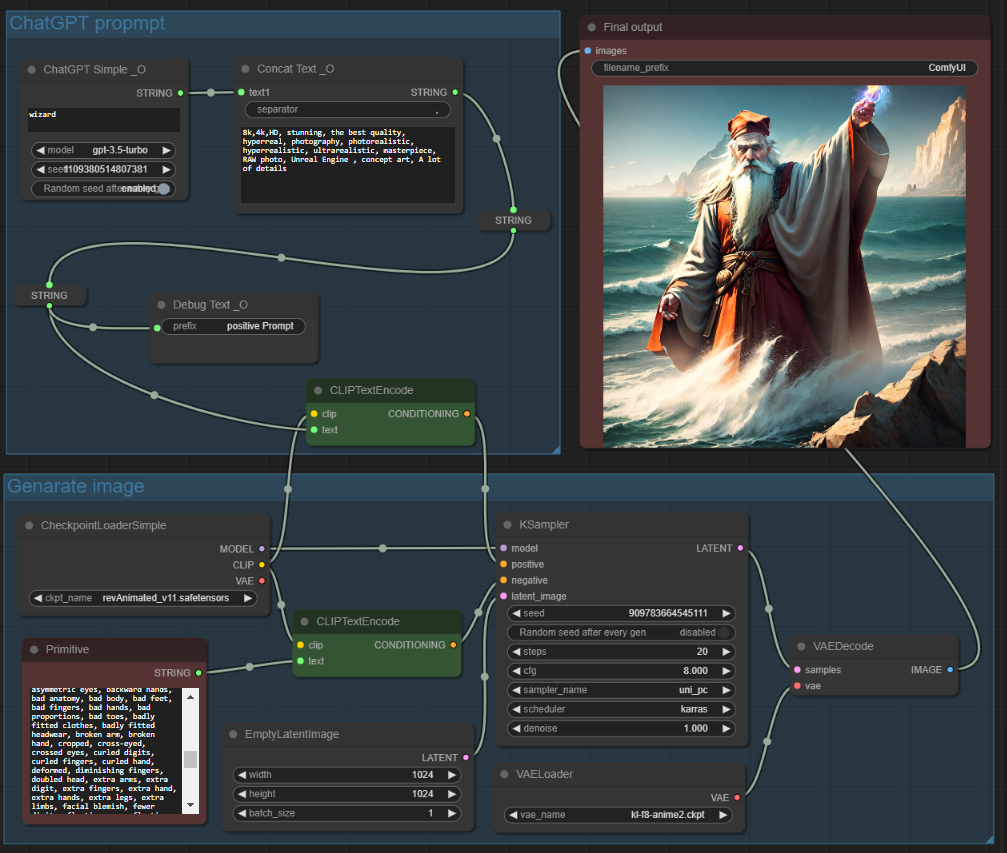
- Add a
ChatGPT Simple _Onode. - Type your subject in the
promptfield (e.g. "a futuristic cityscape at night"). - Choose
tagsbehaviour to get Stable Diffusion prompt tags, ordescriptionfor a natural language description. - Connect the output STRING to your KSampler positive conditioning.
Advanced ChatGPT Workflow
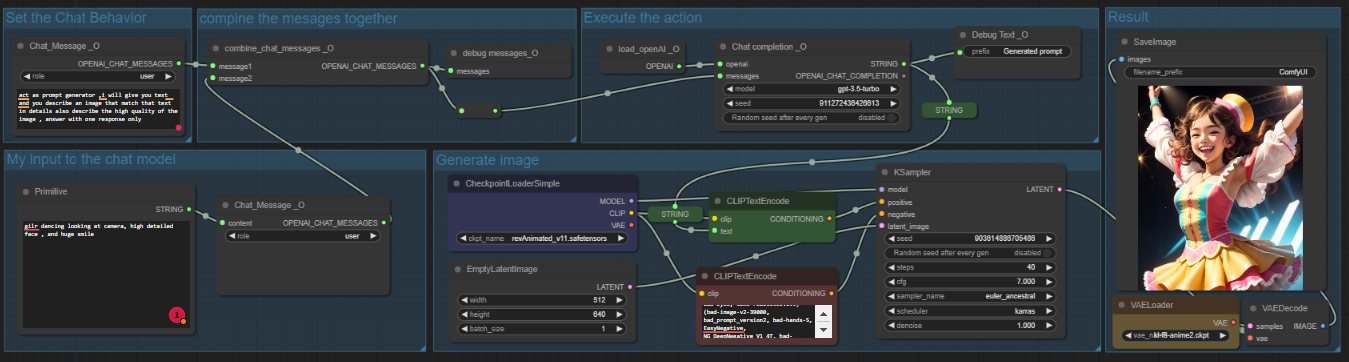
- Add
load_openAI _Oand enter your API key (or rely onconfig.json). - Create a
Chat_Message _Owithrole = systemto set the AI's behaviour. - Create another
Chat_Message _Owithrole = userfor your actual prompt. - Use
combine_chat_messages _Oto merge both messages. - Feed the result into
Chat completion _Oto get the AI's reply as a STRING.
Fonts
The fonts/ folder ships with several built-in fonts:
| File | Font |
|------|------|
| Alkatra.ttf | Alkatra |
| CALIBRI.TTF | Calibri |
| COMIC.TTF | Comic Sans |
| COMICI.TTF | Comic Sans Italic |
| COMICZ.TTF | Comic Sans Bold |
To add a custom font, copy any .ttf, .otf, or .ttc file into the fonts/ directory and restart ComfyUI. The font will appear automatically in the dropdown of the Text2Image _O node.
Auto-Update
The extension automatically checks for updates every time ComfyUI starts (when autoUpdate is true in config.json). It uses pygit2 to pull the latest commits from the configured branch.
To disable auto-update, open config.json and set:
"autoUpdate": false
To switch to the development branch for the latest (potentially unstable) features:
"branch": "dev"
Thanks for reading, and I hope my tools will help you!
Contact
Run ComfyUI workflows without the setup
No installs, no CUDA version roulette, no GPU sitting idle on your bill. Bring a workflow and run it in the browser.