
ComfyUI Extension: ComfyUI-OpenClaw
Run ComfyUI workflows without the setup
No installs, no CUDA version roulette, no GPU sitting idle on your bill. Bring a workflow and run it in the browser.
Your own personal AIGC Factory. Any picture. Any reel. The Comfy way. ©️
Looking for a different extension?
Custom Nodes (0)
README
ComfyUI-OpenClaw
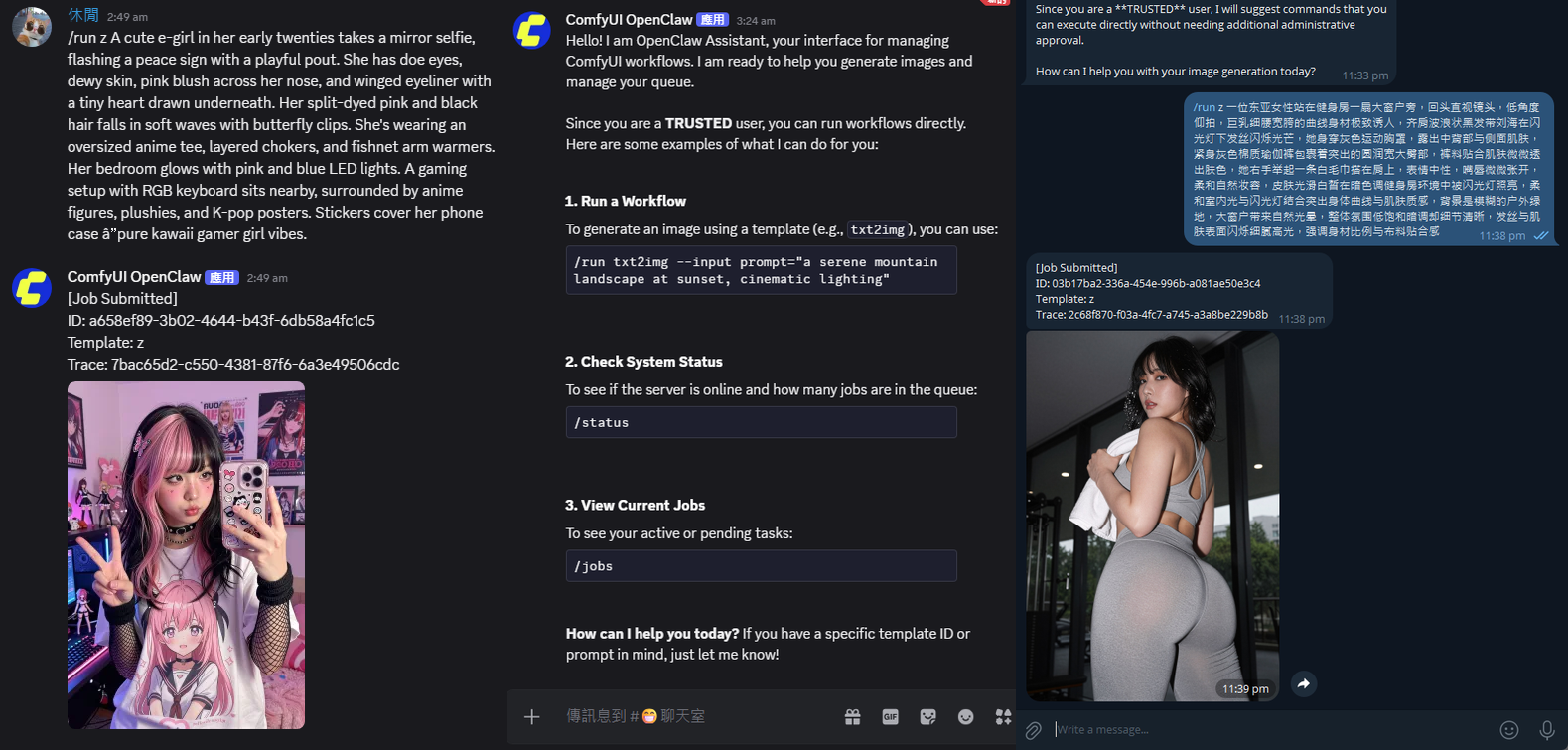
ComfyUI-OpenClaw is a security-first orchestration layer for ComfyUI that combines hardened automation APIs, embedded operator UX, and production deployment controls:
- LLM-assisted nodes (planner/refiner/vision/batch variants)
- A built-in extension UI (
OpenClawpanel) - A standalone Remote Admin Console (
/openclaw/admin) for mobile/remote browser operations - A secure-by-default HTTP API for automation (webhooks, triggers, schedules, approvals, presets, rewrite recipes, model manager)
- Public-ready control-plane split architecture (embedded UX + externalized high-risk control surfaces)
- Verification-first hardening lanes (staged coverage governance, test-debt governance, route drift, real-backend E2E, adversarial fuzz/mutation gates)
- Now supports 8 major messaging platforms, including Discord, Telegram, WhatsApp, LINE, WeChat, KakaoTalk, Slack, and Feishu/Lark.
- And more exciting features being added continuously
Supported product boundary:
- Primary artifact: ComfyUI custom node pack
- First-class runtime identity: embedded operator platform
- Optional attached subsystem: connector-capable control surface via the sidecar runtime
- Decision record: ADR-0002 Product Boundary And Packaging Contract
- Connector packaging status: ADR-0003 Connector Extraction Feasibility And Split-Package Seams
<br> <div align="center"> <img src="assets/adminMobileConsole.png" width="70%" /> </div> <br> <br>
ComfyUI Process (single Python process + shared aiohttp app)
│
├── ComfyUI Core (owned by ComfyUI)
│   ├── Native routes: /prompt, /history, /view, /upload, /ws, ...
│   └── Execution engine + model runtime
│
└── OpenClaw package (loaded from custom_nodes/comfyui-openclaw)
    ├── Registers OpenClaw-managed routes into the same PromptServer app:
    │   ├── /openclaw/*
    │   ├── /api/openclaw/* (browser/API shim)
    │   └── Legacy aliases: /moltbot/* and /api/moltbot/*
    ├── Security/runtime modules (startup gate, RBAC, CSRF, HMAC, audit, SSRF controls)
    ├── Automation services (approvals, schedules, presets, webhook/assist flows)
    ├── State + secrets storage (openclaw_state/*)
    ├── Embedded frontend extension (OpenClaw sidebar tabs) + remote admin page (/openclaw/admin)
    └── ComfyUI nodes exported by this pack (planner/refiner/image-to-prompt/batch variants)

Optional companion process (outside the ComfyUI process):
└── Connector sidecar (Telegram/Discord/LINE/WhatsApp/WeChat/Kakao/Slack/Feishu) -> calls OpenClaw HTTP APIs
This project is designed to make ComfyUI a reliable automation target with an explicit admin boundary and hardened defaults. <br>
<details><summary><h2>Security stance (how this project differs from convenience-first automation packs) - Click to expand</h2></summary>- Public and hardened deployment postures are fail-closed by design: shared-surface acknowledgement, startup gates, route-plane governance, and control-plane split all aim to reduce accidental exposure.
- Admin writes, webhook ingress, and bridge worker paths are protected as explicit trust boundaries rather than convenience-only localhost helpers.
- Connector ingress keeps allowlist and policy checks as first-class controls, with degraded/public posture handled deliberately instead of silently widening access.
- Interactive connector actions are treated as a security boundary too: callback-capable platforms use signed envelopes, timestamp/replay guards, dedupe, and explicit policy mapping instead of trusting button actions as implicit admin intent.
- Connector reply visibility is policy-driven: silent, internal, tool-only, and no-mention text replies can be suppressed without bypassing allowlists, replay checks, approvals, or action-button delivery.
- Outbound egress is constrained: callback delivery and custom LLM base URLs stay behind SSRF-safe validation, exact-host policy, scoped private-network allowance, and explicit insecure overrides.
- Secret handling stays server-side: browser storage is not used for secrets, local secret-manager integration is opt-in, and secrets-at-rest / token lifecycle controls are treated as operational boundaries.
- Multi-tenant mode is isolation-first: tenant mismatches fail closed across config, secret sources, connector installations, approvals, visibility, and execution budgets.
- Connector multi-workspace and multi-account bindings are secret-ref-only and fail-closed by design, so tenant/binding mismatches degrade to explicit rejection paths instead of silently reusing the wrong installation context.
- Operator-facing and audit payloads default to redaction for provider reasoning-like content and explicitly marked internal maintenance/helper prompt material, while diagnostics and runtime guardrails remain explicit and tamper-evident.
- Verification is part of the security model: route drift checks, supply-chain hardening checks, coverage governance, adversarial gates, and doctor/compatibility diagnostics are all wired into CI-parity workflows.
- Repository automation is hardened around deterministic dependency installs, restricted workflow permissions, pinned high-risk publish actions, and PR-time dependency review for dependency manifest changes.
Deployment profiles and hardening references:
- Security Deployment Guide
- Security Key/Token Lifecycle SOP
- Security Checklist
- Runtime Hardening and Startup
- Threat Model
- Frontend Migration Decision
- Added pinned incremental Ruff and Mypy enforcement that blocks new production-code debt in local and CI validation without requiring an unsafe repository-wide rewrite.
- Added deterministic scale baselines for large jobs history, connector summaries, and frontend output normalization, with exact payload and call-count budgets plus advisory timing evidence.
- Hardened selected exception boundaries so cancellation, compatibility fallback, status mapping, and redacted diagnostics remain explicit instead of being swallowed by broad catches.
- Split the largest API route/config, connector command, Slack/Feishu adapter, and frontend Settings/API hotspots into focused owner modules while preserving public routes, patch seams, security checks, DOM behavior, and host compatibility.
- Promoted the governed backend coverage floor to 55% using consecutive release-cycle evidence, all-hotspot regression ownership, atomic config checks, and fail-closed evidence validation.
GET /openclaw/jobsnow provides an Admin-only, versioned jobs view with bounded status/workflow filtering, sorting, pagination, and privacy-minimized summaries across pending, in-progress, completed, failed, and cancelled work.- Jobs listing distinguishes an authoritative empty snapshot from unsupported or unavailable host contracts and never returns raw prompts, workflows, execution errors, tracebacks, current inputs/outputs, tenant/client/trace identifiers, or reasoning text.
- Authorized connector operators can use
/jobs(plusjobsorqueue) for a bounded authoritative summary. The connector validates the response contract, displays only aggregate counts and short job IDs, and uses a coarse queue-count fallback only for explicit host-contract/backend unavailability. - Published host compatibility notes now pin the current ComfyUI, standalone frontend, and Desktop reference anchors while keeping Desktop embedded-frontend lag explicit.
- Output previews keep filename-backed refs first-class, accept optional
asset_hash/hashmetadata when present, and leave asset-service-only identifiers as explicit fallback states. - LINE and WhatsApp connector media URLs now force dangerous active content such as SVG/HTML/JS/CSS/XML to download with no-sniff response headers while preserving safe image delivery.
- Job Monitor now treats HDR
.exrand.hdrimage outputs as explicit source-preview fallback links instead of normal thumbnails, matching the current host expectation without bundling a HDR viewer. - Parameter Lab and graph-helper coverage now preserve non-numeric node IDs and promoted-widget source metadata, while structured color/box widget inputs stay out of missing-model diagnostics.
- Connector
/stop,/cancel, and/interruptcommands now keep no-argument global interrupt explicit while routing supplied job IDs through targeted ComfyUI job cancellation. - Single-job cancellation on older hosts can fall back only to targeted interrupt; multi-job cancellation failures no longer degrade into a global interrupt.
- Compatibility guard coverage now documents SaveImage-style output refs, 3D preview refs, typed asset dimensions, grouped asset behavior, sidebar registration fallback, and the OpenClaw Node.js runtime policy.
- OpenClaw keeps its own package/test harness on Node.js
>=18.0.0while documenting that standalone ComfyUI frontend development may require a newer Node engine.
- Moved developer-only verification helpers out of the package root and into the dedicated developer tooling area, keeping the shipped custom-node pack boundary clearer.
- The default external-tool allowlist now resolves from the package-owned
data/tools_allowlist.json; custom allowlists should useOPENCLAW_TOOLS_CONFIG_PATHinstead of relying on state-directory shadow files. - Runtime cache and external-tool sandbox scratch paths are treated as state-directory-owned generated data, while repo-local
.tmp, virtualenv, and frontend dependency folders remain regenerated local tooling artifacts. - External-tool failures now have deterministic service-level diagnostics for missing sandbox runtime, missing executable/interpreter, timeout, workspace/path violation, and process failure, without adding Docker or broad fallback execution.
- Python formatter/import-order settings and targeted package-hygiene regressions were aligned so validation catches future root clutter, package-resource, and runtime-cache ownership drift.
- Refreshed the published compatibility baseline for ComfyUI
1377a2f7(v0.27.0-47-g1377a2f7, pyproject0.27.0), standalone frontend1.48.1(ceb5ae1eba,v1.48.1-1-gceb5ae1eba), and Desktop0.9.4with core0.22.3plus embedded frontend1.43.18. - Reconciled active prompt state after backend or SSE reconnects so completed prompts are not left in the active queue lane after a host recovery.
- Updated sidebar registration to prefer the current ComfyUI sidebar store API and keep the deprecated frontend facade as a compatibility fallback for older hosts.
- Aligned Model Manager and preflight diagnostics with current ComfyUI model folder names, including newer managed keys such as
gligen,latent_upscale_models,hypernetworks,photomaker,model_patches,geometry_estimation, anddetection, while retaining legacy aliases such asclipandunet. - Made output parsing media-aware for current previewable result groups (
images,video,audio,3d, and boundedtext) while keeping image callbacks compatible, supporting optional hash-backed refs when host metadata is present, and keeping asset-only identifiers as explicit fallback states instead of silently upgrading to/api/assets. - Added Job Monitor support for allowlisted text files under the host
filesoutput key. Previews use same-origin/view, a 5-second timeout, strict textual MIME and UTF-8 checks, a 64-KiB streaming cap, a 4,096-character display cap, and literal text rendering; rejected or unsupported responses keep an explicit source link. - OpenClaw prompt submissions now include stable
comfy_usage_sourceattribution when missing, without overwriting caller-provided attribution or copying prompt/tenant/trace content into that field. - Updated public release/support/troubleshooting docs to match the refreshed host facts and avoid exposing maintainer-only planning paths or machine-local links.
See full update history: docs/release/recent_updates.md
</details>Table of Contents
- Installation
- Quick Start (Minimal)
- Remote Admin Console (Mobile UI)
- Nodes
- Extension UI
- Operator UX Features
- API Overview
- Templates
- Execution Budgets
- LLM Failover
- Advanced Security and Runtime Setup
- State Directory & Logs
- Package and Tool Runtime Hygiene
- Audit Chain Verification
- Troubleshooting
- Tests
- Updating
- Remote Control (Connector)
- Security
Installation
- ComfyUI-Manager: install as a custom node (recommended for most users), then restart ComfyUI.
- Git (manual):
git clone <repo> ComfyUI/custom_nodes/comfyui-openclaw
Alternative install options:
- Copy/clone this repository into your ComfyUI
custom_nodesfolder - Restart ComfyUI.
If the UI loads but endpoints return 404, ComfyUI likely did not load the Python part of the pack (see Troubleshooting).
Quick Start (Minimal)
1 Configure an LLM key (for Planner/Refiner/vision helpers)
Set at least one of:
OPENCLAW_LLM_API_KEY(generic)- Provider-specific keys from the provider catalog (preferred; see
services/providers/catalog.py)
Provider/model configuration can be set via env or /openclaw/config (admin boundary; localhost-only convenience if no Admin Token configured).
Notes:
- Recommended: set API keys via environment variables.
- Optional: for single-user localhost setups, you can store a provider API key from the Settings tab (UI Key Store (Advanced)).
- This writes to the encrypted server-side secret store (
{STATE_DIR}/secrets.enc.json). - Environment variables always take priority over stored keys.
- This writes to the encrypted server-side secret store (
- Built-in local-provider defaults use loopback-only OpenAI-compatible URLs:
Ollama (Local)->http://127.0.0.1:11434/v1LM Studio (Local)->http://localhost:1234/v1
Hosted OpenAI-compatible provider: Atlas Cloud
🎁 Atlas Cloud is a full-modal AI inference platform with an OpenAI-compatible API (DeepSeek, Qwen, GLM, Kimi, MiniMax, …). Use it through the
customprovider:
OPENCLAW_LLM_PROVIDER=custom
OPENCLAW_LLM_BASE_URL=https://api.atlascloud.ai/v1
OPENCLAW_LLM_MODEL=deepseek-ai/deepseek-v4-pro
OPENCLAW_LLM_API_KEY=your_atlascloud_api_key
api.atlascloud.ai is a public HTTPS host, so it passes the default SSRF-safe egress validation with no OPENCLAW_LLM_ALLOW_PRIVATE_NETWORK or insecure override needed. deepseek-ai/deepseek-v4-pro is a reasoning model; any other Atlas chat model id works the same way.
- Anthropic (Claude):
anthropic/claude-haiku-4.5-20251001,anthropic/claude-opus-4.8,anthropic/claude-sonnet-4.6 - OpenAI (GPT):
openai/gpt-5.4,openai/gpt-5.5 - Google (Gemini):
google/gemini-3.1-flash-lite,google/gemini-3.1-pro-preview,google/gemini-3.5-flash - Qwen:
qwen/qwen2.5-7b-instruct,Qwen/Qwen3-235B-A22B-Instruct-2507,qwen/qwen3-235b-a22b-thinking-2507,qwen/qwen3-30b-a3b,Qwen/Qwen3-30B-A3B-Instruct-2507,qwen/qwen3-30b-a3b-thinking-2507,qwen/qwen3-32b,qwen/qwen3-8b,Qwen/Qwen3-Coder,qwen/qwen3-coder-next,qwen/qwen3-max-2026-01-23,Qwen/Qwen3-Next-80B-A3B-Instruct,Qwen/Qwen3-Next-80B-A3B-Thinking,Qwen/Qwen3-VL-235B-A22B-Instruct,qwen/qwen3-vl-235b-a22b-thinking,qwen/qwen3-vl-30b-a3b-instruct,qwen/qwen3-vl-30b-a3b-thinking,qwen/qwen3-vl-8b-instruct,qwen/qwen3.5-122b-a10b,qwen/qwen3.5-27b,qwen/qwen3.5-35b-a3b,qwen/qwen3.5-397b-a17b,qwen/qwen3.6-35b-a3b,qwen/qwen3.6-plus - DeepSeek:
deepseek-ai/deepseek-ocr,deepseek-ai/deepseek-r1-0528,deepseek-ai/DeepSeek-V3-0324,deepseek-ai/DeepSeek-V3.1,deepseek-ai/DeepSeek-V3.1-Terminus,deepseek-ai/deepseek-v3.2,deepseek-ai/DeepSeek-V3.2-Exp,deepseek-ai/deepseek-v4-flash,deepseek-ai/deepseek-v4-pro - Moonshot (Kimi):
moonshotai/Kimi-K2-Instruct,moonshotai/Kimi-K2-Instruct-0905,moonshotai/Kimi-K2-Thinking,moonshotai/kimi-k2.5,moonshotai/kimi-k2.6 - Zhipu (GLM):
zai-org/GLM-4.6,zai-org/glm-4.7,zai-org/glm-5,zai-org/glm-5-turbo,zai-org/glm-5.1,zai-org/glm-5v-turbo - MiniMax:
MiniMaxAI/MiniMax-M2,minimaxai/minimax-m2.1,minimaxai/minimax-m2.5,minimaxai/minimax-m2.7 - xAI:
xai/grok-4.3 - Kwaipilot:
kwaipilot/kat-coder-pro-v2 - Other:
owl
2 Configure webhook auth (required for /webhook*)
Webhooks are deny-by-default unless auth is configured:
OPENCLAW_WEBHOOK_AUTH_MODE=bearerandOPENCLAW_WEBHOOK_BEARER_TOKEN=...- or
OPENCLAW_WEBHOOK_AUTH_MODE=hmacandOPENCLAW_WEBHOOK_HMAC_SECRET=... - or
OPENCLAW_WEBHOOK_AUTH_MODE=bearer_or_hmacto accept either - optional replay protection:
OPENCLAW_WEBHOOK_REQUIRE_REPLAY_PROTECTION=1
3 Optional (recommended): set an Admin Token
Admin/write actions (save config, /llm/test, key store) are protected by the Admin Token:
- If
OPENCLAW_ADMIN_TOKEN(or legacyMOLTBOT_ADMIN_TOKEN) is set, clients must send it viaX-OpenClaw-Admin-Token. - If no admin token is configured, admin actions are allowed on localhost only (convenience mode). Do not use this mode on shared/public deployments.
Remote admin actions are denied by default. If you understand the risk and need remote administration, opt in explicitly:
OPENCLAW_ALLOW_REMOTE_ADMIN=1
Public profile boundary acknowledgement (required when OPENCLAW_DEPLOYMENT_PROFILE=public):
OPENCLAW_PUBLIC_SHARED_SURFACE_BOUNDARY_ACK=1- set this only after your reverse proxy path allowlist + network ACL explicitly block ComfyUI-native high-risk routes (
/prompt,/history*,/view*,/upload*,/ws, and/api/*equivalents)
- set this only after your reverse proxy path allowlist + network ACL explicitly block ComfyUI-native high-risk routes (
Windows env var tips (PowerShell / CMD / portable .bat / Desktop)
- PowerShell (current session only):
$env:OPENCLAW_LLM_API_KEY="<YOUR_API_KEY>"$env:OPENCLAW_ADMIN_TOKEN="<YOUR_ADMIN_TOKEN>"$env:OPENCLAW_LOG_TRUNCATE_ON_START="1"(optional: clear previousopenclaw.logat startup)
- PowerShell (persistent; takes effect in new shells):
setx OPENCLAW_LLM_API_KEY "<YOUR_API_KEY>"setx OPENCLAW_ADMIN_TOKEN "<YOUR_ADMIN_TOKEN>"setx OPENCLAW_LOG_TRUNCATE_ON_START "1"(optional)
- CMD (current session only):
set OPENCLAW_LLM_API_KEY=<YOUR_API_KEY> - Portable
.batlaunchers: addset OPENCLAW_LLM_API_KEY=.../set OPENCLAW_ADMIN_TOKEN=...(optionallyset OPENCLAW_LOG_TRUNCATE_ON_START=1) before launching ComfyUI. - Windows note: changing env vars in System Properties or with
setxdoes not update an already-running portable ComfyUI process; fully restart the launcher sopython_embeded\\python.exeinherits the new values. - ComfyUI Desktop: if env vars are not passed through reliably, prefer the Settings UI key store for localhost-only convenience, or set system-wide env vars.
Remote Admin Console (Mobile UI)
The project now includes a standalone admin UI endpoint for mobile/remote operations:
- primary:
/openclaw/admin - legacy alias:
/moltbot/admin
This page is independent from the embedded ComfyUI side panel and is intended for phone/desktop browsers.
Implementation shape:
- static shell:
web/admin_console.html - runtime app module:
web/admin_console_app.js - runtime API client module:
web/admin_console_api.js
Environment variables for remote admin
Recommended baseline before enabling remote administration:
OPENCLAW_ADMIN_TOKEN=<strong-secret>- required for authenticated write/admin operations from remote devices
OPENCLAW_ALLOW_REMOTE_ADMIN=1- explicit opt-in for remote admin write paths
OPENCLAW_OBSERVABILITY_TOKEN=<strong-secret>(recommended)- tokenized read access for observability routes in non-localhost scenarios
Optional but commonly used with planner/refiner workflows:
OPENCLAW_LLM_API_KEY=<provider-key>(or provider-specific key vars)
Connection from phone or other devices
- Start ComfyUI with external listen enabled (example):
python main.py --listen 0.0.0.0 --port 8200
- Use your host LAN IP (for example
192.168.x.x) and open:http://<HOST_LAN_IP>:<PORT>/openclaw/admin
- Enter the admin token in the page input and click
Save. - Click
Refresh Allto verify health and API reachability.
Notes:
- On Windows, if a port fails with bind errors (for example WinError 10013), choose a different port outside excluded ranges.
- If write actions are denied remotely, verify both
OPENCLAW_ADMIN_TOKENandOPENCLAW_ALLOW_REMOTE_ADMIN=1. - Remote Admin being reachable from LAN does not imply LAN-hosted custom LLM targets are allowed. SSRF rules for
base_urlremain separate and require either the scoped LLM private-network setting for the configured target or the broader insecure override.
Basic operations
After token save, typical flow is:
Dashboard: confirm provider/model/key status and recent errorsJobs / Events: refresh runs, connect SSE stream, verify event updatesApprovals: approve/reject pending itemsSchedules / Triggers: toggle schedules, run now, or fire manual triggerConfig: reload and safely update provider/model/base URL/retry/timeoutDoctor / Diagnostics: inspect security doctor + preflight inventory outputQuick Actions: retry failed schedule, refresh model list, or run drill (subject to existing policy/tool availability)
Reverse proxy and exposure notes
Do not expose ComfyUI/OpenClaw admin endpoints directly to the public internet without a hardened edge.
Minimum recommendations:
- terminate TLS at reverse proxy (HTTPS only)
- add authentication at edge (in addition to OpenClaw admin token)
- restrict source IP ranges when possible
- apply request-rate limits and connection limits
- keep server and node package on current patched versions
- if running
OPENCLAW_DEPLOYMENT_PROFILE=public, setOPENCLAW_PUBLIC_SHARED_SURFACE_BOUNDARY_ACK=1only after enforcing reverse-proxy path allowlist + network ACL boundary controls
For internet-facing deployment templates and hardening checklist, follow:
docs/security_deployment_guide.md
Nodes
Nodes are exported as Moltbot* class names for compatibility, but appear as openclaw:* display names in ComfyUI:
openclaw: Prompt Planneropenclaw: Prompt Refineropenclaw: Image to Promptopenclaw: Batch Variants
The current node category is openclaw; serialized workflows that still reference the legacy Moltbot* class names continue to load through retained compatibility aliases.
See web/docs/ for node usage notes.
Node Portability and Workflow Fallback
Current builds expose a stable portability contract for the shipped OpenClaw nodes so workflow diagnostics can distinguish "custom node missing" from a generic import/runtime failure:
- inventory/preflight surfaces can expose package-level node portability metadata for
openclaw:*nodes alongside the normal node inventory view - when a workflow references an unavailable OpenClaw node, current diagnostics prefer deterministic replacement guidance instead of an opaque missing-node failure
- muted or bypassed root nodes and subgraph branches are reported as suppressed diagnostics when the submitted workflow shape exposes enough frontend metadata, so inactive branches do not become actionable missing-node/model failures
- model-name inputs are checked against current ComfyUI folder keys such as
text_encodersanddiffusion_models, with legacyclipandunetaliases preserved for older workflow metadata - the compatibility class exports (
Moltbot*) remain in place for existing workflows, but portability guidance is anchored on the canonicalopenclaw:*node identities
If you are moving a workflow between hosts, treat the portability metadata and replacement hints as the supported migration path before attempting ad hoc node renames. The troubleshooting guide covers the operator-facing interpretation of those signals.
Extension UI
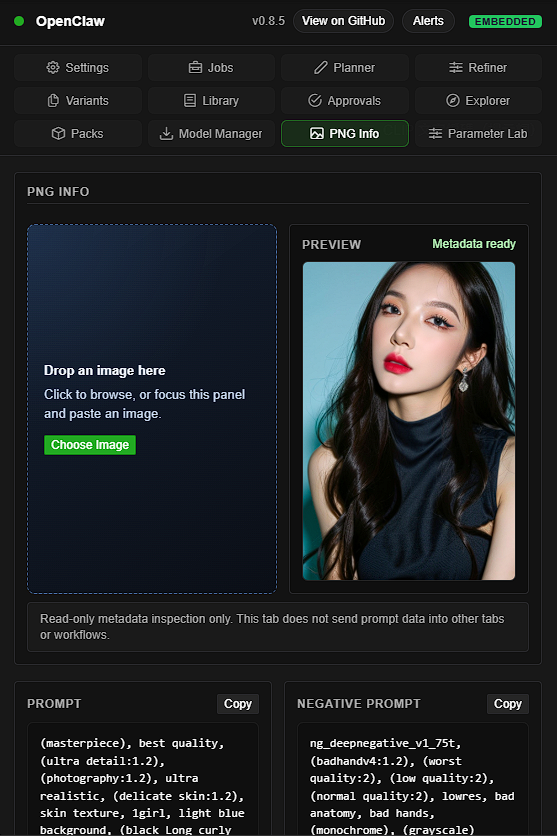
The frontend lives in web/ and is served by ComfyUI as an extension panel. It uses the backend routes below (preferring /api/openclaw/*).
Current sidebar composition keeps web/openclaw_ui.js as the shell root and routes specialized browser logic through focused modules:
- ComfyUI host sidebar registration:
web/openclaw_sidebar_registration.js - actions and submit/cancel wiring:
web/openclaw_actions.js - queue polling and transient banners:
web/openclaw_queue_monitor.jsandweb/openclaw_banner_manager.js - persistent operator notifications:
web/openclaw_notification_center.js - tab registration/remount behavior:
web/openclaw_tabs.js - API transport/session core:
web/openclaw_api.js, with config, generation, resource, model, and event route families owned byweb/openclaw_api_*.jsmodules behind the same singleton - Settings composition and async generation lifecycle:
web/tabs/settings_tab.js, with status, LLM, secrets, logs, DOM, and lifecycle ownership in focusedsettings_tab_*.jsmodules - shared error + compatibility helpers:
web/openclaw_utils.js
New shell/tab wiring should use the shared text-safe DOM helpers in web/openclaw_utils.js instead of duplicating ad hoc element construction in individual tabs.
Canonical DOM/class ownership is now centered on openclaw-*; legacy moltbot-* class compatibility is still supported through shared runtime aliasing instead of duplicated markup in each tab template.
The sidebar now also resolves and stamps its active host surface (standalone_frontend vs desktop-embedded host) and reference metadata at mount time, so Desktop 0.9.4 embedded-frontend lag against standalone frontend 1.48.1 is explicit and testable instead of inferred from runtime accidents.
Sidebar registration prefers ComfyUI's current sidebar store API and falls back to the deprecated frontend facade when running on older host bundles. Hosts without either sidebar API use the legacy menu fallback instead of failing extension setup.
Sidebar Modules
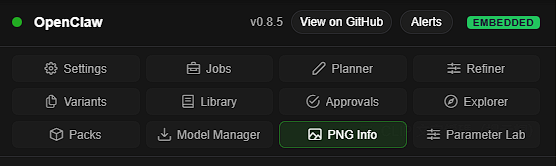
The OpenClaw sidebar includes these built-in tabs. Some tabs are capability-gated and may be hidden when the related backend feature is disabled.
| Tab | What it does | Related docs |
| --- | --- | --- |
| Settings | Health/config/log visibility, provider/model setup, model connectivity checks, and optional localhost key storage. | Quick Start, API Overview, Troubleshooting |
| Jobs | Tracks prompt IDs, consumes deterministic event/task cursor metadata for polling, and shows recent outputs across classic history refs, optional asset_hash/hash-backed refs when host metadata is present, and current previewable media groups (images, video, audio, 3d, bounded inline or file-backed text). Allowlisted text files use a bounded same-origin /view reader and literal text rendering with an explicit source-link fallback; asset-service-only refs stay explicit instead of silently upgrading to /api/assets. | API Overview, Remote Control (Connector) |
| Planner | Uses assist endpoint to generate structured prompt plans (positive/negative/params). | Configure an LLM key, Nodes |
| Refiner | Refines existing prompts with optional image context and issue/goal input. | Configure an LLM key, Nodes |
| Variants | Local helper for generating batch variant parameter JSON (seed/range-style sweeps). | Nodes, Operator UX Features |
| Library | Manages reusable prompt/params presets and provides pack-oriented library operations in one place. | Templates, API Overview |
| Approvals | Lists approval gates and supports approve/reject operations, including the same approval objects now surfaced through Slack and Feishu interactive connector actions. | API Overview, Remote Control (Connector) |
| Explorer | Inventory/preflight diagnostics and snapshot/checkpoint troubleshooting workflows, including snapshot-first inventory refresh state (snapshot_ts, scan_state, stale, last_error) and suppressed inactive-branch findings. | Operator UX Features, Troubleshooting |
| Packs | Dedicated pack lifecycle tab for import/export/delete under admin boundary. | API Overview |
| PNG Info | Inspects saved generation images through drag-and-drop, file picker, or scoped paste, parses A1111 infotext plus ComfyUI prompt / workflow metadata, shows extracted prompt and generation fields when recoverable, and keeps raw metadata visible for operator inspection. | API Overview, Troubleshooting |
| Model Manager | Searches model catalog/install records, queues managed downloads, monitors task lifecycle, and imports completed tasks into the managed install root with current ComfyUI folder-key normalization, including gligen, latent_upscale_models, hypernetworks, photomaker, model_patches, geometry_estimation, and detection, plus legacy type aliases. | API Overview, Troubleshooting |
| Parameter Lab | Runs bounded sweep/compare experiments, stores history, and replays parameters back into the graph while preserving non-numeric host node IDs. | Operator UX Features |
Operator UX Features
Notification Center
The sidebar includes a persistent Notification Center for operator-facing alerts that should survive reloads:
- warning/error banners and selected durable toasts are mirrored into a local notification store
- entries are deduplicated by source-specific keys and keep an unread count
Acknowledgeclears unread state without hiding the itemDismissremoves the item from the active panel while preserving historical storage- notification message/source fields are rendered as escaped text, not trusted as HTML, so operator-facing payloads cannot turn stored notification content into live markup
- action-enabled entries can deep-link back to the affected surface, such as
Model ManagerorJobs
Current examples include queue-monitor incidents and managed-model failures that need operator follow-up.
In-canvas context toolbox
Right-click a node and open the OpenClaw menu to access:
Inspect: jump to the Explorer troubleshooting path.Doctor: run diagnostics and show readiness feedback.Queue Status: jump directly to queue/job monitoring.Compare: open Parameter Lab in compare setup mode for the selected node.Settings: jump to OpenClaw settings.
These actions are capability-aware and degrade to safe guidance when optional backend capabilities are unavailable.
Parameter Lab history and replay
Parameter Lab now supports experiment history and run replay:
Historylists saved experiments from local state.Loadopens stored experiment details and run statuses.Replayapplies a selected run's parameter values back into the active workflow graph without coercing string or non-numeric host node IDs.
This makes iterative tuning and backtracking faster without manually retyping prior parameter sets.
Compare workflow baseline
Parameter Lab includes a baseline compare flow for model/widget A/B style checks:
- Use
Comparefrom the node context toolbox, orCompare Modelsinside Parameter Lab. - The compare planner generates bounded runs from one selected comparison dimension.
- Backend compare submission is validated and admin-protected.
- Compare experiments are persisted and visible in history alongside sweep experiments.
Current scope is focused on bounded compare orchestration and replay-ready records; richer side-by-side evaluation and winner handoff are still being expanded.
Operator guidance and quick recovery
Operator actions are wired for faster recovery loops:
- queue/status routing prefers the dedicated monitor view when available
- doctor checks surface immediate readiness feedback
- compare and history flows are connected so experiments can be reviewed and replayed quickly
API Overview
This README keeps only the route-family view. Detailed endpoint shapes, auth contracts, response semantics, and release-facing compatibility rules live in the API contract and related docs.
Base path notes:
- primary prefix:
/openclaw/* - legacy prefix:
/moltbot/* - browser/extension callers should prefer
/api/openclaw/* - standalone admin UI entry:
GET /openclaw/admin
Main API families:
- Observability: health, capabilities, logs, traces, event feeds
- Jobs visibility: Admin-only, bounded and privacy-minimized list/filter/sort/pagination over the in-process ComfyUI queue and history snapshot
- Admin diagnostics: preflight inventory snapshot/status, doctor-facing readiness views
- Config + LLM: effective config, provider tests, model lists, assist planner/refiner
- Connector diagnostics: installation state, resolution, callback/tenant binding evidence, audit views, extraction seam metadata, and static service-env SecretRef propagation policy
- External tools: admin-gated, feature-flagged allowlist execution with sandbox/path diagnostics
- Webhooks + events: validate, submit, callback delivery, SSE/polling status
- Admin operations: approvals, schedules, presets, rewrite recipes
- Model Manager + Packs: search, download/import lifecycle, pack import/export
- Bridge / sidecar: worker poll/result/heartbeat and bridge health/submit routes
Primary references:
Key operational notes:
- Observability remains token-gated for remote access and redacts provider reasoning-like content plus marked internal maintenance/helper content by default.
GET /openclaw/jobsis Admin-only and returns contract version 1 with bounded job summaries and pagination. Treat HTTP 200 withjobs: []as an authoritative empty snapshot, HTTP 501 as an unsupported host contract, and HTTP 503 as backend unavailability; neither failure is an empty success.- Event/model-download polling and preflight inventory are snapshot/cursor-driven contracts; clients should consume
snapshot_ts,scan_state,stale, and cursor metadata instead of assuming full-refresh polling. - Model Manager and preflight consumers should use current ComfyUI folder keys for model types where possible, including
text_encoders,diffusion_models,gligen,latent_upscale_models,hypernetworks,photomaker,model_patches,geometry_estimation, anddetection; compatibility aliases such asclip,unet,ckpt, and plural legacy names are normalized before lookup/import. - Output/history-facing consumers should keep using the bounded
/history+/viewcontract; current previewable output groups includeimages,video,audio,3d, and boundedtext, while optional hash-backed refs are used only when host metadata is present and refs that only upstream asset services can resolve remain explicitasset_api_requiredcompatibility states. - Queue submissions add stable ComfyUI usage-source attribution (
comfyui-openclaw) when callers do not provide one; callers that already supplyextra_data.comfy_usage_sourcekeep ownership of that value. - Connector diagnostics expose redacted token references only, and
/openclaw/connector/extraction-contractis structural packaging metadata and static SecretRef policy rather than a live installation-health, environment, or token-status feed.
Advanced Security and Runtime Setup
Use this section as an index only. The source of truth for deployment posture, config/secrets behavior, package boundaries, and optional high-risk subsystems lives in the docs below.
Start here:
- Runtime hardening and startup
- Security deployment guide
- Security checklist
- Feature flags
- Config and secrets contract
Architecture and boundary decisions:
Subsystem-specific guides:
High-level operator reminders:
- canonical configuration surface:
OPENCLAW_*(legacyMOLTBOT_*aliases remain compatibility-only) - config precedence:
env > runtime override > persisted config > default - deployment posture, shared-port boundary, and reverse-proxy rules should be taken from the deployment guide rather than duplicated in README
Templates
Templates live in data/templates/.
- Any
data/templates/<template_id>.jsonfile is runnable (template ID = filename stem). data/templates/manifest.jsonis optional metadata (e.g. defaults).- Rendering performs strict placeholder substitution:
- Only exact string values matching
{{key}}are replaced - Partial substitutions (e.g.
"foo {{bar}}") are intentionally not supported
- Only exact string values matching
For the full step-by-step guide (where to put exported workflow JSON, how to author manifest.json, how to verify /openclaw/templates, and how to use /run), see tests/TEST_SOP.md.
Basic /run usage (chat)
Free-text prompt mode (no key=value needed):
/run z "a cinematic portrait" seed=-1
The connector will map the free text into a prompt field using:
allowed_inputsif a single key is declared inmanifest.json, or- fallback order:
positive_prompt->prompt->text->positive->caption.
Key=value mode (explicit mapping):
/run z positive_prompt="a cat" seed=-1
Important:
- Ensure your workflow uses the same placeholder (e.g.,
"text": "{{positive_prompt}}"). seed=-1gives random seeds; a fixed seed reproduces outputs.
Execution Budgets
Queue submissions are protected by concurrency caps and render size budgets (services/execution_budgets.py).
Environment variables:
OPENCLAW_MAX_INFLIGHT_SUBMITS_TOTAL(default: 2)OPENCLAW_MAX_INFLIGHT_SUBMITS_WEBHOOK(default: 1)OPENCLAW_MAX_INFLIGHT_SUBMITS_TRIGGER(default: 1)OPENCLAW_MAX_INFLIGHT_SUBMITS_SCHEDULER(default: 1)OPENCLAW_MAX_INFLIGHT_SUBMITS_BRIDGE(default: 1)OPENCLAW_MAX_INFLIGHT_SUBMITS_PER_TENANT(default: 1, only when multi-tenant mode is enabled)OPENCLAW_MAX_RENDERED_WORKFLOW_BYTES(default: 524288)
If budgets are exceeded, callers should expect 429 (concurrency) or 413 (oversized render).
LLM Failover
Failover is integrated into services/llm_client.py and controlled via runtime config:
OPENCLAW_FALLBACK_MODELS(CSV)OPENCLAW_FALLBACK_PROVIDERS(CSV)OPENCLAW_MAX_FAILOVER_CANDIDATES(int, 1-)
State Directory & Logs
By default, state is stored in a platform user-data directory:
- Windows:
%LOCALAPPDATA%\\comfyui-openclaw\\ - macOS:
~/Library/Application Support/comfyui-openclaw/ - Linux:
~/.local/share/comfyui-openclaw/
Override:
OPENCLAW_STATE_DIR=/path/to/state
Logs:
openclaw.log(legacymoltbot.logis still supported)audit.logfor append-only audit events, plus retained rotated audit segments when log retention is enabledaudit.log.keywhen OpenClaw generates and persists the local audit chain key instead of receiving one from environment/config- Importing config helpers alone does not create the state directory or log files on current builds; writable paths are created lazily on first logger bootstrap or persisted-write paths.
- Optional startup truncation: set
OPENCLAW_LOG_TRUNCATE_ON_START=1to clear the active log file once at process startup (useful to avoid stale-history noise in UI log views). - Optional structured JSON logs for selected core paths:
- set
OPENCLAW_LOG_FORMAT=json(orOPENCLAW_STRUCTURED_LOGS=1) before startup - default behavior remains plain text logs (no structured log emission unless opt-in)
- set
Package and Tool Runtime Hygiene
OpenClaw keeps package-owned resources, runtime state, and local validation artifacts separate:
- package-owned defaults, such as
data/tools_allowlist.json, are read from the installed custom-node pack - custom external-tool allowlists should be supplied explicitly with
OPENCLAW_TOOLS_CONFIG_PATH - runtime cache and external-tool sandbox scratch space belong under the configured state directory (
cache/andtool_sandbox/) - repo-local generated folders such as
.tmp/,.venv/, andnode_modules/are validation/development artifacts and are regenerated from project metadata or lockfiles - OpenClaw does not automatically repair, migrate, or delete runtime dependency caches
External tools remain opt-in and admin-gated:
OPENCLAW_ENABLE_EXTERNAL_TOOLS=trueenables the route familyGET /openclaw/toolslists the allowlisted toolsPOST /openclaw/tools/{name}/runexecutes a named allowlisted tool with validated args- hardened runtime posture fails closed on missing sandbox runtime or ambiguous sandbox policy
- service-level tool execution results include stable diagnostics for common local failures such as
sandbox_runtime_unavailable,interpreter_missing,timeout, andworkspace_violation
Operational references:
Audit Chain Verification
Operators can verify retained audit-log continuity with:
python scripts/verify_audit_chain.py
Machine-readable output:
python scripts/verify_audit_chain.py --json
Notes:
- The verifier checks the current
audit.logand any retained rotated audit segments in the state directory. - When OpenClaw is not given an audit chain key explicitly, it persists a local
audit.log.keysidecar so retained-chain verification still works across restart and rotation. - A failed verification should be treated as an operator-facing integrity incident and investigated before assuming the retained audit trail is trustworthy.
Troubleshooting
Common operator issues now live in a dedicated troubleshooting guide:
Quick jumps:
- backend not loaded / route 404 startup failures
- Operator Doctor usage
- Jobs preview and media fallback for asset-api-only output refs
- audit chain verification after restart or rotation
- external-tool allowlist, sandbox runtime, interpreter, timeout, or workspace diagnostics
- webhook auth not configured
- loopback LLM SSRF validation errors
- Remote Admin vs private-LAN LLM target behavior
- server-side Admin Token vs UI token usage
Tests
Use tests/TEST_SOP.md as the authoritative validation workflow.
Quick entry points:
- full acceptance workflow: tests/TEST_SOP.md
- E2E-specific procedure: tests/E2E_TESTING_SOP.md
- verification-governance policy/details: docs/release/verification_governance.md
The SOP already defines:
- the docs-only exception for strictly documentation/planning/SOP changes
- one-command full test scripts for Windows and Linux/WSL
- supply-chain hardening checks and lockfile-driven frontend dependency installation
- pinned incremental Ruff/Mypy debt enforcement and deterministic scale regression baselines
- the CI-parity backend coverage workflow with the governed 55% floor, retained release-cycle evidence, and required hotspot ownership
Updating
- Git install:
git pullinsidecustom_nodes/comfyui-openclaw/, then restart ComfyUI. - ComfyUI-Manager install: update from Manager UI, then restart ComfyUI.
Remote Control (Connector)
OpenClaw includes a standalone Connector process that allows you to control your local instance securely via Telegram, Discord, LINE, WhatsApp, WeChat, KakaoTalk, Slack, and Feishu/Lark.
The connector currently remains an optional attached subsystem inside this repo/package boundary. Current builds expose extraction diagnostics for maintainers, but do not treat a standalone connector package or separate-repo distribution as a supported release shape.
-
Status & Queue: Authorized operators can use
/jobsfor a bounded authoritative jobs summary; public/statusremains a coarse health/queue view and does not receive the Admin-only jobs payload. -
Run Jobs: Submit templates via chat commands.
-
Targeted cancellation:
/stop,/cancel, and/interruptwithout job IDs send an explicit global interrupt; supplying one or more job IDs requests targeted ComfyUI job cancellation. -
Approvals: Approve/Reject paused workflows from your phone.
-
Secure: Outbound-only for Telegram/Discord. LINE/WhatsApp/WeChat/KakaoTalk/Slack require inbound HTTPS (webhook), while Slack can also use Socket Mode and Feishu can run in either webhook or long-connection mode with a dedicated callback ingress path.
-
Telegram topics: Forum topic commands keep their topic context for immediate replies and delayed result delivery.
-
Replay-safe actions and replies: Duplicate or retried platform events are acknowledged without re-running completed actions; retryable failures before delivery commit can be retried.
-
Reply visibility policy: Direct-message, group/channel, thread, internal, and tool-only contexts share one visible/suppressed text decision; suppressed text is treated as a successful no-op and action/approval controls stay visible.
-
WeChat encrypted mode: Official Account encrypted webhook mode is supported when AES settings are configured.
-
KakaoTalk response safety: QuickReply limits and safe fallback handling are enforced for reliable payload behavior.
-
Slack multi-workspace and interactive mode: Workspace installs can be handled through connector-managed OAuth install/callback routes with per-workspace token binding, fail-closed health diagnostics, and signed interactive callback handling for action payloads.
-
Feishu/Lark multi-account mode: Connector-managed account/workspace bindings support tenant-aware installation resolution, interactive approval cards, and signed callback handling without exposing raw app secrets or widening command trust implicitly.
-
Bounded connector numeric envs: Delivery/media/time-budget settings, bind ports, rate limits, and command-length knobs now clamp or fall back to documented defaults with warnings instead of crashing connector startup on malformed values.
-
Startup diagnostics:
/openclaw/healthreports startup readiness, optional warmup degradation, and fatal startup details without making optional warmups block baseline API availability. -
SecretRef service boundaries: Connector service-env planning preserves only supported env-backed credential references and rejects raw secrets, legacy marker strings, unsupported envs, and runtime-only auth tokens.
-
Internal prompt isolation: Operator-visible and audit payloads remove explicitly marked internal maintenance/helper prompt content before normal reasoning redaction.
-
Packaging diagnostics: Admin operators/maintainers can inspect
/openclaw/connector/extraction-contractfor the current in-repo recommendation, the static service-env SecretRef propagation policy, and the minimum seam families required before any future split.
Security
Read SECURITY.md before exposing any endpoint beyond localhost. The project is designed to be secure-by-default (deny-by-default auth, SSRF protections, redaction, bounded outputs), but unsafe deployment can still create risk.
Repository maintenance workflows also include supply-chain controls: CI/local validation scans declared dependencies and selected workspace persistence surfaces for known malicious indicators, frontend installs are lockfile-driven, and dependency manifest changes receive PR-time review.
Security Deployment Guide
- Security Deployment Guide
- Includes three copy-paste deployment profiles (
local,lan,public) and step-by-step checklists.
Deployment Self-check Command
Validate current env against deployment profile:
python scripts/check_deployment_profile.py --profile local
python scripts/check_deployment_profile.py --profile lan
python scripts/check_deployment_profile.py --profile public
Fail on warnings too (recommended for hardened/public pipelines):
python scripts/check_deployment_profile.py --profile public --strict-warnings
Disclaimer (Security & Liability)
This project is provided as-is without warranty of any kind. You are solely responsible for:
- API keys / Admin tokens: creation, storage, rotation, and revocation
- Runtime configuration: environment variables, config files, UI settings
- Network exposure: tunnels, reverse proxies, public endpoints
- Data handling: logs, prompts, outputs, and any content generated or transmitted
Key Handling Guidance (all environments)
- Prefer environment variables for API keys and admin tokens.
- UI key storage (if enabled) is for local, single-user setups only.
- Never commit secrets or embed them in versioned files.
- Rotate tokens regularly and after any suspected exposure.
Common Deployment Contexts (you must secure each)
- Local / single-user: treat keys as secrets; avoid long-term browser storage.
- LAN / shared machines: require admin tokens, restrict IPs, disable unsafe endpoints.
- Public / tunneled / reverse-proxy: enforce strict allowlists, HTTPS, least-privilege access.
- Desktop / portable / scripts: ensure secrets are not logged or persisted by launchers.
No Liability
The maintainers and contributors accept no responsibility for:
- Unauthorized access or misuse of your instance
- Loss of data, keys, or generated content
- Any direct or indirect damages resulting from use of this software
By using this project, you acknowledge and accept these terms.
Run ComfyUI workflows without the setup
No installs, no CUDA version roulette, no GPU sitting idle on your bill. Bring a workflow and run it in the browser.