
ComfyUI Extension: ComfyUI Text Processor
Run ComfyUI workflows without the setup
No installs, no CUDA version roulette, no GPU sitting idle on your bill. Bring a workflow and run it in the browser.
The ultimate text processing suite for ComfyUI. Now features Batch Cleaning, LLM Parsing, Dynamic Wildcards, Image and Logic Tools for sophisticated automation.
Looking for a different extension?
Custom Nodes (17)
README

ComfyUI Text Processor
An advanced automation toolkit for ComfyUI, bridging the gap between raw data and generative AI. Features Batch Text Cleaning (for Img2Text), LLM Output Parsing, Dynamic Wildcards, and Logic Evaluation to streamline complex prompt engineering workflows.
01/2026 update: Add Text to Image node now supports intelligent text adaptation with auto_adapt toggle - automatically wraps long text and adjusts font size to fit image dimensions, plus truncation mode with ellipsis for fixed-size rendering. Height constraints are now enforced alongside width checks.
06/2026 compatibility update: Host-facing node metadata has been added for current ComfyUI search/help surfaces. Advanced Image Saver now omits previews for explicitly allowed absolute output paths outside ComfyUI output while still returning saved paths in files. Load Image Batch and Load Mask expose validation hooks where ComfyUI supports them, and Text Storage prefers the ComfyUI user directory while keeping legacy plugin-local entries readable.
1. Advanced Text Filter Node (Core)
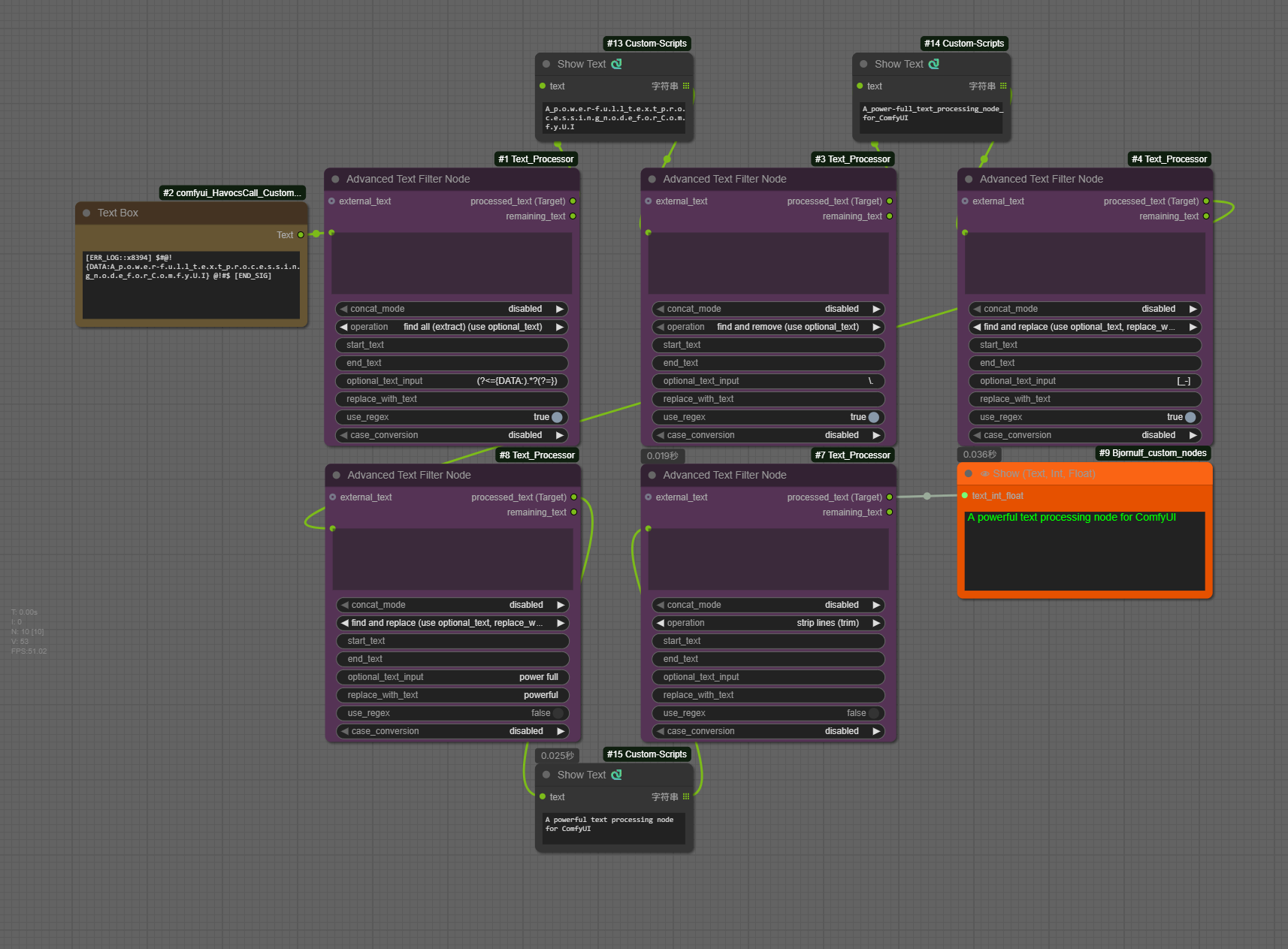
This is a powerful and flexible text processing node for ComfyUI, designed to automate and simplify your dynamic prompt workflows.
Whether you need to precisely extract sections from a large text block, batch replace keywords, or clean up messy text, this node provides robust support. Its dual-output design allows you to create complex node chaining, passing the remaining text from one node to the next for further processing.
Core Features
- Dual Outputs (Node Chaining): Provides
processed_text (Target)andremaining_textoutputs. You can chain theremaining_textto anotherAdvancedTextFilternode for multi-step text parsing. - 17+ Operation Modes:
- Global Find/Replace/Extract
- First-Match Split/Between
- Format Cleanup
- [New] LLM Output Parsing (JSON, Code blocks)
- Robust Error Handling (v1.1.5): The new
if_not_foundoption allows you to choose the fallback behavior (return original, return empty, or trigger error) when a pattern isn't found, preventing batch workflow failures. - Powerful Regex Support: A
use_regextoggle switches all find and split operations to use Regular Expressions. Now supportsDOTALLmode for multi-line matching.- Regex extract with one capture group returns the captured text; multiple capture groups are joined as
group1 | group2.
- Regex extract with one capture group returns the captured text; multiple capture groups are joined as
- Multi-Keyword Handling:
Find/Replaceoperations support multiple, comma-separated (,) targets in theoptional_text_inputfield. - Input Flexibility: An optional
external_textinput allows you to concatenate two text sources (like B-box data and a prompt) before processing. - Pre-processing: Built-in
to UPPERCASE/to lowercasefunctions to normalize case before any operation.
Operation modes
The node's operations are split into three main categories:
A. Find / Replace / Extract (Global Operations)
This group finds and processes all matching instances. It uses the optional_text_input field as the target.
find and remove: Removes all specified keywords.find and replace: Replaces all keywords withreplace_with_text.find all (extract): Extracts all matched keywords; returns original text with matches removed as "remaining".
B. Split & Between (First Match Only)
This group targets only the first matched instance. It uses the start_text and end_text fields.
extract between/remove betweenextract before start text/remove after start textextract after start text/remove before start text
C. Text Cleanup
remove empty lines,remove newlines,strip lines (trim),remove all whitespace.
D. LLM Utilities (New in v1.1.5)
Specialized tools for processing raw outputs from Large Language Models (LLMs).
LLM: extract code block (```): Extracts code content strictly within triple backticks.LLM: extract JSON object ({...}): Locates and extracts the first valid JSON object structure, useful for chaining with JSON parsers.LLM: clean markdown formatting: Removes bold (**), italics (*), headers (#), and links to return clean, plain text.
E. Batch Operations (New in v1.2.0)
Designed for Img2Text workflows or bulk cleaning.
batch replace (use replacement_rules): Performs multiple find-and-replace operations in a single pass.-
Uses the
replacement_rulesinput box. -
Syntax:
find_text -> replace_text(one rule per line). -
Example:
ugly -> beautiful bad hands -> detailed hands error_tag -> -
Supports Regex if
use_regexis enabled.
-
2. Text Utilities
Text Input Node
A smart text combiner that merges up to 7 text sources into a single string.
- Flexible Inputs: Mix of 3 input slots (for chaining) and 4 text widgets (for manual input).
- Auto-Cleaning: Automatically filters out empty inputs to prevent double separators.
- Fun Fallback: If no input is provided, it returns a cute placeholder prompt.
Text Scraper Node
Fetches and formats headlines from public HTTP/HTTPS URLs. Ideal for injecting real-time context into LLMs.
- Simple Interface: Just input a URL string.
- Smart Parsing: Uses heuristics to identify headlines from
h1-h3, headline-like class names, and matching links. - Safe: Allows only HTTP/HTTPS public targets by default, blocks local/private network addresses, and includes timeouts to prevent workflow freezing.
Text Storage Nodes (Reader & Writer)
A persistent "clipboard" for ComfyUI. These nodes allow you to save and retrieve text data across different workflows or sessions. Current ComfyUI installs store new entries under the ComfyUI user directory when available, while legacy entries in this node's text_storage/ folder remain readable.
Text Storage (Writer)
Saves text content to a file or internal database.
- Inputs:
text_input: The text content to save.filename_prefix: Optional prefix for categorization (e.g.,ProjectA_).save_name: The main filename or key. Supports Time Formatting (e.g.,%Y-%m-%d) and Wildcards (e.g.,***for auto-incrementing 001, 002...).mode:- Add New (Auto Rename): Automatically avoids conflicts by renaming (e.g.,
Log_2024-11-26_001.txt). - Overwrite Existing: Replaces content if the name exists.
- Delete: Removes the specified file/key from both the current user-directory storage and legacy plugin-local storage when both exist.
- Add New (Auto Rename): Automatically avoids conflicts by renaming (e.g.,
storage_format(New!):json: Saves as a key inside the internaltext_storage.jsondatabase.txt: Saves as a standalone.txtfile for easy external editing.
Text Storage (Reader)
Retrieves saved text content.
- Unified List: Automatically scans and lists both JSON keys and
.txtfiles from the storage folder. - Passthrough: Outputs the selected text content string.
- > Important Note: The dropdown list is generated when the node loads. If you have just saved a NEW file using the Writer node, you must Refresh the ComfyUI Page (F5) to see the new file appear in the Reader's list.
Wildcards Processor (Dynamic Prompt Mixer)
Generate rich, dynamic prompts using wildcard syntax (e.g., __style__) and random choices (e.g., {cat|dog}). This node has been evolved into a powerful 7-slot mixer.
- Unified & Powerful (7-Slot Mixer): Replaces the previous Basic/Advanced split with a single, robust node. It features 7 input slots, allowing you to combine manual text and wildcard files in complex layers.
- Hybrid Inputs:
Each of the 7 slots offers both a Text Box (for manual prompt or
{choice}syntax) and a Dropdown Menu (to select a wildcard file). They work together—you can use one, the other, or both simultaneously. - Smart "Random" Mode: The dropdown menu includes a special "Random" option. When selected, it picks a random wildcard file from your collection for that specific slot, adding an extra layer of surprise.
- Recursive Generation:
Fully supports nested wildcards (e.g., a wildcard file containing other
__wildcards__). - Independent Seeds:
Each input slot uses a unique internal seed offset. This ensures that even if you use the same
{A|B}syntax in multiple slots, they won't rigidly output the same result. - Cross-Platform: Fully supports nested subdirectories and handles Windows/Linux/macOS file paths correctly.
- Wildcard Sources:
Looks in
ComfyUI/wildcards/first, then this plugin'swildcards/; duplicate names are resolved from the ComfyUI root folder first.
3. Logic & Math Nodes (Simple Eval)
Safely evaluate Python expressions for dynamic calculations and logic flow. Powered by simpleeval.
Simple Eval (Integers / Floats / Strings)
Perform mathematical calculations or string manipulations without writing complex code.
- 3 Variants: Dedicated nodes for
Integers,Floats, andStrings. - Variables: Supports inputs
a,b, andc. You can use them in your expression (e.g.,(a + b) * 2ora + " " + b). - Safe execution: Restricted environment prevents unsafe code execution while allowing powerful logic.
- Console Logging: Optional toggle to print results to the console for debugging.
4. Image Utilities
Advanced Image Saver
A professional-grade image export node with advanced quality control and aesthetic filtering.
- Aesthetic Score Filtering:
- Optional support for the Aesthetic Predictor V2.5 model; install it with
pip install aesthetic-predictor-v2-5. calculate_aesthetic_scoreenables built-in scoring for each image.- Built-in scoring uses a loader that requires trusted remote code, so
allow_aesthetic_remote_codeis disabled by default and must be explicitly enabled before the model will load. aesthetic_precisionsupportsauto,bf16,fp16,fp32, andcpu_fp32;autouses the best supported device/precision and falls back when needed.keep_aesthetic_model_loadedcontrols whether the scorer remains cached after a run.- The optional
aesthetic_scoreinput lets you supply external scores without loading the built-in predictor. - Images scoring below
aesthetic_thresholdare filtered from the outputs.
- Optional support for the Aesthetic Predictor V2.5 model; install it with
- Flexible Output Path:
- Dynamic path parsing with time formatting (e.g.,
[time(%Y-%m-%d)]→2025-12-25). - Relative paths are kept under ComfyUI output; absolute paths require the explicit
allow_absolute_output_pathopt-in. - Auto-create directories if they don't exist.
- Dynamic path parsing with time formatting (e.g.,
- Smart Filename Generation:
- Customizable
filename_prefix,filename_delimiter, andfilename_number_padding. - Auto-increment counter with conflict detection.
filename_number_startswitches between number-first and number-last formats (0001_prefixvsprefix_0001).overwrite_mode = prefix_as_filenameuses the prefix as a static filename.
- Customizable
- Multi-Format Support:
- PNG: Stores node-controlled metadata through PngInfo.
- JPEG/JPG: Quality control (1-100) with DPI settings.
- WebP: Lossless mode support with EXIF metadata storage.
- BMP/TIFF: Additional fallback formats.
- Metadata Management:
metadata_modecontrolsfull / minimal / none.embed_workflowcontrols whether ComfyUI-restorableprompt/workflowgraph data is written where supported.- When workflow embedding is disabled, saved metadata will not include ComfyUI-restorable
promptorworkflowgraph entries. minimalmode preserves the currentparameterssummary for downstream metadata readers.- JPEG/JPG metadata support is intentionally limited; use PNG or WebP when metadata must be read back.
- WebP: Stores metadata in EXIF tags (Make/ImageDescription).
- Output Control:
- Three Outputs:
filtered_images(IMAGE),files(paths),scores(aesthetic scores). - Optional preview toggle for headless workflows. When saving to an absolute path outside ComfyUI output, the file is still returned in
files, but ComfyUI previews are omitted because/viewonly serves host-managed output paths. - Returns only images that pass aesthetic threshold for downstream nodes.
- Three Outputs:
Image Cropper
A handy utility to crop images directly within your workflow.
- Targeted Cropping: Crop by fixed side length, aspect ratio, alignment, and XY offsets.
- Mask-guided Centering: Can use an optional mask to bias the crop center toward the masked subject.
- Optional Rescaling: Can rescale the cropped result by longest side, shortest side, width, or height.
- Batch Processing: Supports cropping for image batches.
Resize Image Advanced
Resize image batches with direct size controls, aspect-ratio target calculation, and optional mask alignment.
- Node ID: Registered as
ResizeImageAdvancedwith display nameResize Image Advanced. - Resize Modes: Use explicit width/height or automatic aspect-ratio sizing with
original,custom, and common presets. - Scale Targets:
scale_to_sidesupports longest side, shortest side, width, height, and total kilo-pixel targets. - Fit Modes: Supports
fill,stretch,resize,letterbox,pad,pad_edge,pad_edge_pixel,pillarbox_blur,crop, andtotal_pixels. - Methods and Device: Preserves KJ-style
nearest-exact,bilinear,area,bicubic,lanczos, and optionalnvidia_rtx_vsrmethods, plus CPU/GPU device selection. RTX VSR requires a compatible NVIDIA VFX runtime and GPU. - Background Fill:
background_colorcontrols letterbox/pad canvas fill. - Multiple Alignment:
round_to_multiplekeeps the final size divisible by a selected integer, covering the original KJdivisible_bybehavior. - Mask Alignment: Optional
MASKinput is resized, cropped, or padded with the image and returned as an aligned mask. - Workflow Helpers: Returns
IMAGE, finalwidth, finalheight, and alignedMASKoutputs.
Image and Mask IO
Image and mask IO utilities for workflows that need to load batch images or persist mask data.
- Load Image Batch: Loads one static
IMAGEfrom a directory bypath+ relativepattern, with single, incremental, or seeded-random selection. When ComfyUI validation hooks are available, invalid folders, empty matches, unsafe patterns, and out-of-range fixed indexes are reported before execution. Registered asLoadImageBatch. - Save Mask: Writes masks to the ComfyUI output directory as PNG files.
- Load Mask: Loads supported image files from the ComfyUI input directory and converts them to
MASK. - ComfyUI Integration: Uses ComfyUI input/output path helpers when available.
Image Concat Advanced
Concatenate images from a batch (or list) into a directional grid.
- Direction:
left_to_right / right_to_left / top_to_bottom / bottom_to_top. - Wrap Limit:
max_images_per_linecontrols when the layout wraps to the next row or column. - Resize: Each cell uses the first image size; other images are resized to fit while keeping aspect ratio.
- Blank Fill: Incomplete final rows or columns are filled with blank cells.
- Output Channels: Force
rgb(default),rgba, orauto.
Add Text to Image
Renders text onto images with advanced formatting options.
- Adaptive Text Layout:
auto_adaptwraps and shrinks text to fit both width and height; the non-adaptive path truncates with ellipsis. - Flexible Placement: Supports center/corner anchors, margins, text-box or full-width-strip backgrounds, and per-line spacing.
- Batch Support: Can process image batches; text labels loop automatically if fewer than images.
- Font Fallbacks: Handles missing stored font names by resolving compatible fonts from the current environment when possible.
- Compatibility: Always outputs standard RGB images for downstream image/video nodes.
Installation
Method 1: Via ComfyUI Manager (Recommended)
This is the easiest way to install the node pack.
- Open ComfyUI Manager within your ComfyUI interface.
- Click on "Custom Nodes Manager".
- Search for
ComfyUI Text Processor. - Click Install and wait for the process to complete.
- Restart ComfyUI.
Method 2: Manual Installation
If you prefer terminal commands or don't use the Manager:
-
Navigate to your custom nodes directory:
cd ComfyUI/custom_nodes/ -
Clone this repository:
git clone https://github.com/rookiestar28/ComfyUI_Text_Processor.git -
Install dependencies:
pip install -r requirements.txtOptional built-in aesthetic scoring support:
pip install aesthetic-predictor-v2-5 -
Restart ComfyUI.
Asset Setup (Optional)
- Fonts: Place your
.ttfor.otffiles inComfyUI/custom_nodes/ComfyUI_Text_Processor/fonts/for the Add Text to Image node. - Wildcards: Place your wildcard text files in
ComfyUI/wildcards/orComfyUI/custom_nodes/ComfyUI_Text_Processor/wildcards/.
License
This project is licensed under the MIT License. See LICENSE for details.
🧹 Basic Cleaning
| Goal | Regex Pattern | Description |
| :--- | :--- | :--- |
| Remove Extra Spaces | \s+ | Replaces multiple spaces with a single space. |
| Remove Non-English | [^a-zA-Z0-9,\.\s] | Removes everything except English letters, numbers, commas, and dots. |
| Remove Digits/Numbers | \d+ | Removes all numbers (e.g., weights or unintended seeds). |
| Clean Line Breaks | [\r\n]+ | Replaces new lines with commas (useful for flattening lists). |
🔍 Advanced Extraction & Filtering
| Goal | Regex Pattern | Description |
| :--- | :--- | :--- |
| Remove HTML Tags | <[^>]*> | Cleans up text scraped from websites (removes div, br tags, etc.). |
| Remove Weight Brackets | \(([^)]*:\d+(?:\.\d+)?)\) | Removes standard prompt weights like (word:1.2). |
| Extract Email | [a-zA-Z0-9._%+-]+@[a-zA-Z0-9.-]+\.[a-zA-Z]{2,} | Extracts email addresses from mixed text. |
| Match Wildcards | __\w+__ | Matches typical wildcard syntax like __character__. |
Run ComfyUI workflows without the setup
No installs, no CUDA version roulette, no GPU sitting idle on your bill. Bring a workflow and run it in the browser.