
ComfyUI Extension: comfyui-sg-openai-client
Run ComfyUI workflows without the setup
No installs, no CUDA version roulette, no GPU sitting idle on your bill. Bring a workflow and run it in the browser.
ComfyUI custom nodes for OpenAI API integration (local supported) with chat completion and image support.
README
comfyui-sg-openai-client
Custom nodes for ComfyUI to integrate with OpenAI API (local supported), providing chat completion capabilities with support for images.
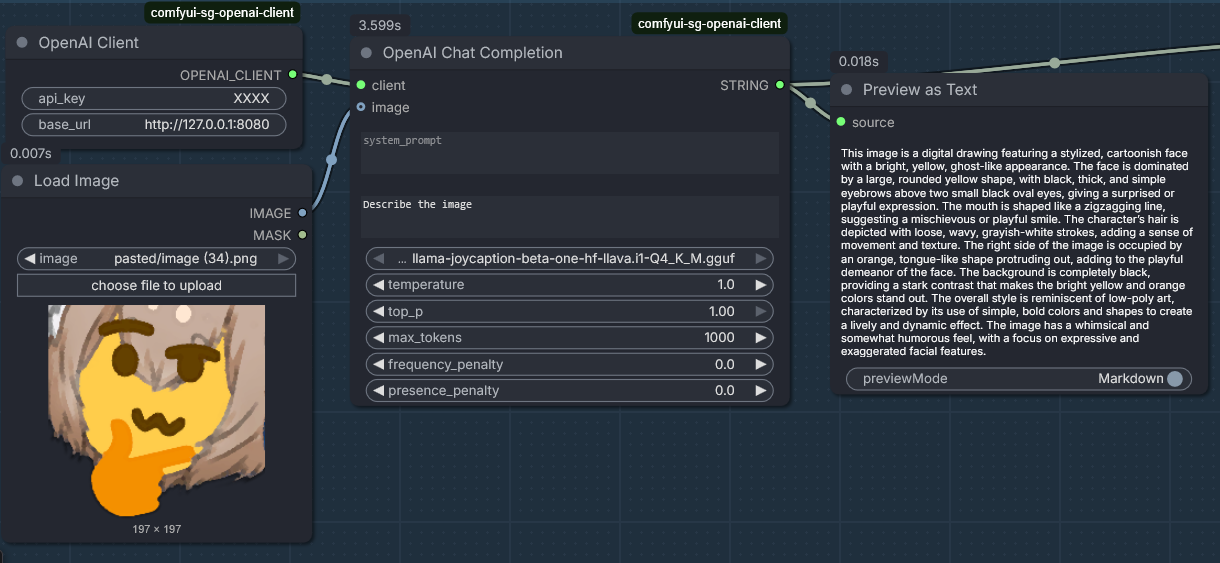
Features
- OpenAI Client Node: Authenticate with OpenAI API using API key and optional custom base URL. Supports OpenAI-compatible providers (Ollama, OpenRouter, etc.).
- OpenAI Chat Completion Node: Generate text completions with system/user prompts, vision support via image batches, and advanced sampling parameters.
- Vision Support: Supports single images or image batches (via "Batch Images" node).
- Advanced Parameters: Includes
top_k,min_p,seed, and custom JSON parameter injection.
Installation
-
Clone this repository into your ComfyUI
custom_nodesdirectory:git clone https://github.com/sebagallo/comfyui-sg-openai-client.git cd ComfyUI/custom_nodes/comfyui-sg-openai-client pip install -r requirements.txt -
Restart ComfyUI to load the custom nodes.
Usage
OpenAI Client Node
- Inputs:
api_key(required): Your OpenAI API key.base_url(optional): Custom API base URL (defaults to OpenAI's).
- Output: OpenAI client object for use in other nodes.
OpenAI Chat Completion Node
- Required Inputs:
client: Connected from OpenAI Client Node.system_prompt: System message for the conversation context.user_prompt: User message to generate a response for.model: Model selection (Dropdown).
- Optional Inputs:
images: Image tensor(s). Supports image batches for multi-image context.temperature: Randomness (0.0-10.0, default 1.0).top_p: Nucleus sampling (0.0-1.0, default 1.0).top_k: Limits next tokens to top k (Unofficial/Provider-specific).min_p: Probability threshold relative to top token (Unofficial/Provider-specific).max_tokens: Maximum tokens to generate (1-32768, default 1000).frequency_penalty: Penalize frequency (-2.0-2.0, default 0.0).presence_penalty: Penalize presence (-2.0-2.0, default 0.0).seed(optional): Set an integer seed for deterministic results (mostly).extra_parameters: Custom JSON string for any additional provider-specific parameters (e.g.,{"logit_bias": {...}}).
- Output: Generated completion text.
API Endpoint
The package adds a POST endpoint /sg_openai_models to ComfyUI's server for fetching available models. It requires api_key and optional base_url in the request body.
Requirements
- ComfyUI
- OpenAI Python client (included in requirements.txt)
License
See LICENSE file.
Run ComfyUI workflows without the setup
No installs, no CUDA version roulette, no GPU sitting idle on your bill. Bring a workflow and run it in the browser.