
ComfyUI Extension: Download File
Run ComfyUI workflows without the setup
No installs, no CUDA version roulette, no GPU sitting idle on your bill. Bring a workflow and run it in the browser.
Single ComfyUI node to securely download image/audio files from a URL.
README
ComfyUI - Download File
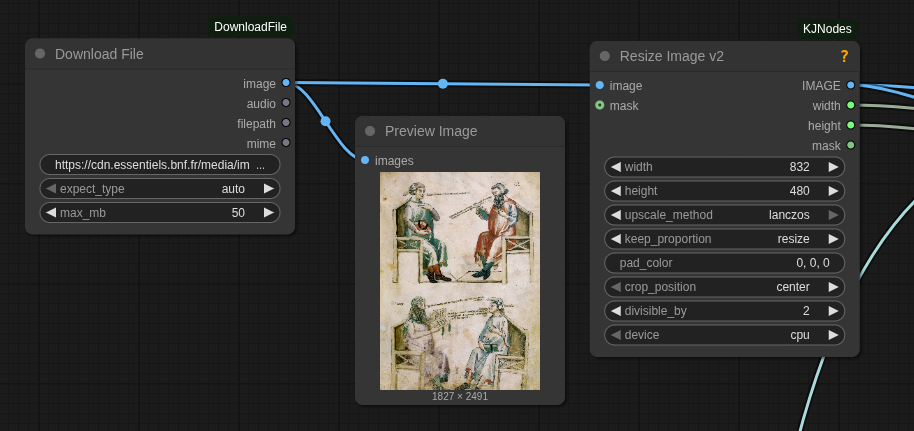
A single ComfyUI node to securely download an image or audio file from a URL, store it in the temp directory, and return it as an IMAGE/AUDIO tensor plus file path.
Installation
- Clone into
ComfyUI/custom_nodes:cd ComfyUI/custom_nodes git clone https://github.com/serious-factory/ComfyUI-DownloadFile.git - Install dependencies:
pip install -r requirements.txt - Restart ComfyUI.
Quick usage
- Add the Download File node (category
Utilities/Download). - Provide an HTTP/HTTPS URL to an image (
jpg/png/webp/gif) or audio file (mp3/wav/flac/ogg/m4a). - Optional:
expect_type(auto/image/audio) to force the expected type,max_mbto cap size (default 50 MB). - Wire
IMAGEto image nodes orAUDIOto audio nodes.filepathpoints to the downloaded file in ComfyUI temp.
Built-in safety
- HTTP/HTTPS only, blocks private/loopback hosts to reduce SSRF risk.
- Connection/read timeouts and configurable size limit.
- MIME/extension allowlist for images and audio; unsupported types are rejected.
Core dependencies
requests,torch,torchaudio,pillow,numpy(ComfyUI providesfolder_paths).
Run ComfyUI workflows without the setup
No installs, no CUDA version roulette, no GPU sitting idle on your bill. Bring a workflow and run it in the browser.