
ComfyUI Extension: ComfyUI-VOID
Run ComfyUI workflows without the setup
No installs, no CUDA version roulette, no GPU sitting idle on your bill. Bring a workflow and run it in the browser.
ComfyUI nodes for VOID — Video Object and Interaction Deletion (netflix/void-model)
Looking for a different extension?
Custom Nodes (5)
README
ComfyUI-VOID
A ComfyUI custom node pack for running VOID (Video Object and Interaction Deletion) inference directly inside ComfyUI workflows. VOID removes objects and their physical interactions — shadows, contact patches, reflections — from video clips using interaction-aware inpainting built on CogVideoX-Fun-V1.5-5b-InP.
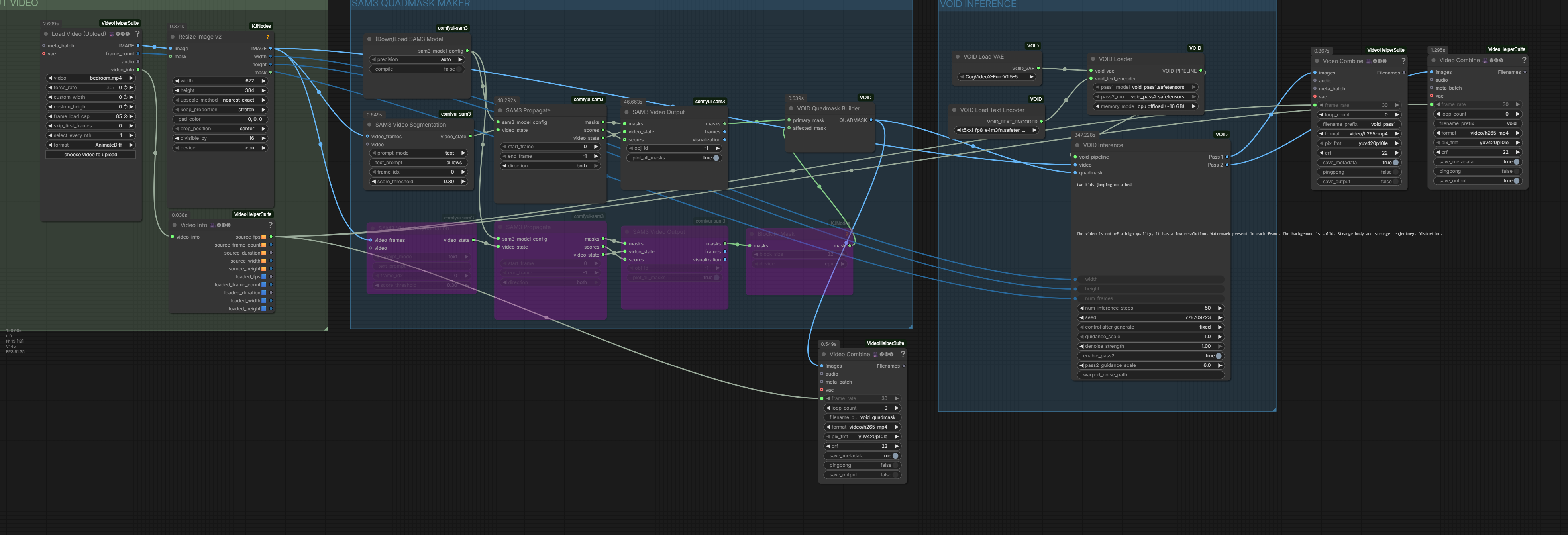
Nodes
| Node | Description |
|---|---|
| VOID Load VAE | Loads the CogVideoX-Fun 3D VAE from models/vae/. |
| VOID Load Text Encoder | Loads the T5-XXL text encoder (fp8 supported) from models/clip/. |
| VOID Loader | Loads both VOID transformer checkpoints and assembles the inference pipelines. |
| VOID Inference | Runs Pass 1 base inpainting and optional Pass 2 warped-noise refinement. |
| VOID Quadmask Builder | Compiles a VOID quadmask from SAM2 / SAM3 segmentation masks. |
Requirements
- ComfyUI with the V3 node API (
comfy_api.latest) - diffusers >= 0.33.1 — CogVideoX requires a newer version than ComfyUI ships by default
- Python packages: see
requirements.txt
Install dependencies:
pip install -r requirements.txt
Installation
- Clone this repository into your
ComfyUI/custom_nodes/directory:
cd ComfyUI/custom_nodes
git clone https://github.com/shanef3d/ComfyUI-VOID
- Restart ComfyUI. The VOID nodes will appear in the VOID category.
Model Weights
Download the following files manually and place them in the specified folders:
| Model | Source | File | Save to |
|---|---|---|---|
| CogVideoX VAE (~1.5 GB) | alibaba-pai/CogVideoX-Fun-V1.5-5b-InP | vae/diffusion_pytorch_model.safetensors | ComfyUI/models/vae/ |
| T5-XXL text encoder (~5 GB, fp8) | Comfy-Org/flux1-dev | t5xxl_fp8_e4m3fn.safetensors | ComfyUI/models/clip/ |
| VOID Pass 1 transformer (~10 GB) | netflix/void-model | void_pass1.safetensors | ComfyUI/models/void-model/ |
| VOID Pass 2 transformer (~10 GB) | netflix/void-model | void_pass2.safetensors | ComfyUI/models/void-model/ |
The T5 tokenizer (~800 KB) is downloaded automatically from HuggingFace on first use and cached locally — no manual step required.
Typical Workflow
VHS Load Video ──────────────────────────────────────────────────┐
                                                                  ↓
SAM3 Video Segmentation → SAM3 Propagate → SAM3 Video Output → VOID Quadmask Builder
                                                                  ↓
VOID Load VAE ──────────────────┐                        VOID Inference
VOID Load Text Encoder ──────────┤→ VOID Loader →  Pass 1 output ──→ VHS Save Video
                                └────────────────→  Pass 2 output ──→ VHS Save Video
Mask generation uses ComfyUI-SAM3 — SAM3 Video Segmentation, SAM3 Propagate, and SAM3 Video Output nodes feed directly into VOID Quadmask Builder. SAM2-based mask nodes are also compatible.
Credits
- VOID model: netflix/void-model — paper
- CogVideoX-Fun: alibaba-pai/CogVideoX-Fun-V1.5-5b-InP
- SAM3 ComfyUI nodes: PozzettiAndrea/ComfyUI-SAM3
License
MIT — see LICENSE.
The VOID model weights are released by Netflix under the Apache 2.0 License.
Run ComfyUI workflows without the setup
No installs, no CUDA version roulette, no GPU sitting idle on your bill. Bring a workflow and run it in the browser.