
ComfyUI Extension: ComfyUI-LTX-FDG
Run ComfyUI workflows without the setup
No installs, no CUDA version roulette, no GPU sitting idle on your bill. Bring a workflow and run it in the browser.
Frequency-Decoupled Guidance (FDG) for ComfyUI and ComfyUI-LTXVideo that improves upon standard Classifier-Free Guidance by applying separate guidance scales to different frequency components.
README
ComfyUI-LTX-FDG
Frequency-Decoupled Guidance (FDG) for ComfyUI and ComfyUI-LTXVideo.
Credit to dorpxam for bringing it up.
He might have more tested version soon https://github.com/AkaneTendo25/musubi-tuner/issues/40#issuecomment-4033048905
Vibecoded based on the paper:
"Guidance in the Frequency Domain Enables High-Fidelity Sampling at Low CFG Scales" https://arxiv.org/abs/2506.19713
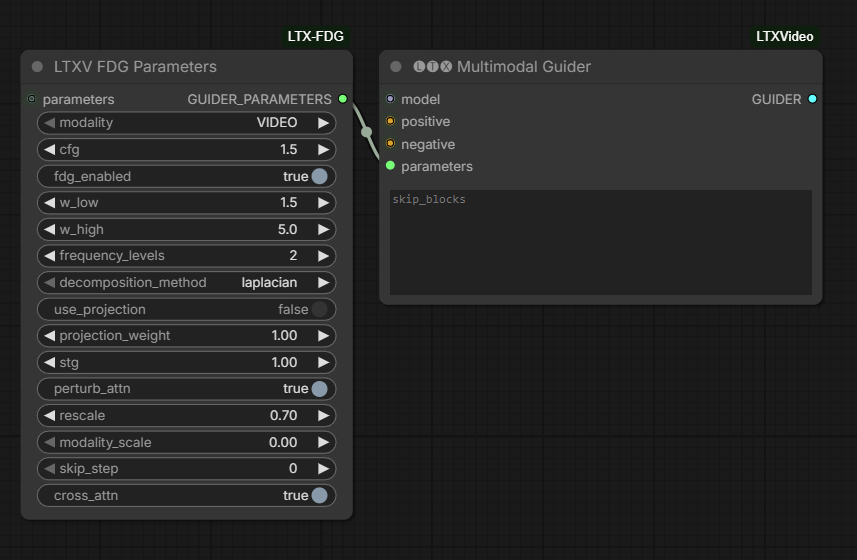
What is FDG?
FDG improves upon standard Classifier-Free Guidance (CFG) by applying separate guidance scales to different frequency components:
-
Low-frequency guidance (
w_low): Controls global structure, composition, and color- Lower values preserve diversity and prevent oversaturation
- Higher values improve condition alignment
-
High-frequency guidance (
w_high): Enhances visual fidelity, details, and sharpness- Can use higher values without the drawbacks of high CFG
Installation
-
Clone or download this repository into your ComfyUI
custom_nodesfolder:ComfyUI/custom_nodes/ComfyUI-LTX-FDG/ -
Restart ComfyUI
-
The FDGParameters node will appear in the
lightricks/LTXVcategory
Usage
Basic Workflow with ComfyUI-LTXVideo
┌─────────────────────┐
│  FDGParameters      │
├─────────────────────┤
│ modality: VIDEO     │
│ cfg: 1.5            │
│ fdg_enabled: ON     │
│ w_low: 1.5          │
│ w_high: 5.0         │
│ frequency_levels: 2 │
└─────────┬───────────┘
          │
          └─> parameters ──> MultimodalGuider ──> SamplerCustomAdvanced
Video-Only (LTXV models):
┌─────────────┐     ┌─────────────┐     ┌──────────────┐
│  Positive   │────>│ Multimodal  │────>│   Sampler    │
│  Negative   │────>│  Guider     │     │   Custom     │
│  Model      │────>│  (LTXV)     │     │   Advanced   │
└─────────────┘     │             │     └──────────────┘
┌─────────────┐     │             │
│ FDGParams   │────>│             │
│ (VIDEO)     │     │             │
└─────────────┘     └─────────────┘
Video+Audio (LTXAV models):
Use two FDGParameters nodes (one for VIDEO, one for AUDIO):
┌──────────────────┐     ┌──────────────────┐
│ FDGParameters    │     │ FDGParameters    │
│ modality: VIDEO  │     │ modality: AUDIO  │
│ w_low: 1.5       │     │ w_low: 1.0       │
│ w_high: 5.0      │     │ w_high: 3.0      │
└────────┬─────────┘     └────────┬─────────┘
         │                       │
         └───────┬───────────────┘
                 ▼
         ┌───────────────┐
         │  Multimodal   │
         │    Guider     │
         │  (LTXAV)      │
         └───────────────┘
Recommended Settings
Video-Only (LTXV)
| Parameter | Value | Description |
|-----------|-------|-------------|
| cfg | 1.5 | Low CFG for better diversity |
| w_low | 1.0-1.5 | Conservative for temporal stability |
| w_high | 4.0-7.0 | Higher for sharp details |
| frequency_levels | 2 | Default, good balance |
Video+Audio (LTXAV)
Video:
w_low: 1.0-1.5- Prevent temporal flickerw_high: 4.0-7.0- Sharp video details
Audio:
w_low: 1.0- Maintain audio qualityw_high: 2.0-3.0- Moderate enhancement
Paper's Recommended Settings (Table 8)
| Model Type | cfg | w_low | w_high | Use Case | |------------|-----|-------|--------|----------| | SDXL | 3.0 | 3.0 | 10.0 | High quality | | SD3 | 1.5 | 1.5 | 12.0 | Maximum detail | | EDM2-XL | 2.0 | 1.0 | 2.0 | Fast generation |
Key Benefits
- Better quality at low CFG scales - Get high-detail results without high CFG
- Reduced oversaturation - Avoid color artifacts from high guidance scales
- Maintained diversity - Keep the natural variation of low CFG sampling
- Plug-and-play - No model retraining needed
Performance
FDG adds computational overhead:
| Setting | Relative Speed | |---------|----------------| | Standard CFG | 1x (baseline) | | FDG 2 levels | ~1.3-1.5x slower | | FDG 3+ levels | ~1.5-2x slower |
To speed up, reduce frequency_levels to 1.
How It Works
FDG uses Laplacian pyramids to decompose the model prediction into frequency bands:
- Build Laplacian pyramid from conditional prediction
- Build Laplacian pyramid from unconditional prediction
- Apply different guidance scales to each frequency level
- Reconstruct from guided pyramid
Troubleshooting
Q: The generated videos look oversaturated
A: Reduce w_low to 1.0-1.5
Q: Details are blurry
A: Increase w_high to 5.0-10.0
Q: Too much flicker between frames
A: Reduce both w_low and w_high for more temporal consistency
Q: FDG doesn't seem to work
A: Make sure fdg_enabled is ON in FDGParameters and the parameters are connected to MultimodalGuider
Q: Sampling is slower with FDG
A: This is expected. To speed up, reduce frequency_levels to 1, or disable FDG with fdg_enabled: OFF
Q: Error with cfg=1.0 A: FDG requires cfg > 1.0 to work. Use cfg=1.5 or higher.
Citation
If you use FDG in your research, please cite:
@article{sadat2025fdg,
  title={Guidance in the Frequency Domain Enables High-Fidelity Sampling at Low CFG Scales},
  author={Sadat, Seyedmorteza and Vontobel, Tobias and Salehi, Farnood and Weber, Romann M.},
  journal={arXiv preprint arXiv:2506.19713},
  year={2025}
}
License
This implementation follows the same license as ComfyUI.
References
- Paper: https://arxiv.org/abs/2506.19713
- Laplacian Pyramids: Burt & Adelson (1983)
- ComfyUI-LTXVideo: https://github.com/Lighttricks/ComfyUI-LTXVideo
Run ComfyUI workflows without the setup
No installs, no CUDA version roulette, no GPU sitting idle on your bill. Bring a workflow and run it in the browser.