
ComfyUI Extension: latent-rotate-90
Run ComfyUI workflows without the setup
No installs, no CUDA version roulette, no GPU sitting idle on your bill. Bring a workflow and run it in the browser.
A minimal, opinionated ComfyUI custom node that emits portrait (0°) and/or landscape (90°) latent variants in a single run.
README
Latent Rotate (Portrait / Landscape) — ComfyUI Custom Node
A minimal, opinionated ComfyUI custom node that emits portrait (0°) and/or landscape (90°) latent variants in a single run.
This node is designed for deterministic orientation comparison and geometry-aware workflows, without redundant rotations, filename hacks, or UI friction.
Why this node exists
Diffusion models operate on a grid-aligned latent space.
Only two rotations preserve that structure meaningfully:
- 0° — native orientation (portrait)
- 90° — orthogonal orientation (landscape)
Rotations of 180° and 270° do not add new structural information and only increase compute cost and dataset noise.
This node intentionally excludes them.
This node was created to remove repetitive manual rotation steps in orientation-sensitive workflows.
Features
- Emits 0°, 90°, or both in a single execution
- Uses latent lists (no queue tricks, no batch hacks)
- Deterministic output ordering
- Rotation applied before sampling
- Metadata passthrough (
rotation,orientation) - Compatible with all samplers, VAEs, and SaveImage
- No filename manipulation or suffix logic
- Clean, predictable graph semantics
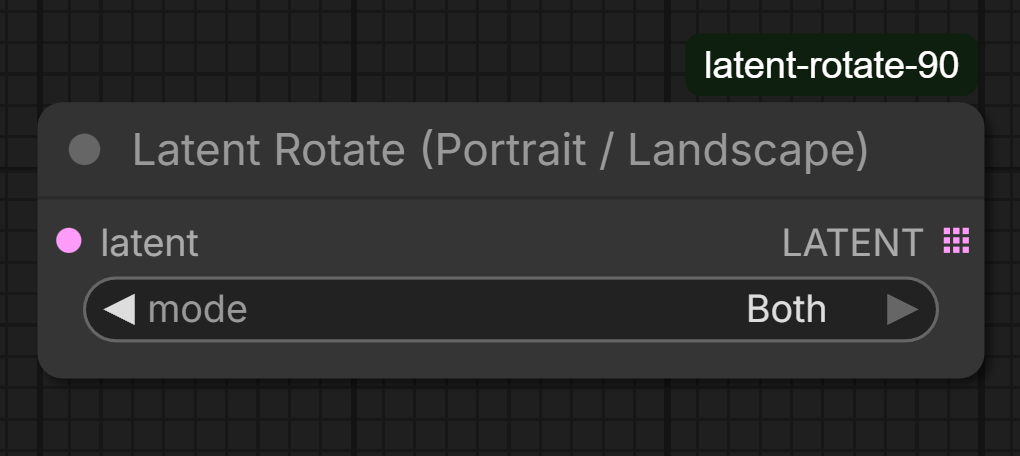
Node Inputs
latent
Input latent.
mode
Select which orientations to emit:
- Portrait Only → 0°
- Landscape Only → 90°
- Both → 0° and 90°
Outputs
LATENT (list)
Depending on mode:
- Portrait Only →
[latent_0deg] - Landscape Only →
[latent_90deg] - Both →
[latent_0deg, latent_90deg]
The output is always a list, even when it contains a single latent.
This is intentional and keeps downstream behavior stable.
Usage
Typical wiring:
Empty Latent ↓ Latent Rotate (Portrait / Landscape) ↓ KSampler ↓ VAE Decode ↓ SaveImage
yaml Copy code
ComfyUI automatically iterates over the latent list and generates one image per orientation.
Notes on determinism
For meaningful orientation comparison:
- Use a fixed seed in the KSampler
- Keep sampler, steps, CFG, and model settings identical
The node prints a reminder in the console to reduce accidental randomness.
Why filenames are not modified
This node deliberately does not modify filenames or emit suffixes.
Rationale:
- Orientation is visually obvious
- Filename logic is often already complex (timestamps, experiment IDs, pipelines)
- SaveImage works best as a simple sink
If filename tagging is required, it can be handled upstream using standard STRING nodes.
FAQ
Why does the output port look dotted or stacked?
The dotted icon indicates that the node outputs a list of latents rather than a single latent.
This is normal behavior in ComfyUI and allows downstream nodes to process each orientation automatically.
Why not support 180° or 270° rotations?
Those rotations do not introduce new compositional information for diffusion models.
They mainly add redundant computation and clutter datasets without practical benefit.
Can this node rotate by arbitrary angles like 45°?
No. Arbitrary-angle rotations break grid alignment in latent space and introduce interpolation artifacts.
This node is intentionally limited to rotations that preserve latent structure.
Does this double VRAM usage?
No. The model is loaded once.
Latents are processed sequentially, not duplicated in memory.
Design philosophy
This node follows a strict “do one thing well” approach:
- Geometry only
- No UI automation
- No implicit side effects
- No redundant options
The goal is clarity, predictability, and composability within larger ComfyUI graphs.
Installation
Clone or copy the folder into:
ComfyUI/custom_nodes/latent-rotate-90/
yaml Copy code
Restart ComfyUI.
The node appears under:
latent → geometry
yaml Copy code
License
MIT
Acknowledgements
This custom node was developed with assistance from ChatGPT for code generation, debugging, and documentation refinement.
Final design decisions, integration, and validation were performed by the author.
Run ComfyUI workflows without the setup
No installs, no CUDA version roulette, no GPU sitting idle on your bill. Bring a workflow and run it in the browser.