
ComfyUI Extension: ComfyUI-BodyRatioMapper
Run ComfyUI workflows without the setup
No installs, no CUDA version roulette, no GPU sitting idle on your bill. Bring a workflow and run it in the browser.
A project for pose alignment and human body proportion mapping based on SDPose.
Looking for a different extension?
Custom Nodes (7)
README
ComfyUI-BodyRatioMapper
A project for pose alignment and human body proportion mapping based on SDPose.
Introduction
The core goal of ComfyUI-BodyRatioMapper is to match the "target motion" to the "reference body shape," then align and rescale the target pose relative to the reference. This project is also the first of its kind to support multi-person scenarios.
Typical use cases:
- Preprocessing for human motion transfer in images or videos
- Generating keypoint sequences with consistent body proportions
Features
- Pose Alignment
- Body Ratio Mapping
- Multi-person support with identity-based tracking (nearest-neighbor + sliding-window voting)
- Built-in keypoint rendering nodes for visual inspection
- Per-bone FK chain scaling (SDPose Bone Scale node)
- Global keypoint translation (SDPose Translate node)
- Match-original-ear-scale mode for consistent ear width output
RunningHub Online Workflow Example
RunningHub is an online ComfyUI compute platform. If your local hardware cannot run AI models, you can run the workflow below for free on RunningHub; register through the link to receive 1000 credits.
| Super posture alignment BodyRatioMapper solves the consistency problem of chibi characters | |---| | <a href="https://www.runninghub.ai/post/2073345729814609920/?inviteCode=rh-v1565"><img src="docs/images/image_006.jpg" width="360" alt="Super posture alignment BodyRatioMapper solves the consistency problem of chibi characters"></a> | | https://www.runninghub.ai/post/2073345729814609920/?inviteCode=rh-v1565 |
Results
Single-Image Examples
- Workflow example:
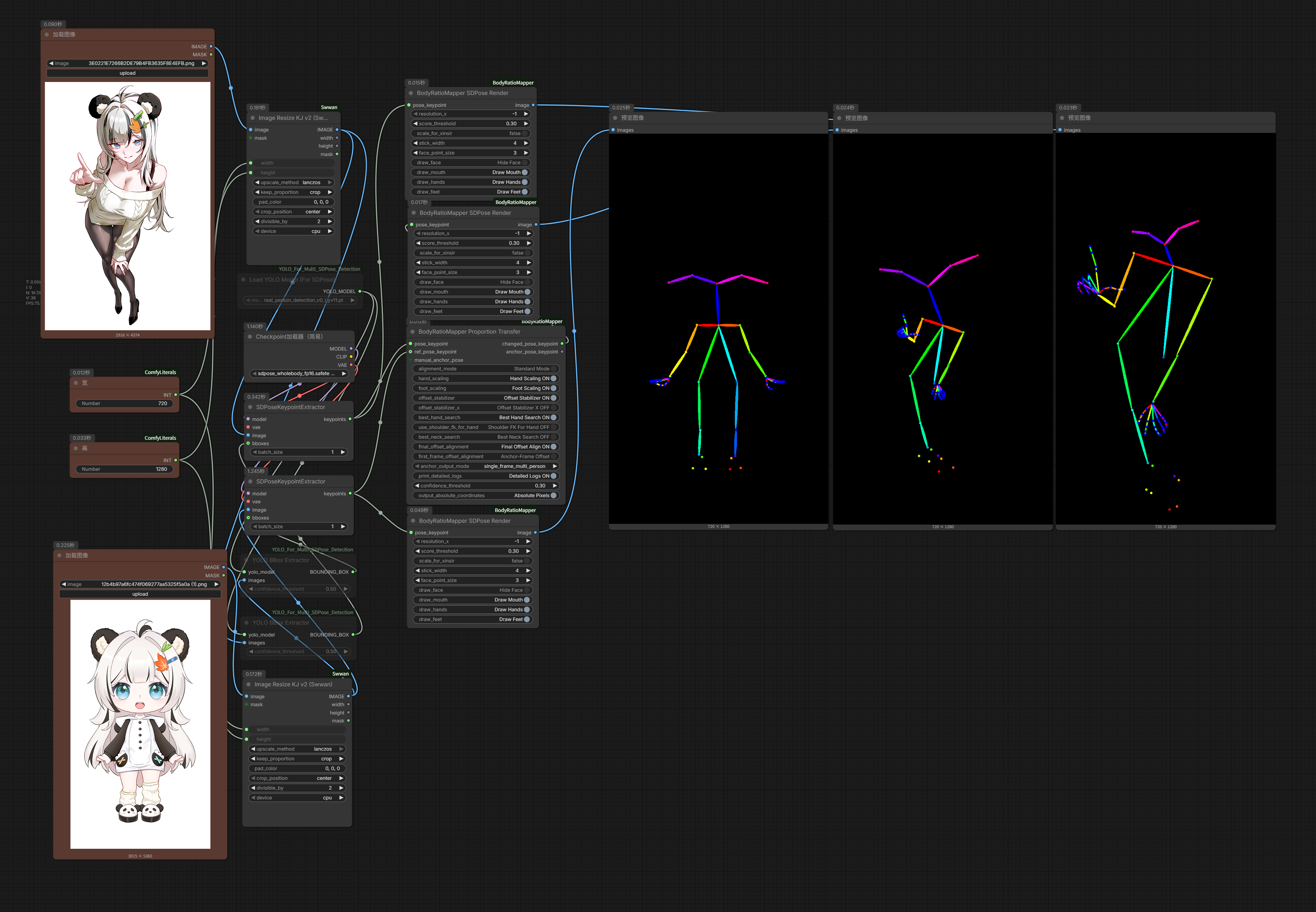
- Comparison result:
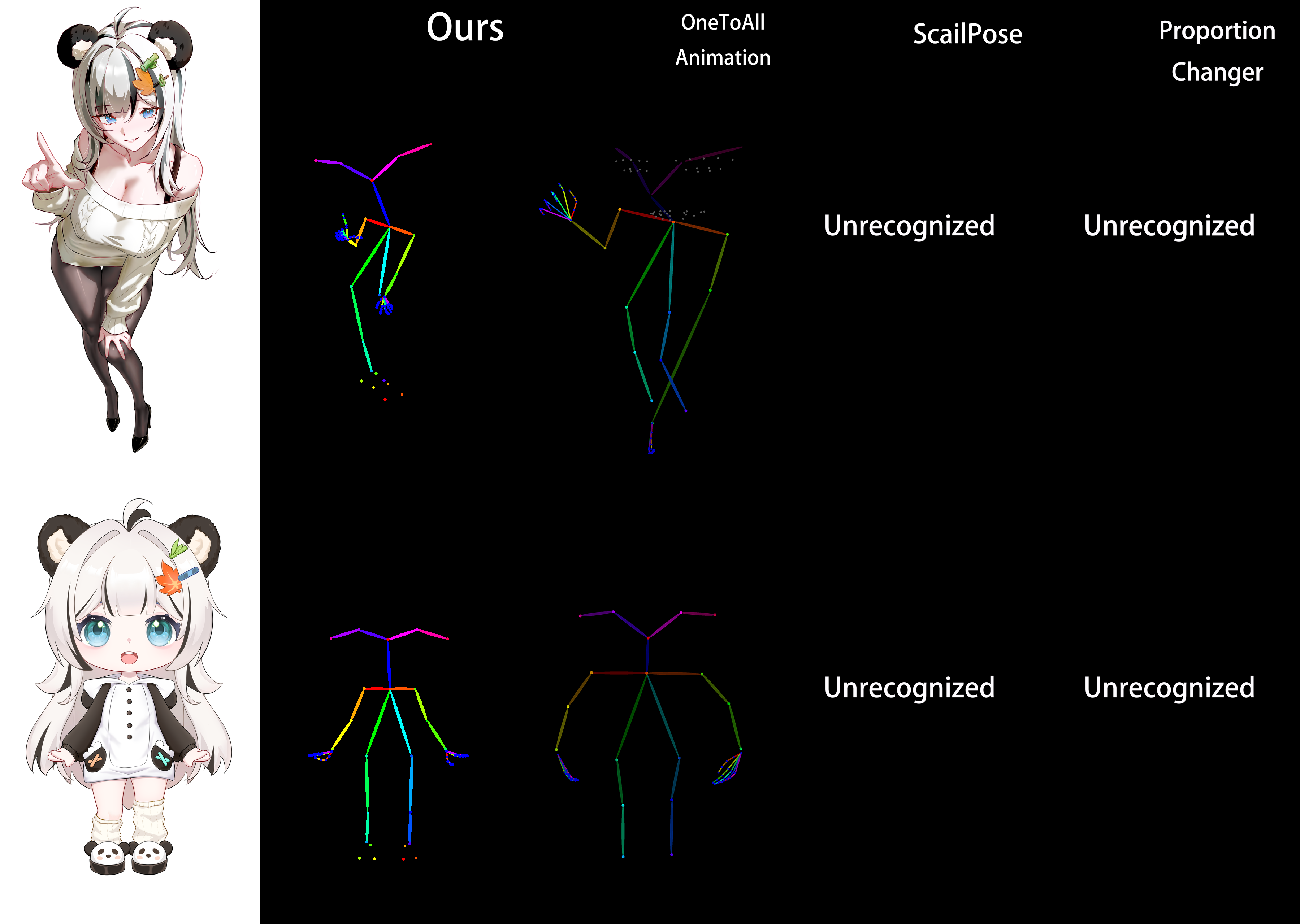
Video Examples
Single-person comparison:
https://github.com/user-attachments/assets/7b1087a6-a2a3-4885-b266-a9ce76837c85
https://github.com/user-attachments/assets/0dde62cf-17a0-45c6-9898-849841c310fd
Multi-person comparison:
https://github.com/user-attachments/assets/b2ca9b26-0dae-4514-ae05-4e4fccdc2cfe
Comparison Summary
Tests show that aligning body skeletons to a reference significantly improves character consistency in motion transfer.
Compared with similar methods (such as One To All animation and ProportionChanger), this project performs better.
All tests were run with SteadyDancer under identical settings, including random seed.
Installation
Clone this repository into ComfyUI's custom_nodes directory and install dependencies:
cd ComfyUI/custom_nodes
git clone https://github.com/wuwukaka/ComfyUI-BodyRatioMapper.git
cd ComfyUI-BodyRatioMapper
pip install -r requirements.txt
Restart ComfyUI after installation.
Quick Start
- Launch ComfyUI and make sure this plugin is loaded.
- Example workflows require ComfyUI
0.16.1or newer. - Import the example workflows:
example_workflows/bodyratiomapper_officail_sdpose_image.jsonexample_workflows/bodyratiomapper_officail_sdpose_video.json
Node Description
1. BodyRatioMapper Proportion Transfer
- Node name:
BodyRatioMapperProportionTransfer - Purpose: Performs pose alignment and body proportion mapping, then outputs transformed keypoints and anchor keypoints.
- Main inputs:
pose_keypointref_pose_keypointmanual_anchor_posemanual_first_frame - Common parameters:
enable_rpca,hand_scaling,foot_scaling,offset_stabilizer_y,offset_stabilizer_x,best_hand_search,best_neck_search,final_offset_alignment,base_offset_mode,head_fixed_mode,match_original_ear_scale,confidence_threshold,output_absolute_coordinates - Outputs:
changed_pose_keypoint,anchor_pose_keypoint,first_frame_output
2. BodyRatioMapper SDPose Bone Scale
- Node name:
BodyRatioMapperSDPoseBoneScale - Purpose: Per-bone FK chain scaling on SDPose keypoints. All scales default to 1.0 (no change).
- Parameters:
person_idx(-1 = all persons),scale_head_x,scale_head_y,scale_neck,scale_shoulder_width,scale_upper_arm,scale_lower_arm,scale_torso,scale_hip_width,scale_upper_leg,scale_lower_leg,scale_foot - Output:
POSE_KEYPOINT
3. BodyRatioMapper SDPose Translate
- Node name:
BodyRatioMapperSDPoseTranslate - Purpose: Apply a global XY offset to all keypoints of an SDPose person.
- Parameters:
person_idx(-1 = all persons),translate_x,translate_y - Output:
POSE_KEYPOINT
4. BodyRatioMapper SDPose Render
- Node name:
BodyRatioMapperSDPoseRender - Purpose: Renders keypoints as a skeleton image.
- Common parameters:
resolution_x,score_threshold,stick_width,face_point_size,draw_face,draw_hands,draw_feet - Output:
IMAGE
5. pose_keypoint input
- Node name:
PoseJSONToPoseKeypoint - Purpose: Converts a JSON string into
POSE_KEYPOINT, useful for manual debugging or external keypoint input.
6. pose_keypoint preview
- Node name:
PoseKeypointPreview - Purpose: Converts
POSE_KEYPOINTinto JSON text and displays it in-node for copying, inspection, and round-tripping.
Project Structure
ComfyUI-BodyRatioMapper/
├─ body_ratio_mapper/
│  ├─ core_modules/
│  │  ├─ multi_person_tracker.py
│  │  ├─ frame_ops.py
│  │  ├─ global_rpca.py
│  │  ├─ scale_solver.py
│  │  ├─ wscs_anchor.py
│  │  └─ matrix_ops.py
│  ├─ proportion_transfer_node.py
│  ├─ render_nodes.py
│  └─ bone_scale_node.py
├─ web/js/poseKeypointPreview.js
├─ example_workflows/
├─ docs/
├─ nodes.py
├─ requirements.txt
├─ pyproject.toml
└─ __init__.py
FAQ
1. Nodes do not appear after installation
- Confirm the repository path is
ComfyUI/custom_nodes/ComfyUI-BodyRatioMapper - Check whether dependencies were installed successfully
- Restart ComfyUI and check startup logs for errors
2. Keypoints are empty or look abnormal
- Verify the input is valid
POSE_KEYPOINT - Lower
confidence_thresholdif needed - Use
pose_keypoint previewto inspect whether the keypoint JSON is complete
Acknowledgements
- Some code is derived from
grmchn/ComfyUI-ProportionChanger(pose_keypoint inputandpose_keypoint preview): https://github.com/grmchn/ComfyUI-ProportionChanger - Special thanks to my friends 望星铭 (https://space.bilibili.com/13066617) and 阿临 (https://space.bilibili.com/20848068) for providing OC test assets.
Contact
- Bilibili: @wuwukasi
- Email: wuwukawayi@gmail.com
Sponsor
If you find this project useful, consider buying me a coffee! Your support is my greatest motivation. Every bit of encouragement keeps this project going. Thank you for being part of the journey!
<p align="center"> <img src="docs/images/iamge_003.png" alt="WeChat Sponsor" width="400"/> <img src="docs/images/image_004.jpg" alt="Alipay Sponsor" width="400"/> </p>License
Since part of the code is derived from the GPL v3.0 project ComfyUI-ProportionChanger, this project is also released under GPL v3.0.
When redistributing, publishing, or modifying this project's code, you must preserve the copyright notices and follow the attribution and modification-marking requirements in NOTICE.
Run ComfyUI workflows without the setup
No installs, no CUDA version roulette, no GPU sitting idle on your bill. Bring a workflow and run it in the browser.