
ComfyUI Extension: ComfyUI-LoRA-stacker
Run ComfyUI workflows without the setup
No installs, no CUDA version roulette, no GPU sitting idle on your bill. Bring a workflow and run it in the browser.
A simple ComfyUI custom node that lets you apply multiple LoRAs (up to 10) to a model in one node.
README
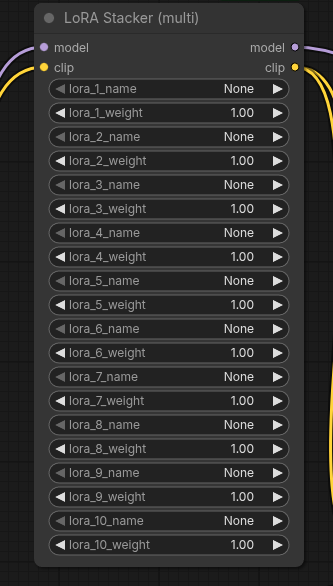
ComfyUI LoRA Stacker
A simple ComfyUI custom node that lets you apply multiple LoRAs (up to 10) to a MODEL + CLIP in one node.
Features
- Stack up to 10 LoRAs with individual weights
- UI button Add LoRA to reveal additional LoRA rows
- Uses the standard ComfyUI LoRA folder (
models/loras)
Installation
-
Go to your ComfyUI
custom_nodesfolder. -
Clone this repository:
git clone https://github.com/zwaigani/ComfyUI-LoRA-stacker.git -
Restart ComfyUI.
Dependencies
- Uses ComfyUI's built-in
torchand loader utilities (no extra pip deps).
Troubleshooting
- "LoRA not found"
- The selected file doesn't exist under ComfyUI's LoRA folder (usually
ComfyUI/models/loras). - Make sure the filename matches and the file is in the expected folder.
- The selected file doesn't exist under ComfyUI's LoRA folder (usually
- This node must be run inside ComfyUI
- Importing the node module outside ComfyUI will fail because it expects ComfyUI's runtime modules.
License
MIT License. See LICENSE.
Changelog / Releases
- Changes are tracked in CHANGELOG.md.
- For a new release: update
CHANGELOG.md, create a git tag (e.g.v1.0.1), then publish a GitHub Release for that tag.
Usage
- Add the node LoRA Stacker (multi) (node id:
LoRA Stacker) from categoryloaders. - Connect your
MODELandCLIP. - Select
lora_1_name+ setlora_1_weight. - Click Add LoRA to show
lora_2_*…lora_10_*. - Setting a LoRA name to
Noneor weight to0skips it.
Note: The screenshot path in this README expects an image at images/lora-stacker.png.
ComfyUI LoRA Stacker(日本語)
MODEL と CLIP に対して、複数の LoRA(最大 10 個)を 1 つのノードで適用できる ComfyUI カスタムノードです。
特徴
- 最大 10 個の LoRA を個別の重みで積み重ね可能
- Add LoRA ボタンで LoRA 行を追加表示
- ComfyUI 標準の LoRA フォルダ(
models/loras)を利用
インストール
-
ComfyUI の
custom_nodesフォルダへ移動します。 -
このリポジトリを clone します:
git clone https://github.com/zwaigani/ComfyUI-LoRA-stacker.git -
ComfyUI を再起動します。
使い方
- カテゴリ
loadersの LoRA Stacker (multi)(ノードID:LoRA Stacker)を追加します。 MODELとCLIPを接続します。lora_1_nameとlora_1_weightを設定します。- Add LoRA を押すと
lora_2_*〜lora_10_*が表示されます。 - LoRA 名が
None、または重みが0のものはスキップされます。
注:この README の先頭画像は images/lora-stacker.png を参照しています。
依存関係
- ComfyUI 環境に含まれる
torchやローダー機能を利用します(追加の pip 依存はありません)。
トラブルシュート
- "LoRA not found" が出る
- 選択した LoRA ファイルが ComfyUI の LoRA フォルダ(通常
ComfyUI/models/loras)に存在しません。 - ファイル名の一致と配置フォルダを確認してください。
- 選択した LoRA ファイルが ComfyUI の LoRA フォルダ(通常
- "This node must be run inside ComfyUI" が出る
- ComfyUI の実行環境外で import すると、ComfyUI のモジュールが無いためエラーになります。
ライセンス
MIT License(LICENSE)。
Run ComfyUI workflows without the setup
No installs, no CUDA version roulette, no GPU sitting idle on your bill. Bring a workflow and run it in the browser.